

TL;DR
- Organizations often struggle with missed approvals, broken workflows, and delayed resolutions. Employees raise requests but lose visibility. Onboarding halts because of unassigned devices or access issues. A service desk acts as a communications center where customers can find help from their IT service providers.
- The problem is sluggish speed, a lack of consistency, ownership, and system-wide coordination. A service desk definition: it is a support hub that manages incident and service requests, playing a strategic role in an organization’s IT support structure.
- But IT Service Desk tools like ManageEngine ServiceDesk Plus now enable IT and non-IT teams to respond faster, automate tasks, and give every department a clear line of sight into request handling by providing a centralized platform for logging, tracking, and managing support requests.
On this page
Operations Breakdown When Service Flow Fails
Organizations face daily pressure to deliver smoothly across departments like IT, HR, facilities, admin, and finance. But internal service requests often hit avoidable roadblocks.
For example, VPN access takes too long to provision. Or onboarding misses timelines because system access remains pending. Sometimes, facilities tickets do not reach the right team. Even HR cases disappear into mail threads.
The problem is, employees have no single portal to raise or track requests, and managers receive no visibility into SLAs or escalations. A ticket management system addresses these issues by providing a centralized platform where all incidents and requests are logged, tracked, and managed effectively, ensuring nothing gets lost or overlooked.
These gaps stall project kickoffs, block compliance reviews, and reduce confidence in internal systems. Even with capable teams, poor service desk infrastructure makes enterprise functions feel unresponsive.
Fragmented Tools Create Hidden Bottlenecks
Most teams use email, shared docs, and spreadsheets to coordinate service workflows. This setup works on a small scale. But it collapses once teams grow, departments expand, or operations go hybrid.
In such environments, service quality depends on tribal knowledge and personal follow-ups. There is no real accountability, no SLA monitoring, and no consistent workflow. Tickets get lost. Approvals stall. Updates get missed. The only way to resolve issues is to chase someone manually.
When one issue impacts multiple departments, for example, laptop provisioning during onboarding, it becomes difficult to track which step failed. Fragmented systems do not offer a root-cause trail as they only show symptoms.
This is why enterprises are now moving toward unified service management platforms.
Why are IT Service Desk Tools Quickly Gaining Traction?
IT Service Desk were popular with IT departments in the past, from quite some time. But today, HR uses it for onboarding and policy requests, and facilities use it for maintenance and space management. Finance departments use it to track approvals for procurement and reimbursements.
Even legal teams run contracts and NDAs through service flows. IT service desks are often managed by dedicated service providers, acting as the primary point of contact between users and IT teams.

There are four main types of IT service desks: Local Service Desk, Centralized Service Desk, Virtual Service Desk, and ‘Follow the Sun’ Service Desk, each designed to meet different organizational needs.
Continuous IT support ensures smooth operations and timely employee help.
The reason is that every internal function now demands support-like clarity. Tickets, workflows, approvals, escalation paths, and automation are the core pillars of enterprise-wide routine operations today.
Modern organizations want every service request, whether it’s technical or non-technical, to follow a visible, trackable, auditable path. They expect status updates, ownership logs, and SLA monitoring across functions.
And that’s precisely what IT Service Desk Tools that deliver this become: a value multiplier for operations—those who do not, become blockers.
What Causes Daily Service Delivery Gaps?
Several recurring issues emerge when organizations rely on outdated systems or email threads. Some of the most common examples are:
- Missing status updates
- Confusing escalation paths
- SLA breaches with no alerts
- Delayed onboarding due to misaligned workflows
- Manual approvals are lost in inboxes
- No reporting across departments
- High ticket volumes with low visibility
Result? Support teams end up firefighting. Business teams lose time coordinating basic tasks. Leadership gets reactive instead of strategic. These issues are a clear indication of infrastructure gaps, and highlight the importance of ensuring that support requests are addressed promptly to maintain efficient operations.
A lack of accountability and reliance on manual follow-ups further hinder productivity. An IT service desk improves collaboration by serving as a single point of contact for IT support, streamlining communication between employees and IT staff.
Enterprises Now Demand Service Management Infrastructure
Service delivery is now measured with the same precision as customer experience. Internal teams expect speed, transparency, and resolution. They want to raise a request, see where it stands, and get notified when it moves.
This is where platforms built for enterprise service management enter. Tools like ManageEngine ServiceDesk Plus deliver centralized visibility, intelligent routing, and cross-department workflows that adapt to every team.
They help IT teams:
- Register incidents
- Track assets
- Resolve technical tickets
- Manage change approvals
- Manage releases and deployments of software
They help business teams:
- Track the entire onboarding and offboarding process
- Submit requests for assistance, such as HR or admin support, directly through the service desk
- View SLAs and response times
- Access dashboards by team or location
- Route tasks to the right owners
With one console, these platforms bring structure, accountability, and speed to every service interaction. An IT service desk centralizes IT support, which can improve communication and reduce downtime.
How Automation Changes Internal Service Dynamics?
Enterprise support systems today rely on automation to drive consistency. Approvals run on predefined workflows. Responses auto-route based on ticket category. Triggers activate follow-ups and status updates.
But most importantly, automation improves trust. Teams know what happens next. No one waits for a reply to move forward. Audit logs record every step. Managers track workload by category, by function, by response time.
Without automation, the IT Service Desk depends on memory and manual follow-through. With automation, they scale.
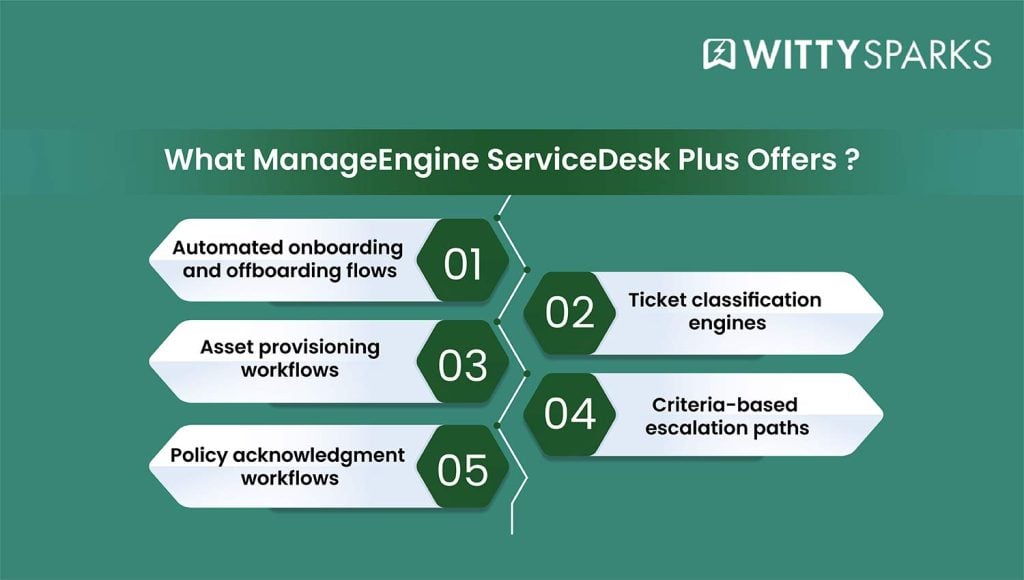
Tools like ManageEngine ServiceDesk Plus allow enterprises to build:
- Automated onboarding and off-boarding flows: Ensure smooth entry and exit processes with predefined task sequences for both new joiners and outgoing employees.
- Asset provisioning workflows: Automate access and device allocation with role-based rules.
- Ticket classification engines: Automatically assign categories based on issue type, reducing manual sorting.
- Criteria-based escalation paths: Trigger escalations based on defined thresholds such as SLA breaches, issue priority, or ticket age.
And every step in the chain becomes transparent to both the requester and the responder.
Visibility Turns Support into Strategy
Support teams used to work reactively. But that’s not possible today. Now the game is all about metrics. For example, resolution times, first-response speed, ticket category patterns, user requests analysis, and department-level SLA compliance feed into strategic decisions.
Modern service management platforms like ManageEngine ServiceDesk Plus offer real-time dashboards that answer questions like:
- Which department receives the most tickets?
- What is the average resolution time per team?
- Which workflows experience delays?
- How many open tickets remain unresolved beyond SLA?
- How many onboarding tasks are completed on time?
IT service desks often include reporting and analytics tools that provide valuable insights into user requests and trends.
This data improves planning, staffing, and operations. It allows teams to forecast support needs and scale without surprises.
Tools Like ServiceDesk Plus Enable Operational Resilience
Platforms like ManageEngine ServiceDesk Plus are built to centralize and streamline internal service delivery. They offer native capabilities that cover both IT and business service flows. For example, ManageEngine ServiceDesk Plus helps with:
- Incident, change, and problem management
- Asset lifecycle tracking
- IT project coordination
- Custom service catalogs
- Low-code/no-code workflow builders
- Role-based dashboards
- SLA and escalation management
- AI-powered predictive insights and automated triage
- Integration with email, chat, and authentication systems
- Integration capabilities with existing systems to maximize operational efficiency and scalability
- Support for multiple platforms and channels, including chat, mobile apps, and other digital touchpoints for seamless omnichannel engagement
An IT service desk typically offers a range of features to support employees and streamline IT operations, including ticket management systems and incident management.
The best part? ManageEngine ServiceDesk Plus now comes with native AI capabilities. Zia, the built-in assistant, handles ticket triage, summarization, task assignment, resolution suggestions, and workflow automation.
Whether powered by Zia LLM, OpenAI, or Azure OpenAI, all responses stay secure and auditable. With AI now driving actions, decisions happen faster and teams scale better.
Organizations deploy these tools to create uniform service experiences across departments like finance, facilities, IT, or HR.
One interface. One workflow engine. One audit trail. This makes the resolutions fast and better team execution.
Incident Management: The First Line of Defense
Incident management sits at the heart of an effective service desk, acting as the primary shield against technical issues that threaten business operations.
When incidents arise – whether it’s a system outage, software glitch, or access problem – a robust incident management process ensures they are identified, categorized, and prioritized for swift resolution.
With modern service desk software, organizations can automate routine tasks, streamline ticket handling, and provide consistent support to users across the enterprise.
By addressing incidents promptly, IT teams minimize downtime and keep business operations running smoothly. This not only improves user satisfaction but also elevates overall service quality.
An effective service desk empowers support teams to focus on resolving complex issues, while automated workflows handle repetitive tasks and ensure that every technical issue is addressed in a timely manner.
Ultimately, strong incident management capabilities transform the service desk into a proactive force for business continuity and operational excellence.
Asset Management and IT Services: Keeping Track of What Matters
Asset management is a cornerstone of successful IT service management, providing organizations with a clear, centralized view of all their IT assets, from hardware and software to licenses and peripherals.
By integrating asset management with IT services, businesses gain a single point of contact for tracking, maintaining, and optimizing their IT infrastructure.
This unified approach enables IT teams to make informed decisions about resource allocation, budgeting, and lifecycle planning, all while aligning with broader business objectives.
A comprehensive asset management system not only streamlines operations but also enhances user satisfaction by ensuring that the right resources are available when needed. It supports compliance efforts, protects sensitive data, and maintains the integrity of the IT environment.
With a single point of contact for asset-related information, organizations can reduce costs, improve service quality, and ensure their IT services are always aligned with evolving business needs.
Change Management and Knowledge Base: Enabling Smooth Transitions
Change management is essential for organizations looking to evolve their IT infrastructure and services without disrupting business operations.
By leveraging service desk software with advanced change management capabilities, companies can ensure that every change, whether it’s a software update, system upgrade, or process improvement, is carefully assessed, approved, and implemented.
This structured approach minimizes risk and keeps business operations running smoothly.
A comprehensive knowledge base complements change management by serving as a centralized repository of valuable data, including technical documentation, user guides, and troubleshooting resources.
This empowers IT teams to resolve technical issues quickly and efficiently, while also providing users with self-service options for common questions. By integrating change management with a robust knowledge base, organizations can facilitate seamless transitions, reduce downtime, and consistently deliver high-quality IT services.
Security and Compliance: Safeguarding Enterprise Trust
In today’s digital landscape, security and compliance are non-negotiable for any organization relying on IT services. A modern service desk software solution plays a pivotal role in protecting sensitive data, maintaining the integrity of the IT environment, and ensuring compliance with industry regulations.
With advanced security features such as access controls, encryption, and real-time monitoring, service desk platforms help organizations safeguard their IT systems against cyber threats and data breaches.
Effective service management also means staying ahead of regulatory requirements and demonstrating a commitment to protecting user information. By prioritizing security and compliance within service desk operations, organizations build trust with users, protect their reputation, and ensure the continuity of business operations.
This proactive approach not only mitigates risk but also reinforces the value of the service desk as a guardian of enterprise trust.
Scalability and Flexibility: Growing with the Business
As organizations evolve, their service desk operations must be able to scale and adapt to new challenges. A scalable service desk software solution can handle increasing volumes of service requests, incidents, and user interactions without sacrificing performance or service quality.
Flexibility is equally important, allowing IT teams to integrate new IT services, applications, and workflows as business needs change.
By choosing a service desk platform designed for scalability and flexibility, organizations ensure that their support operations remain aligned with business objectives and can respond rapidly to shifting user needs.
This adaptability not only improves service delivery but also supports innovation and growth, enabling the business to stay competitive in a dynamic environment. Ultimately, a scalable and flexible service desk is a key enabler of operational efficiency, user satisfaction, and long-term success.
Lessons from the Field
Nottingham College faced repeated onboarding delays across its 10 campuses. HR marked new hires in the system, but IT lacked real-time visibility. Procurement only got looped in days later, leaving device delivery and account setups in limbo.
A staff member joined on Monday. Their laptop reached them on Thursday. Access to core tools took another day. The lag resulted from disconnected service flows. Three teams worked in order, not in sync.
After adopting ManageEngine ServiceDesk Plus, the college flipped this experience. Requests were bundled with predefined templates. Tasks ran in parallel, and SLA alerts flagged delays. Statuses were visible to every team involved.
Now, onboarding time matches start dates. Asset delivery happens on schedule. And most importantly, departments stopped working in silos.
Why Enterprise Leaders Are Now Prioritizing Internal Experience?
In digital operations, there is no separation between internal experience and external performance. Delayed onboarding affects revenue. Missed IT requests slow project launches. Unclear approval chains create compliance risks.
IT Service Desk now reflects how companies operate under pressure. They show how quickly teams respond, how clearly departments collaborate, and how effectively leaders receive visibility.
That is why CIOs and COOs now track internal service metrics, including customer satisfaction as a key metric, alongside delivery KPIs. They invest in tools that give departments full control, full auditability, and full confidence in service workflows.
Measuring performance with key metrics like first response time and resolution time helps identify bottlenecks and drive continuous improvement in service desk operations.
Internal Service Is the New Customer Experience
The employee journey runs on requests. Provisioning, approvals, access, support, all of it happens across service flows. When those flows break, work slows. When they run smoothly, outcomes accelerate.
Modern organizations use platforms like ManageEngine ServiceDesk Plus to reduce delays, increase clarity, and give every department the tools to respond fast without friction, while providing seamless access to support and resources.
Businesses are learning quickly that support is the core feature of any organization’s infrastructure. And IT Service Desk now sits at the heart of every operation that moves. An IT service desk ensures smooth IT operations by handling a wide range of user needs and offering fast, accurate, and scalable technical support across departments.
Liked this blog? If you did, feel free to explore our website. I regularly come up with a lot of useful and creative stuff there. I post tools reviews, informative posts, market updates, and more. So feel free to check out.
FAQs
What is an enterprise service management platform used for?
It enables IT and non-IT teams to handle internal requests, approvals, tickets, and workflows from one console, helping to standardize and automate service management processes.
How do platforms like ManageEngine ServiceDesk Plus help?
They unify service delivery, eliminate repetitive tasks, surface critical performance metrics, and enable teams to respond with speed and precision. The key benefits of using an IT service desk platform include centralized management of IT support requests, improved service delivery, and enhanced efficiency for organizations.
Who benefits from a centralized IT Service Desk?
IT, HR, facilities, legal, procurement, and finance, all functions that process internal requests, benefit from unified systems and advanced service desk capabilities that deliver fast, accurate, and personalized support tailored to each department’s needs.
Is this only for technical teams?
No. Modern service desk now supports non-technical workflows across departments with custom forms and process rules. The service desk acts as the primary communication hub between end-users and IT support teams, facilitating both technical and non-technical workflows, incident management, and support request fulfillment to maintain operational efficiency.
Can these platforms track SLAs and compliance?
Yes. Service level agreements (SLAs) tracking, escalations, and audit logs are standard features designed for regulatory and performance alignment. Defining and enforcing SLAs helps prioritize work and maintain accountability within the service desk.
Read more from Technology
- My Go-To AI Chart Generator Stack to Create Business Charts in Minutes
- Top Ways AI Is Changing Software Development and Product Management
- The Hidden Cost of Network Blind Spots & How ITOM Software Can Fix It?
- Why SIEM tools Lead Compliance in 2025?
- Why Enterprises Want the Best IT Service Desk to Monitor Employee Experience?
- Why Remote Device Threats Are a New IT Headache?
- How to choose the best procure-to-pay software for your business?
- Choosing the Right Enterprise LMS for Your Organization
- The Pros and Cons of Using Generative AI for API Testing
