

Typography can make or break a design. Whether you’re building a SaaS dashboard, designing packaging for a new product, or crafting social media carousels, the right type choices communicate trust, personality, and professionalism before a single word is consciously read.
But here’s the challenge: finding fresh typographic inspiration that actually fits your project, not just looks cool on Pinterest, requires a systematic approach. You need to know where to look, what to collect, and how to transform references into original work.
On this page
In this guide, you’ll learn how to build a personal typography library, explore current trends and timeless sources, and develop the skills to turn inspiration into distinctive typographic systems. Let’s get started.
What is typographic inspiration in 2025?
Typographic inspiration is the deliberate practice of seeking out type styles, layouts, and lettering ideas to inform real-world design projects.
It goes beyond scrolling through font websites, it’s about building a mental and visual library that helps you make faster, smarter decisions when choosing fonts for web interfaces, mobile apps, packaging, books, and campaigns.
In 2025, the context for typographic inspiration has expanded significantly:
- Variable fonts are now standard in Figma and CSS workflows, letting designers fine-tune weight, width, and optical size in real time.
- Responsive type on iOS and Android adapts seamlessly across device sizes.
- Social media platforms like Instagram and LinkedIn demand typography that works in carousel formats, vertical video, and static posts simultaneously.
- AI-assisted design tools surface font recommendations, but human curation remains essential for brand distinctiveness.
Here’s how designers typically use typographic inspiration in practice:
- Moodboards: Collecting screenshots, photos, and saved specimens that capture a project’s intended tone.
- Type specimens: Studying how foundries present their typefaces in context – headlines, body text, captions.
- Screenshots: Capturing UI patterns, app onboarding screens, and website hero sections that demonstrate strong hierarchy.
- Physical references: Photographing signage, book covers, menus, and packaging encountered in daily life.
What makes this practice powerful is the blend of historical references, from Gutenberg-era blackletter to 1920s Art Deco to 1960s Swiss style, with contemporary digital trends. The best typographic work in 2025 often draws from multiple eras, remixing classic proportions with modern rendering and responsive behavior.
This article will give you both curated examples (specific designers, projects, and platforms) and actionable methods for building your own inspiration library.
Foundations: understanding typography before you hunt for inspiration
Before you start saving screenshots, you need a solid grasp of typography basics. Without this foundation, inspiration becomes random, you’ll collect things that look interesting but won’t understand why they work or how to apply similar principles to your own projects.
Good typography balances several interconnected elements: readability, legibility, hierarchy, contrast, white space, alignment, and color. Understanding these fundamentals makes your inspiration-gathering more intentional and your design decisions more confident.
Readability vs. legibility
These terms are often confused, but the distinction matters:
- Legibility refers to how easily individual characters can be distinguished from one another. A typeface with clear letterforms, good x-height, and distinct shapes for similar letters (like ‘I’, ‘l’, and ‘1’) is considered legible.
- Readability is about how comfortable and efficient extended reading is. Factors include line length, leading (vertical distance between lines), font size, and overall spacing.
For example, Inter at 16px on a 2025 SaaS dashboard is highly readable, it was designed specifically for screen interfaces. A decorative display font on a festival poster prioritizes visual impact over readability, which is appropriate because viewers only need to read a few words.
Key typographic elements
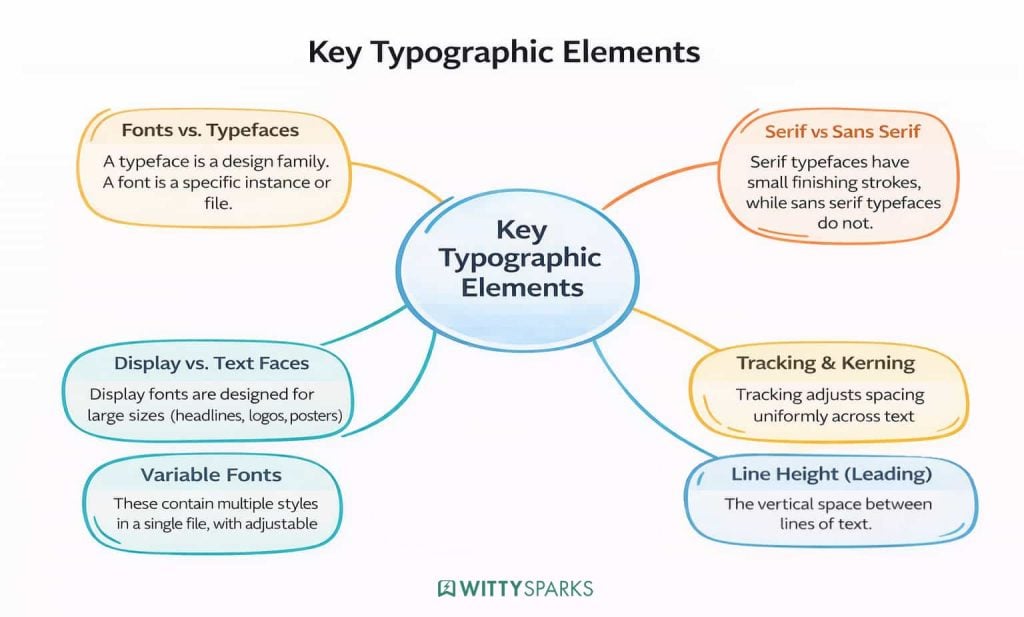
- Fonts vs. typefaces: A typeface is the design family (e.g., Garamond). A font is a specific file or instance (e.g., Garamond Regular 12pt). In digital contexts, these terms are often used interchangeably.
- Serif vs. sans serif: Serif typefaces have small finishing strokes on letterforms, they often feel traditional or authoritative. Sans serif typefaces omit these strokes, appearing more modern and neutral.
- Display vs. text faces: Display fonts are designed for large sizes (headlines, logos, posters). Text fonts are optimized for body text at smaller sizes.
- Variable fonts: These contain multiple styles in a single file, with adjustable axes for weight, width, slant, and more.
- Line height (leading): The vertical space between lines of text, crucial for readability.
- Tracking and kerning: Tracking adjusts spacing uniformly across text; kerning fine-tunes space between specific letter pairs.
Classic and contemporary typeface references
When studying typography, it helps to know a few benchmark typefaces:
- Garamond (16th century): An old-style serif with elegant proportions, still widely used for books and editorial.
- Helvetica (1957): The quintessential neo-grotesque sans, synonymous with neutrality and corporate design.
- Futura (1927): A geometric sans with perfect circles and clean lines, used in everything from Supreme logos to NASA missions.
For contemporary work, explore typefaces that have gained traction in 2024–2025:
- Space Grotesk: A geometric sans with distinctive quirks, popular in tech and startup branding.
- Söhne: A refined grotesque used by companies like Stripe, balancing warmth with professionalism.
- Inter: A free, highly legible sans designed for user interfaces, now a system font on many platforms.
Understanding why these typefaces work – their proportions, spacing, and intended contexts, helps you recognize similar qualities in the inspiration you collect.
Everyday sources of typographic inspiration
Inspiration surrounds you. Once you train your eye to notice typography, you’ll find compelling lettering and layouts everywhere: street signs, transit maps, coffee cups, grocery packaging, and the apps you use daily.
The key is to start documenting what catches your attention. Your smartphone is the most powerful tool for this, every interesting sign or label is one photo away from your inspiration library.
Physical environment
- Transit signage: The New York City Subway uses Helvetica (and Helvetica Neue), designed for quick legibility at a distance. Tokyo Metro’s bilingual signage harmonizes Latin and Japanese characters in tight spaces.
- Street signs and wayfinding: Airport directional systems, hospital signage, and highway markers all prioritize clarity under stress, lessons applicable to dashboards and mobile interfaces.
- Retail and packaging: Coffee cup branding from local roasters, supermarket packaging, and product labels demonstrate how brands differentiate on crowded shelves. Notice how typography creates hierarchy between brand name, product description, and regulatory copy.
- Bookstores and libraries: Book spines and covers from the past 25 years show evolving typographic trends. Pay attention to how publishers balance readability with shelf appeal.
Digital and media sources
- Streaming platforms: Netflix and HBO title sequences from 2020–2025 showcase motion typography at its best. Spotify and Apple Music playlist covers blend type with imagery in compact formats.
- Popular apps: Study the typography in products you use daily – Notion, Linear, Slack, Coinbase, and Figma itself. Notice how they handle hierarchy, weights, and spacing in UI components.
- Indie magazines: Publications like Eye Magazine and Printed Pages push editorial typography boundaries. Museum exhibition catalogs (from MoMA, Tate Modern, or the Design Museum) from 2023–2025 shows often feature distinctive type systems.
How to capture and tag inspiration
- Photograph interesting signage, menus, and packaging whenever you encounter them.
- Screenshot app screens, websites, and social posts that demonstrate strong type choices.
- Tag your finds by mood: brutalist, minimal, playful, editorial, luxury, tech.
- Note the context: where you found it, what drew your attention, and any fonts you can identify.
Online platforms and curated typography galleries
While everyday observation builds your eye, online platforms are the fastest way to gather high-quality, contemporary typographic inspiration. These resources let you explore thousands of professional examples, filtered by style, industry, and application.
Design portfolio platforms
- Behance: Filter by “Graphic Design” or “Typography” categories. Explore projects from agencies like Pentagram, Collins, and local studios in design-forward cities.
- Dribbble: Search tags like “typography,” “lettering,” “type poster,” and “font pairing.” The platform skews toward polished, presentational work, useful for headlines and hero sections.
- Awwwards: Focuses on web design with strong typography. Study how award-winning sites handle responsive type, scroll interactions, and headline treatments.
Dedicated typography resources
- Typewolf: Curates examples of fonts in use, with detailed recommendations for pairings and alternatives. The “Site of the Day” feature highlights exemplary web typography.
- Fonts In Use: An extensive archive of typographic design sorted by typeface, industry, and format. Essential for seeing how specific fonts perform across different contexts.
- Inspiration Grid: Aggregates design work across disciplines, with strong typography representation.
Font marketplaces and libraries
- Google Fonts: Free, open-source fonts with a “Trending” section. Filter by style to find options for your next project.
- Adobe Fonts: Included with Creative Cloud subscriptions. Browse curated collections and font packs.
- Pangram Pangram, Lost Type, Velvetyne: Independent foundries offering distinctive display faces, often with free trials or “name your price” options.
- MyFonts: One of the largest commercial libraries. The “What the Font” tool helps identify typefaces from images.
Social platforms for type inspiration
- Instagram: Follow hashtags like #typography, #typegang, #goodtype, and #typeinspiration. Many lettering artists and type designers share process work here.
- Pinterest: Create boards sorted by categories, “serif headlines,” “UI body text,” “experimental display,” “brand systems.” Pinterest’s algorithm surfaces related pins to expand your collection.
- TikTok: Short-form video creators demonstrate lettering techniques, font pairing methods, and design critiques. Search “typography tutorial” or “font pairing.”
When browsing these platforms, pay attention to type trends visible in 2023–2025 portfolios: the shift toward optical sizes in variable fonts, the revival of serif typefaces in tech branding, and the continued influence of brutalist aesthetics in editorial and cultural work.
Typographic styles and trends to explore
Typographic trends cycle through periods of revival and reaction. What feels fresh today often echoes specific decades, 1970s serif revivals, 1990s grunge experimentation, early-2000s web minimalism, while adapting to current technologies and viewing contexts.
Understanding these patterns helps you find inspiration that’s both timely and timeless.
Prominent styles from 2020–2025
- Neo-grotesque sans serifs for tech: Startups and SaaS companies gravitate toward clean, neutral typefaces like Inter, Söhne, and Geist. These fonts signal modernity and reliability without demanding attention.
- Chunky retro serifs for DTC brands: Direct-to-consumer brands in food, wellness, and lifestyle often use bold, friendly serifs that evoke 1970s warmth. Think rounded terminals and generous x-heights.
- Condensed display faces for festivals and events: Music festivals, conferences, and cultural events use tall, tight letterforms that pack impact into limited space. These work especially well on posters and social graphics.
- Soft-curve sans serifs for wellness apps: Health and mindfulness apps favor rounded, approachable sans serifs that feel calm and trustworthy.
- High-contrast Didone for luxury: Fashion, beauty, and luxury brands continue using Didone-style typefaces with dramatic thick-thin contrast. Vogue’s masthead is the classic example.
Niche aesthetics worth exploring
- Brutalist web typography: Raw, system fonts, stark black-and-white palettes, and deliberately “undesigned” layouts. This style prioritizes content over decoration and can feel refreshingly honest.
- Y2K-inspired lettering: Metallic effects, bubble letters, and early-computer aesthetics have returned, especially in youth-oriented branding and music graphics.
- Vaporwave gradients with bold sans: Soft pink-to-blue gradients combined with chunky, geometric sans serif type. Popular in editorial and cultural contexts that want to feel contemporary without being minimal.
- Motion typography in product videos: Animated type that responds to music, user interaction, or scroll position. Variable fonts enable smooth weight and width transitions that were previously impossible.
Real brand examples
- Airbnb rebrand: Moved from a humanist sans to a more geometric, globally legible custom typeface (Cereal) that works across dozens of languages.
- Spotify Wrapped campaigns: Each year’s campaign pushes bold, colorful typography with custom lettering elements. The 2023 and 2024 editions used layered, energetic compositions.
- Stripe: Uses Söhne throughout its brand and product, demonstrating how a refined grotesque can work from marketing headlines to dense documentation.
Case studies: real-world typographic inspiration
Studying specific designers and projects reveals how typographic choices solve real problems. Each case study below highlights a different angle – murals, inclusive design, 3D lettering, and hand lettering, to show the breadth of what’s possible.
Use these examples as starting points for your own exploration. Notice not just what the designers made, but how they approached the problem and what you can learn for your own work. To further enhance your process, explore these prototyping tools to find the best one for building attractive UI/UX designs.
Vibrant typographic murals in public spaces
Large-scale typographic murals transform cities into galleries. Designers like Alex J Fowkes, known for work across London, Vancouver, and Barcelona, use oversized lettering to create immersive experiences that stop people in their tracks.
- Scale and impact: Murals often span entire building facades, making typography feel monumental. This scale demands simplified letterforms and high contrast.
- Color blocking: Bold, flat colors ensure readability from a distance. Many muralists use two or three colors maximum, letting the type itself carry the visual weight.
- Message clarity: With only seconds to capture attention, mural typography prioritizes short, memorable phrases. Every element serves legibility.
- Layering and rhythm: Letters often overlap, stack, or break across architectural features, creating dynamic compositions that reward closer viewing.
What you can borrow: Think beyond screens. Experiment with scale, overlapping elements, and bold color in your digital compositions. Even a website hero section can benefit from mural-scale thinking.
Inclusive editorial design and data-driven type
Modern editorial and digital publication projects increasingly use typography to make complex information accessible. Campaigns from studios like Google Creative Lab and R/GA São Paulo in the early 2020s demonstrate how type can humanize data and highlight social issues.
- Accessible typeface choices: Clean, highly legible fonts like Roboto, Noto, or Source Sans ensure that readers with varying visual abilities can engage with content.
- Large type for key statistics: Important numbers and findings appear in oversized type, creating visual anchors that guide the eye through dense information.
- Color-coding sections: Different content types get distinct typographic treatments, reducing cognitive load and helping users find what they need.
- Clear language hierarchy: Headlines, subheads, body text, and captions follow consistent sizing and spacing rules, making the structure obvious at a glance.
What you can borrow: When presenting reports, dashboards, or infographics, prioritize clarity over decoration. Strong hierarchy and accessible font choices make data feel approachable rather than intimidating.
3D lettering and candy-colored compositions
Designers and art directors like Memo Vigil (and similar artists across Latin America and beyond) have popularized glossy, 3D letterforms that turn simple phrases into sculptural artworks.
- Volumetric type: Letters become objects in space, with depth, shadows, and reflections. This treatment makes even familiar phrases feel fresh and tactile.
- Candy-colored palettes: Saturated pinks, purples, yellows, and greens create joyful, eye-catching compositions. Gradients add dimension and light.
- Motivational and playful messaging: This style often pairs with short mantras, brand slogans, or single impactful words, perfect for social posts and campaign assets.
- Tools of the trade: Cinema4D, Blender, and Adobe Dimension are common in 3D lettering workflows, especially since around 2018 when these tools became more accessible.
What you can borrow: Treat type as an object in space, not just flat text. Even subtle 3D effects or layering can add dimension to hero images, product launches, and social content.
Intricate hand-lettered scripts and logotypes
Hand-lettering specialists like Tamara Arkatova create detailed scripts and flourished wordmarks that digital fonts simply cannot replicate. This craftsmanship shines in boutique branding, book covers, wedding stationery, and packaging.
- Personality and uniqueness: Every stroke carries the artist’s hand, making each piece genuinely one-of-a-kind. This is invaluable for brands that want to stand out from templated competitors.
- Craftsmanship as value signal: Intricate details, swashes, ligatures, ornamental flourishes, communicate care and quality, justifying premium positioning.
- The workflow: Pencil sketching, inking, scanning, vectorizing in Illustrator or Affinity Designer, then refining spacing and balance. The process is labor-intensive but yields results impossible to achieve with standard fonts.
- When to use it: Custom logotypes, hero words for campaigns, packaging details, and anywhere a brand needs to feel artisanal or bespoke.
What you can borrow: Even if most of your project uses digital fonts, consider commissioning or creating custom lettering for a single key element, a logotype, a headline, a product name. The contrast between structured type and hand-drawn elements creates visual interest.
Building your personal typography inspiration library
Having a well-organized inspiration library transforms how you approach new projects. Instead of starting from zero, you begin with a curated collection of references that match the mood, industry, and technical requirements of your work.
Here’s how to build and maintain an effective typography library:
Capturing inspiration
- Smartphone photos: Snap pictures of interesting signage, packaging, and print materials whenever you encounter them. The best camera is the one you have with you.
- Screenshots: Capture app screens, websites, and social posts. On desktop, tools like CleanShot or the built-in screenshot features work well. On mobile, screenshot and immediately move to your organization system.
- Scanning: For printed materials worth preserving in higher quality, magazine spreads, book covers, event programs, use a flatbed scanner or a scanning app.
- PDFs and specimens: Download type specimens from foundry websites. Many include extensive showing of fonts in use, which are valuable references.
Organizing your library
Choose a tool that fits your workflow:
- Notion: Create a database with properties for date, source, mood, fonts used, and notes. Embed images directly or link to cloud storage.
- Figma files: Dedicated pages or frames for different categories. Easy to reference while actively designing.
- Milanote: Visual boards that work well for moodboarding. Good for sharing with collaborators or clients.
- Pinterest: Quick to add to, with algorithmic suggestions for related content. Best for broad exploration; supplement with more controlled systems.
Suggested categories
- Serif headlines
- Sans serif body text
- Experimental display
- UI components and patterns
- Brand systems and identity
- Editorial layouts
- Packaging and 3D applications
- Motion and animated type
Metadata to include
For each entry, note:
- Date found
- Source (URL, location, publication)
- Fonts used (if identifiable)
- Mood descriptors
- What specifically inspires you (hierarchy, alignment, color, spacing, contrast)
Review and maintenance
Set a monthly review session (even just 30 minutes) to:
- Identify patterns in what you gravitate toward
- Remove outdated or less relevant entries
- Ensure you’re not over-relying on any single source or style
- Look for gaps, if you only save minimal sans serif work, deliberately seek out serif and display examples
Turning inspiration into original typographic work
Inspiration is only valuable if it informs your own designs. The goal isn’t to copy what you collect, but to understand the principles behind successful typography and apply them in new contexts.
The difference between copying and transforming
- Copying: Recreating someone else’s work too closely, using the same fonts, colors, and composition for a similar purpose.
- Transforming: Using multiple references, changing context (poster to app, app to book cover), and combining influences from different eras or styles.
The more sources you draw from, the more original your synthesis becomes. A single reference is a template; a dozen references filtered through your perspective is a voice.
Practical exercises
- Recreate with a swap: Take a layout you admire and recreate it using a different typeface. If the original uses a serif, try a sans serif while preserving the hierarchy and spacing relationships.
- Context shift: Redesign a 2010s poster for a 2025 digital campaign. Consider how responsive behavior, variable fonts, and dark mode change the requirements.
- Constraint-based experiments: Design with only one typeface family (all weights and sizes allowed), or only uppercase, or only two sizes. Constraints force creativity.
- Combine eras: Pair a typeface inspired by 1970s photo-type catalogs with a layout structure from 2024 SaaS landing pages. The friction creates something new.
Testing with real readers
Typography isn’t purely aesthetic, it needs to work for your audience:
- Run quick A/B tests on headlines to see which versions perform better.
- Check readability on mobile devices, not just desktop.
- Ask non-designers for feedback on clarity: “What does this say? What’s most important?”.
- Test with users who have different visual abilities and reading preferences.
Documenting your process
Keep notes on how inspiration evolved into finished work:
- Which references influenced specific decisions.
- What you tried that didn’t work.
- How feedback changed your approach.
- The final typographic specifications (fonts, sizes, spacing, colors).
This documentation helps you learn from each project and builds a personal methodology over time.
Typography in the Age of AI: Evolution and New Possibilities
The rise of artificial intelligence is transforming many creative fields, and typography is no exception. AI-powered tools are reshaping how designers discover, create, and customize typefaces, opening exciting new possibilities for typographic inspiration and innovation.
How AI is evolving typography
AI algorithms can analyze vast libraries of existing fonts to identify patterns, styles, and characteristics, enabling them to generate entirely new typefaces or suggest font pairings tailored to specific design needs.
This evolution helps designers experiment faster and explore creative directions that might have taken much longer to develop manually.
Moreover, AI enhances accessibility by automating tedious tasks such as kerning adjustments, hinting for screen readability, and responsive scaling, allowing designers to focus more on the artistic and conceptual aspects of typography.
AI tools for generating typography
Several AI-driven platforms and applications now offer typography generation and assistance:
- Fontjoy: Uses deep learning to generate font pairings that harmonize well together, helping designers quickly find complementary typefaces.
- Glyphr Studio: While primarily a font editor, it incorporates AI features that assist in designing letterforms and spacing.
- Calligraphr: Converts handwriting into custom fonts with AI-enhanced vectorization, making personalized typography accessible.
- Adobe Sensei: Integrated within Adobe Creative Cloud, Sensei leverages AI to automate font matching and layout suggestions.
- DeepFont: An AI tool that identifies fonts from images, helping designers find inspiration and match typography styles effortlessly.
Learning typography with AI integration
To stay ahead in this evolving landscape, designers can explore courses that cover AI applications in typography and design:
- “AI for Graphic Designers” on platforms like Coursera or LinkedIn Learning covers how AI tools can augment design workflows, including typography.
- Adobe’s tutorials on Sensei provide practical guidance on using AI-powered features for font selection and design.
- Type@Cooper occasionally offers workshops exploring the intersection of type design and AI technologies.
Embracing AI in typography does not replace the designer’s creative judgment but acts as a powerful collaborator, enhancing efficiency and expanding the boundaries of what typography can achieve in the digital age.
Key takeaways and next steps
Typographic inspiration is most powerful when it’s grounded in fundamentals, supported by systematic collection, and translated into deliberate experiments. Here’s what to remember:
- Foundations matter: Understanding readability, legibility, hierarchy, and contrast helps you recognize why inspiring work succeeds, and apply those principles yourself.
- Inspiration is everywhere: From 15th-century books to 2025 digital products, from subway signage to indie magazines. Diversity of reference leads to stronger, more distinctive work.
- Organize systematically: A well-tagged library saves time and prevents you from starting every project from scratch.
- Transform, don’t copy: Draw from multiple sources, change contexts, and filter everything through your perspective to develop an original voice.
Your next steps
- Follow 3–5 type-focused accounts on Instagram or X (formerly Twitter).
- Pick one project – an app, a poster, a website, and analyze its typography this week.
- Test a new type pairing in something you’re currently designing.
- Create a small weekly ritual: 30 minutes every Friday exploring new type work and updating your inspiration library.
Finally, remember that developing a personal typographic voice takes time. Every font choice you make, every layout you study, and every experiment you run contributes to your growth as a designer.
The goal isn’t to chase every new trend, it’s to build a foundation that lets you make confident, intentional decisions no matter what project lands on your desk.
Start collecting today. Your future self will thank you.
If you’re looking specifically for curated typography inspiration websites, explore our list of 20 cool sites.
Typography – Keep Learning
Hand-picked courses, guides, and tools to take your understanding to the next level.

Read more from Design