

Every ai video tool promises the same thing: paste in an idea and get a finished video on the other side. On paper, that sounds great. In reality, most workflows still feel heavier than they should.
If you’ve ever had to publish demos, tutorials, feature launches, or changelog videos regularly, you know how it goes. Recording is the easy part. Then come script edits. Scene adjustments. Caption fixes. Branding tweaks. Exports. Revisions. Another export. It adds up fast.
| Category | Analysis and Data |
|---|---|
| Core Verdict | Highly Efficient for SaaS and Business Teams |
| Workflow Type | Agentic (Idea → Script → Storyboard → Render) |
| Key Advantage | Prevents “Render-Waste” with a pre-visual storyboard layer |
| AI Engine | Gemini Nano Banana 2 and Veo 3.1 Architecture |
| Best Use Case | Product Demos, Changelogs, and Tutorials |
| WittySparks Rating | 4.7 / 5.0 |
Key Takeaways
- Ngram AI uses an agentic workflow (Idea → Script → Storyboard → Render) that reduces revision loops vs. traditional AI video tools.
- The storyboard approval layer is its standout feature, you fix logic before visuals render, saving significant re-render time.
- Best suited for SaaS teams, product marketers, and agencies publishing demos, changelogs, or tutorials regularly.
- WittySparks rating: 4.7/5 after testing 4 video formats including a SaaS demo and blog-to-video conversion.
- Starts at $23.20/month – free trial available at ngram.com
On this page
Even with AI tools in the mix, the process often feels like jumping between systems instead of running a clean pipeline. That’s what was happening with me when I was using Gemini Veo for creating videos. And to be honest, it DID NOT reduce my workload!
Iterations, changes and the slow pace of creating a single scene at a time consumed almost the same time, if not less!
That’s where Ngram caught my attention.
Instead of behaving like a traditional editor with AI features layered on top, ngram presents itself as a structured production system. The promise is simple: start with an idea, a document, a URL, or a screen recording.
Yes, it uses Gemini’s Nano Banna 2 and Veo 3.1 itself, which is available with Gemini’s paid version. But this platform handles the script, builds a storyboard, applies branding, selects a voice, adds captions, and generates the video.
That sounded efficient.
But efficiency claims are easy to make. What matters is whether the workflow actually reduces friction when you’re creating videos consistently.
To test that properly, I ran multiple formats through the system: a SaaS-style demo, a feature announcement, a blog-to-video explainer, and a short educational clip.
The goal was simple. See how much manual work disappears and how the output compares with tools like HeyGen, Synthesia, InVideo, and Descript.
Here’s what actually happened.
What Is Ngram AI?
ngram AI is not another flashy text-to-video generator chasing cinematic visuals.
It takes a different route.
The company positions it as an “agentic AI video editor.” That phrase matters. Instead of acting like a template builder or avatar presenter, ngram behaves more like a smart assistant that orchestrates the entire video creation workflow.
You start with input. A URL. A PDF. A screen recording. A rough topic. This video tool analyzes that material and builds a narrative. It generates a script. It breaks the content into scenes. It proposes a storyboard before rendering anything. You approve the flow first. Then the system handles voiceover, visual emphasis, zoom logic, music selection, captions, and brand elements.
That approval layer changes everything.
Most AI video tools either lock you into rigid templates or throw visuals together and ask you to clean up the mess afterwards. ngram ai video tool flips that dynamic. It organizes the logic upfront.
That is what they mean by agentic.
The tool actively makes decisions about pacing, emphasis, audience targeting, and structure. You guide it. You override when needed. But it does not wait for constant micro-instructions.
Who is Ngram built for?
SaaS teams. Product marketers. Growth teams. Agencies. Anyone shipping demos, onboarding walkthroughs, launch announcements, or changelog updates regularly.
It solves a very specific problem: impactful business video at scale.
It does not try to compete with cinematic AI video generators. It does not focus on AI avatars as the core hook. It does not lean into entertainment visuals.
Instead, it focuses on clarity, consistency, and speed.
In the current AI video market, that positioning feels deliberate. Most tools chase creativity. Ngram chases operational efficiency.
And that difference shows immediately when you open the dashboard.
How Ngram AI Actually Works?
Most AI video tools start with visuals. Ngram starts with information. That change defines everything.
1. Input Layer
You can feed this ai video tool almost anything. A URL. A PDF. A product page. A screen recording. Or just a raw idea typed into the prompt box.
That flexibility matters because most business content already exists somewhere. You already wrote the blog post. You already recorded the walkthrough. You already launched the feature.
ngram asks for source material to build your video from scratch. That is the first signal this tool targets operational teams, not hobby creators.
2. AI Research + Script Generation
Once you provide input, Ngram researches the topic. If you drop a URL, it extracts positioning, messaging, and key details. If you upload a document, it parses the structure. If you record a screen, it identifies moments worth emphasizing.
Then it writes the script.
This step feels less like random generation and more like condensation. It organizes information into scenes. It identifies hooks. It shapes transitions.
You do not get a chaotic block of text. You get a narrative draft.
3. Storyboard Approval Layer
This is where Ngram separates itself.
Before rendering visuals, it shows you the storyboard. Scene by scene. Structured. Editable.
You adjust the flow. You refine messaging. You control tone.
This approval layer prevents expensive re-renders and saves massive cleanup time. Instead of editing visuals later, you correct logic early.
That feels intentional. It respects time.
4. Brand + Voice + Audience Layering
Next, this ai video tool layers identity.
You choose a voice style. You define the audience. You add a watermark. You let it select subtitles. You match the background music. You apply brand elements.
ngram orchestrates these choices cohesively. It does not treat them as afterthought toggles.
It builds alignment.
5. Render and Export
Once approved, rendering happens fast. You export for YouTube, social, or standard formats. The workflow feels cloud-native and streamlined.
Why does this structure matter?
Because business video fails when logic breaks. Not when animation lacks sparkle.
ngram prioritizes clarity first. Visual polish comes second.
For structured content like demos, explainers, onboarding, or feature announcements, that philosophy makes sense. It reduces friction. It reduces revision loops. It reduces chaos.
And in business workflows, chaos costs money.
Interface and First Impressions (UI Analysis)
When you open Ngram, it does not overwhelm you.
You see a prompt bar at the top asking you to describe your video idea, audience, and tone. That single box sets the tone immediately. ngram expects structured thinking.
It does not throw 30 templates at you. It does not force timeline editing.
It starts with intent.
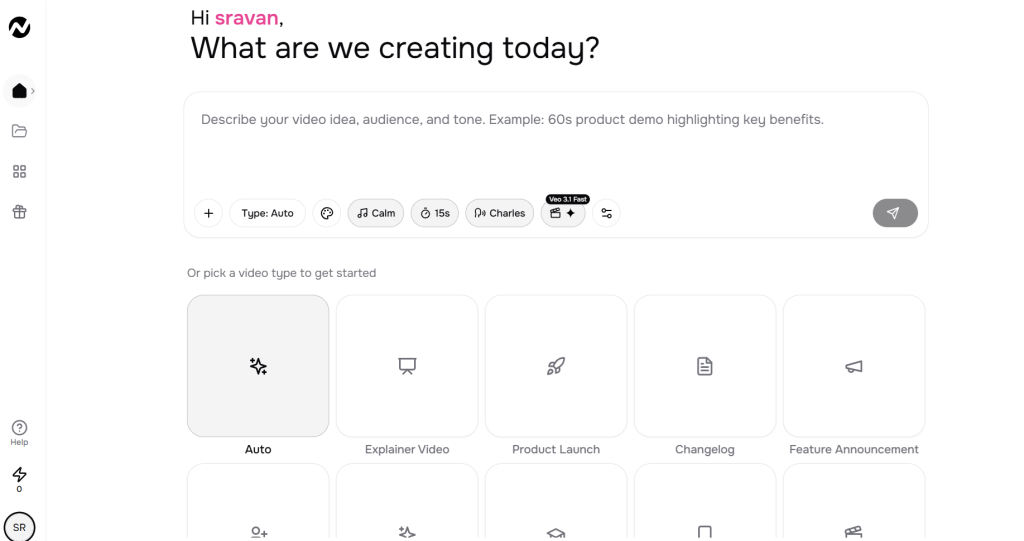
Below that, you see categorized use cases. Explainer. Product Launch. Changelog. Feature Announcement. Customer Onboarding. Tutorial. Social Clip. Teaser.
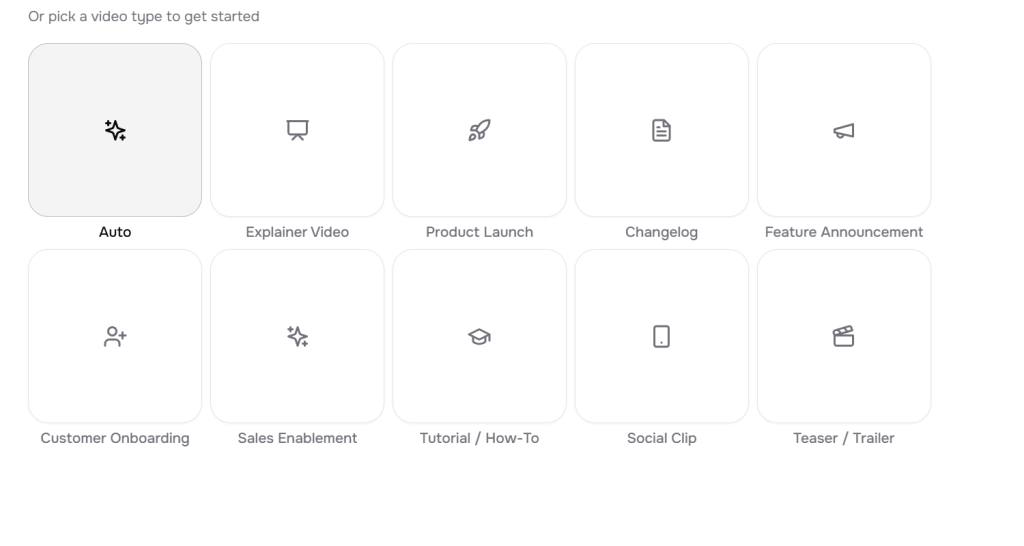
That list tells you exactly who ngram targets. SaaS and structured content teams.
Prompt-First Interface
The prompt bar anchors the workflow. Duration, tone, voice, and type sit nearby. You can select a calm mood. Choose 15 seconds or one minute. Define a platform like YouTube.
That small detail matters. Platform targeting early in the process keeps the structure aligned.
Duration and Tone Controls
Instead of adjusting pacing after generation, you define it upfront. That reduces cleanup.
You feel guided, not restricted.
Story Flow Settings
Inside the creation modal, Ngram lists decisions clearly:
- Follow auto story flow.
- Narrate with best voice available.
- Add watermark.
- Auto-select subtitles.
- Choose background music.
- Define target audience.
That checklist creates clarity. You know what the AI handles.
Ease of Use
The interface feels clean and clutter-free. You won’t find any confusing menus and can start the video creation within minutes.
Cognitive Load
The most interesting thing about this ai video tool is the low cognitive load.
Ngram avoids overwhelming sliders and effects. It keeps decisions high-level andrather than technical.
Professional Feel
It feels purpose-built for business. The layout looks intentional, and there is no clutter that makes it dull.
Learning Curve
Minimal for if you’ve even a basic idea about prompting and AI tools. If you understand messaging and storytelling basics, you will adapt quickly.
If you want full manual control over animation timing and cinematic edits, ngram AI tool will feel constrained.
But that constraint feels deliberate.
How to Use Ngram?
To properly understand how ngram works, I created a project inside the platform and followed the complete workflow from idea to export.
Instead of rushing to the final video, I want to show you how ngram actually behaves at each step. That’s where the “agentic” concept becomes clear.
The process follows a simple pipeline:
Idea → Script → Storyboard → Video Preview → Export
Let’s walk through it step by step.
Step 1: Creating the Video Idea (Input Stage)
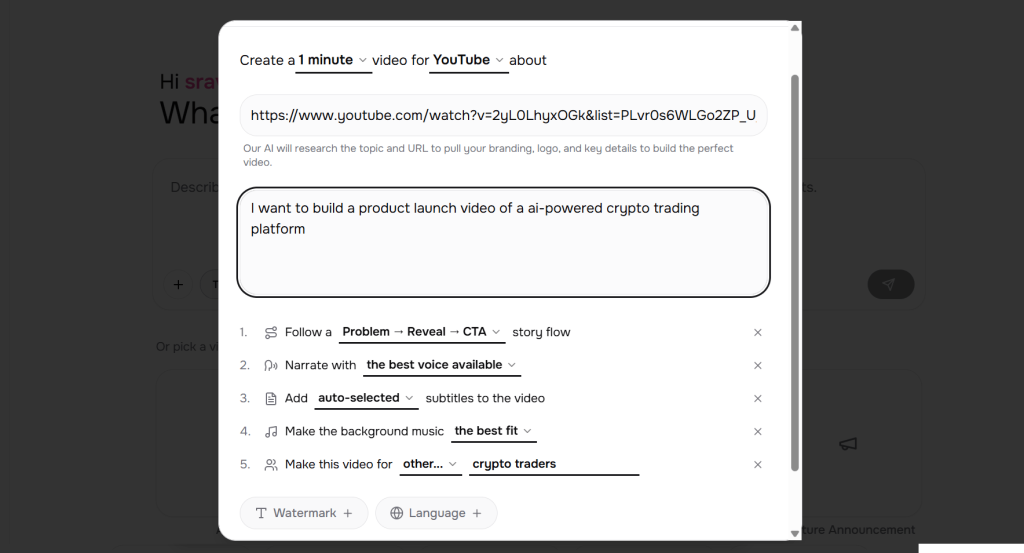
The first step starts with a simple creation modal.
ngram asks you to define a few things before it generates anything:
- video length
- target platform
- topic or URL
- optional context about the project
In my test, I asked it to create a product launch video for an AI-powered crypto trading platform.
What’s interesting here is that this ai video tool also asks you to define the narrative structure upfront.
You can choose the story flow. I picked Problem → Reveal → CTA format.
This is actually important.
Most AI video tools jump straight into visuals, which often leads to messy storytelling. ngram ai video tool forces you to lock the narrative logic first.
Below the prompt, you can also set additional controls like:
- Narration voice
- Subtitles
- Background music
- Target audience
- Watermark
These settings act like guardrails for the AI before it generates anything.
Once everything looks good, you click Proceed, and the system moves into the script generation phase.
Step 2: Script Generation
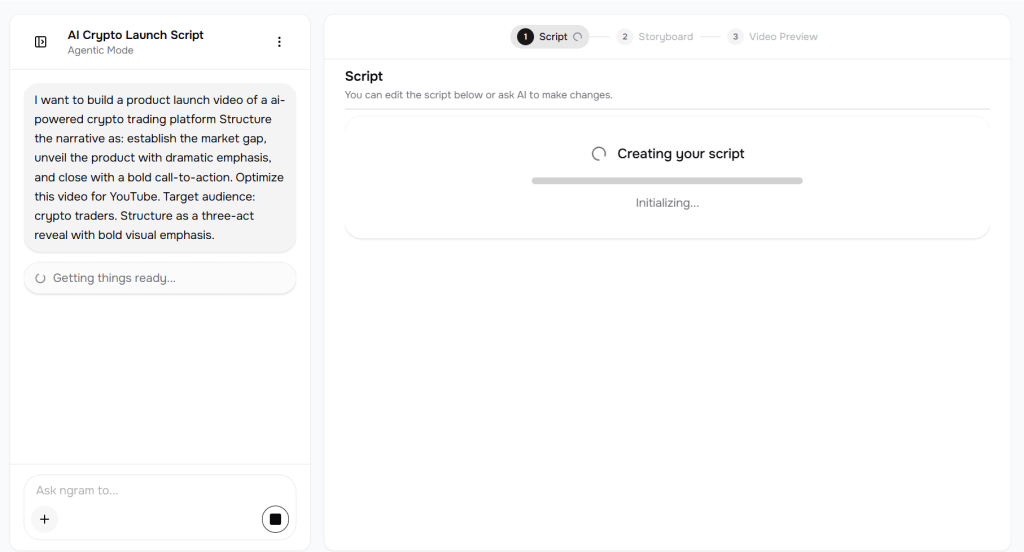
After submitting the idea, Ngram immediately begins building the script.
The interface shows a short loading phase labeled:
“Creating your script… Initializing.”
This is where the AI analyzes your prompt and starts constructing the narrative.
Unlike template-based tools, ngram builds the script from scratch based on the project description and story flow you selected.
Step 3: Script Editor
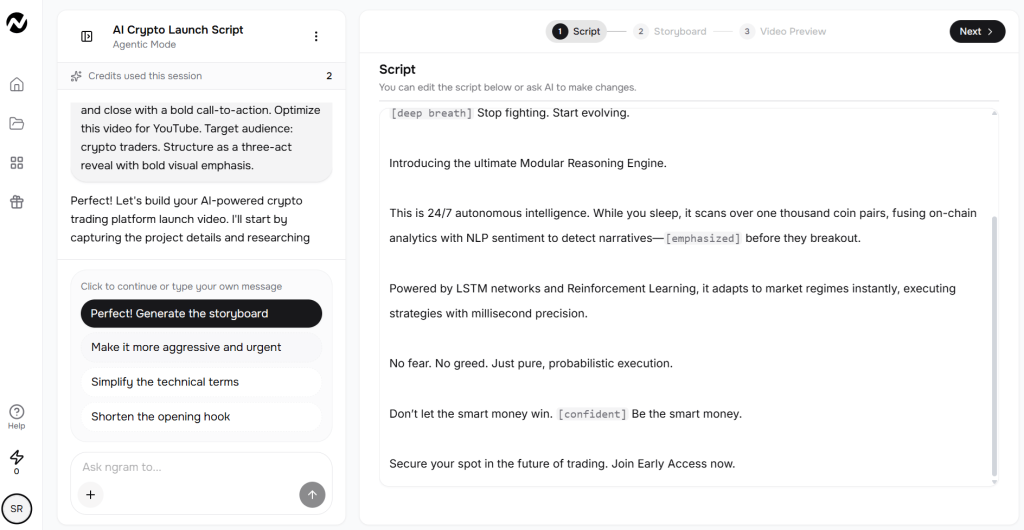
Once the script is ready, ngram drops you into the script editor.
This is where the first real output appears.
The script is already well-designed and includes pacing cues such as:
- [deep breath]
- [emphasized]
- [confident]
These cues help guide the narration style and timing.
The script editor allows two types of editing:
Manual editing
You can directly change the text inside the editor just like a document.
AI-assisted editing
On the left side of the interface, Ngram suggests quick improvements like:
- Make it more aggressive and urgent
- Simplify technical terms
- Shorten the opening hook
You can simply click these suggestions and let the AI adjust the script and this saves you a lot of time.
This makes the writing stage surprisingly fast.
Step 4: Generating the Storyboard
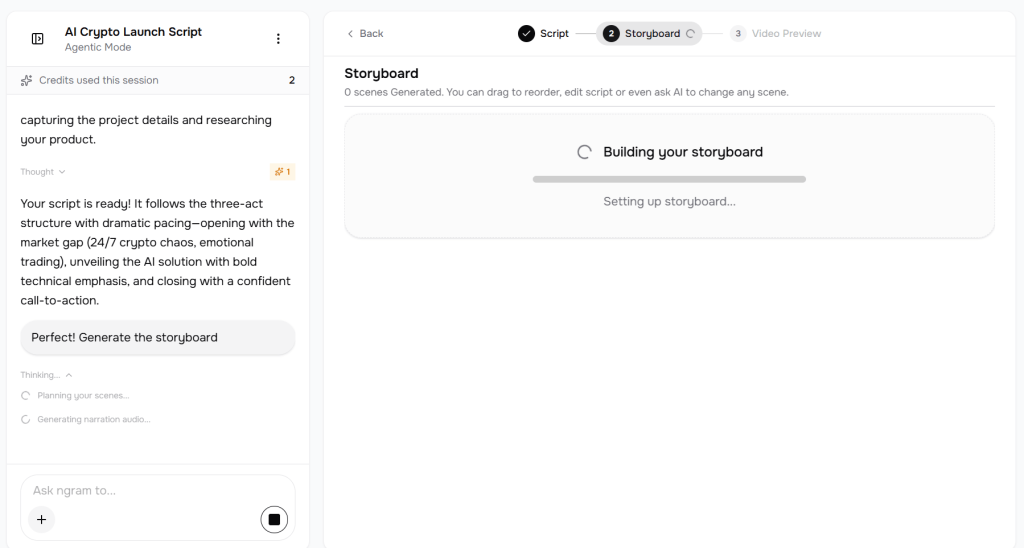
Once the script looks good, the next step is to generate the storyboard.
You simply click:
“Perfect! Generate the storyboard.”
This ai video tool then starts building the visual structure of the video.
The system shows a loading screen labeled:
“Building your storyboard… Setting up storyboard.”
At this stage, the AI is translating the script into scenes.
Step 5: Storyboard Layout
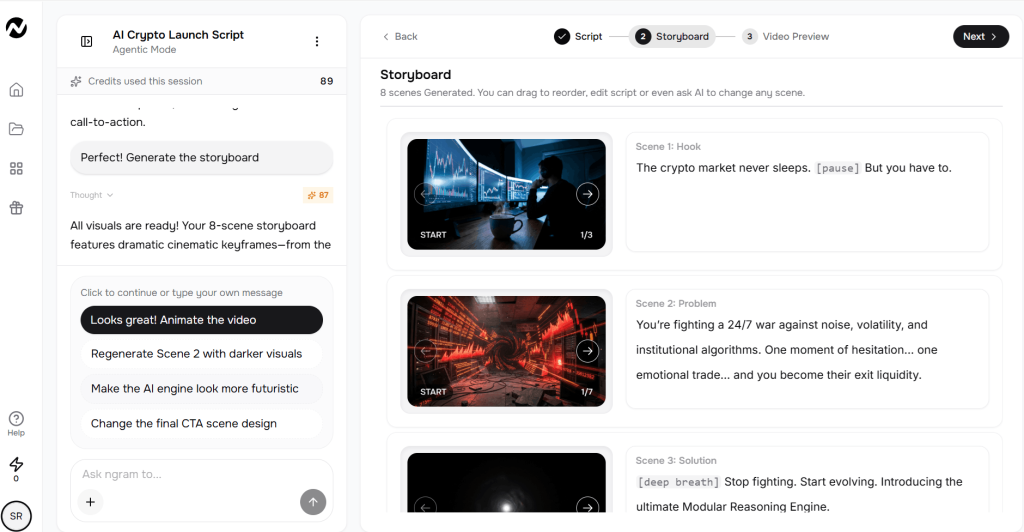
Once the storyboard finishes generating, the interface shows a series of scenes.
In my case, the system generated eight scenes automatically.
Each scene contains:
- a visual thumbnail
- the corresponding script line
- the scene label (Hook, Problem, Solution, etc.)
For example:
- Scene 1: Hook
- Scene 2: Problem
- Scene 3: Solution
This layout makes it easy to understand how the final video will unfold.
Step 6: Editing the Storyboard
This is where the workflow becomes really flexible.
Inside the storyboard editor you can:
- Drag scenes to reorder them
- Edit the script for individual scenes
- Regenerate visuals
- Adjust the narrative pacing
You are essentially shaping the final video structure before rendering anything.
This step saves a lot of time because you can fix problems early instead of re-rendering the entire video later.
One of the most interesting parts of this ngram tool appears in the left-side panel.
The AI assistant suggests improvements automatically.
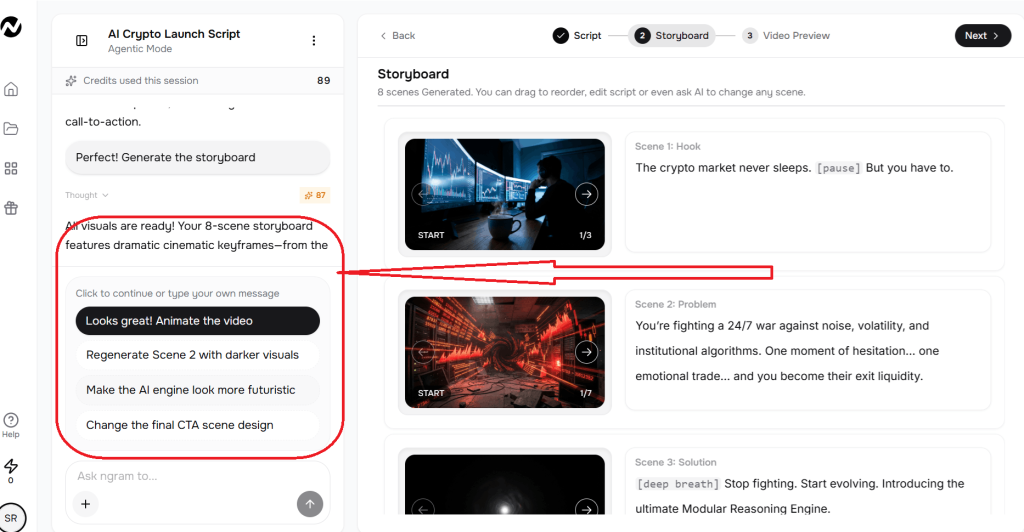
For example, it suggested things like:
- Animate the video
- Regenerate the scene with darker visuals
- Make the AI engine look more futuristic
- Change the final CTA scene design
Instead of manually tweaking every element, you can give the AI simple instructions.
This interaction feels less like editing software and more like directing a creative assistant. Once you make the necessary changes, the video gets rendered, and Ngram finalizes your video.
Step 7: Exporting the Final Video
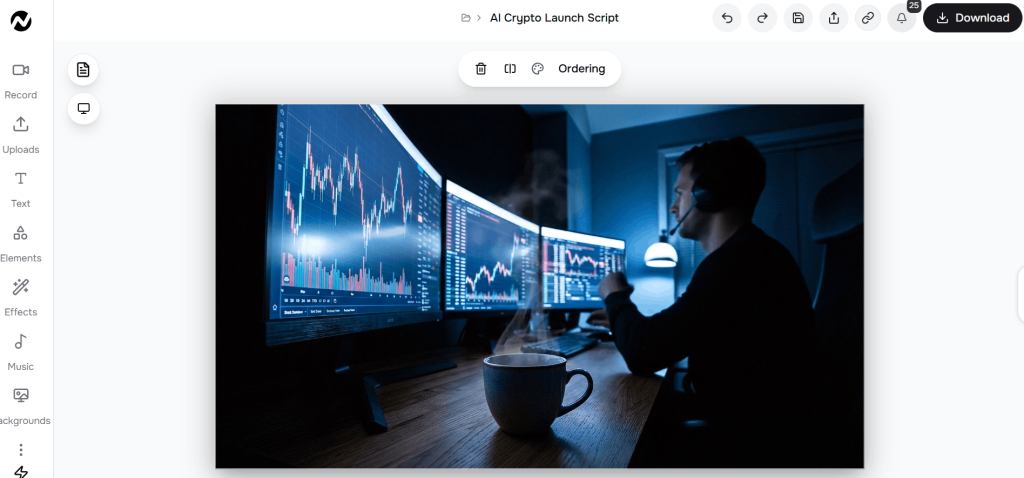
Once everything looks good, you can export the video.
The interface provides a clear Download button in the top corner. At this point, the video is fully rendered and ready for publishing. You can either share it on multiple channels or you can download it in the format of your choice.
Ngram AI Real-World Test: From Raw Idea to Finished Demo (Unedited Results)
To verify Ngram AI’s ‘agentic’ claims, I used the tool to build this 1 minute 5 seconds product launch video of AI-powered crypto trading platform from a single URL. No external editing software was used; this video represents the raw output of the storyboard-to-render pipeline discussed in this review.
Testing Ngram
- Input Source: YouTube URL + Prompt + Custom Settings
- Total Production Time: 12 Minutes
- AI Model Used: Ngram Agentic Engine (Gemini Veo 3.1)
- Reviewer: Sravan Kumar Kandagatla
Ngram output video
What This Workflow Reveals About Ngram?
After walking through the full process, it’s easy to get an idea about Ngram’s design philosophy.
ngram tool is built unlike a traditional video editor. Instead, it follows a proper production pipeline:
Idea → Script → Storyboard → Video
- Input stage – provide a URL, document, prompt, or recording.
- Script generation – AI analyzes the material and writes a narrative draft.
- Storyboard approval – scenes are generated and can be edited before rendering.
- Brand and voice layer – voiceover, subtitles, music, and branding are applied.
- Render and export – video is generated and exported for platforms such as YouTube or social media.
This approach solves a problem most creators struggle with. If you have worked on video creation and editing, you know that editing clips is NOT video creation! It’s all about crafting a story.
And to be honest, it takes time.
But by forcing the script and storyboard to come first, ngram removes a lot of the chaos and time from the production process.
That’s the core idea behind its “agentic” workflow.
AI Quality Breakdown: Where Ngram Delivers (and Where It Needs Tweaks)
After building several videos with Ngram, my biggest takeaway is this: the system gets most things right on the first pass, but it rarely produces a perfect video without a few adjustments.
Look, this is a simple understanding. That’s exactly how AI-assisted production works right now.
Sometimes you’ll need to rewrite a line in the script. Other times, you’ll regenerate a scene image because the visual doesn’t fully match the narration. Occasionally, you might tweak the story flow or change the pacing.
The good news is that ngram makes those adjustments easy because the entire workflow is built around editing the script and storyboard before the final video renders.
So how does it score in different aspects of video-creation? Let’s find out.
Script Quality
Score: 8.5 / 10
The script is the backbone of the whole system, and in most cases, Ngram produces a solid first draft.
When I tested ngram ai video tool, the scripts followed clear narrative patterns like:
- Hook
- Problem framing
- Solution reveal
- Closing call-to-action
That structure works well for explainers, launch videos, and product demos.
Another detail I appreciated is the pacing cues inside the script. The AI inserts instructions like [pause], [confident], or [emphasized], which help the voice narration sound more natural.
However, the script isn’t always perfect.
Sometimes the wording feels slightly generic or too marketing-heavy. In those cases, I found myself asking the AI to rewrite certain lines or simplify technical explanations.
You might also want to tweak the opening hook to make it sharper or more specific to your audience.
That said, editing the script is quick, and since everything else in the video builds on it, fixing the script early makes the rest of the workflow smoother.
Voiceover Realism
Score: 8 / 10
The voice narration is surprisingly good for an automated system.
The pacing sounds natural and the tone usually matches the script’s intent. For business videos, tutorials, or explainers, the voice feels professional enough that most viewers wouldn’t question it.
Still, it doesn’t completely match premium AI voice tools like ElevenLabs in terms of emotional range.
Sometimes the delivery can sound slightly flat during dramatic sections or product reveal moments.
In those situations, rewriting a line in the script often fixes the problem because the voice engine performs better with shorter, clearer sentences.
For standard product videos and explainers, though, the voice quality is more than acceptable.
Background Music Matching
Score: 8 / 10
This ai video tool automatically selects background music that matches the tone of the video.
In most of my tests, the music worked well with the pacing of the scenes. It didn’t overpower the narration, and the style generally matched the topic.
For example, the crypto launch video generated a darker, energetic soundtrack that fit the narrative.
That said, the music selection occasionally felt a little safe. It leans toward neutral corporate styles rather than bold cinematic soundtracks.
Luckily, swapping the track is simple if you want something more distinctive.
Subtitles Accuracy
Score: 9 / 10
The subtitle generation is one of the strongest parts of the system.
Captions are synced accurately with the narration, and the formatting looks clean enough for social media platforms.
I rarely had to adjust timing or wording.
For creators who want YouTube-ready videos or short-form clips with captions, this feature saves a lot of manual work.
Visual Transitions
Score: 8 / 10
Scene transitions feel smooth and consistent across most videos.
ngram avoids flashy effects and sticks with clean, professional transitions that work well for explainer content.
The pacing usually matches the narration timing, which keeps the video easy to follow.
However, there were a few cases where a transition felt slightly abrupt. Regenerating the scene or adjusting the storyboard fixed the issue quickly.
Overall, the transitions do their job without drawing attention away from the message.
Motion Graphics Quality
Score: 7.5 / 10
Motion graphics are solid but not groundbreaking.
The animations focus on clarity rather than visual spectacle. Elements move smoothly and highlight key information without feeling distracting.
For product explainers, tutorials, and onboarding videos, this style works well.
But if you’re expecting cinematic motion design or highly stylized visuals, the system will feel limited.
The goal here is efficiency and clarity, not dramatic animation.
Brand Kit Application
Score: 8.5 / 10
Brand elements integrate smoothly into the final video.
Logos, watermarks, colors, and typography remain consistent across scenes once you configure them.
In my tests, the branding looked cohesive and didn’t feel randomly inserted into the visuals.
That said, you may occasionally want to regenerate a scene image if the color palette clashes slightly with your brand style.
It doesn’t happen often, but it’s something to watch for when reviewing the storyboard.
Overall AI Quality Summary
Here’s the overall scoring across the different AI components:
| Feature / Metric | Observed result in test | Notes from our review |
|---|---|---|
| Script Quality | 8.5 / 10 | Strong narrative structure (hook → problem → solution → CTA), but occasional wording edits needed. |
| Voiceover Realism | 8 / 10 | Natural pacing suitable for explainers; less expressive than premium human voice engines. |
| Background Music Matching | 8 / 10 | Music is generated by the AI to match the mood and pacing of your video. |
| Subtitles Accuracy | 9 / 10 | Captions synced accurately with narration and required minimal adjustment. |
| Visual Transitions | 8 / 10 | May need some minor edits as per your requirements. |
| Motion Graphics Quality | 7.5 / 10 | Functional and clear for business videos but not cinematic. |
| Workflow Model | Idea → Script → Storyboard → Video | Structured pipeline designed to reduce editing chaos. |
| Input Sources | Prompt, URL, PDF, screen recording | Tool analyzes source material and generates narrative automatically. |
| Brand Kit Application | 8.5 / 10 | Brand elements like, logo, colors, typography integrate smoothly into the final video. |
The key thing to remember is that this ngram AI tool works best as a collaborative AI tool rather than a one-click generator.
The AI handles the heavy lifting, but you’ll still want to review the script, tweak the narrative flow, and occasionally regenerate a scene.
Fortunately, the interface makes those adjustments quick, which keeps the overall production process fast and manageable.
Pricing Plans: Is ngram worth it?
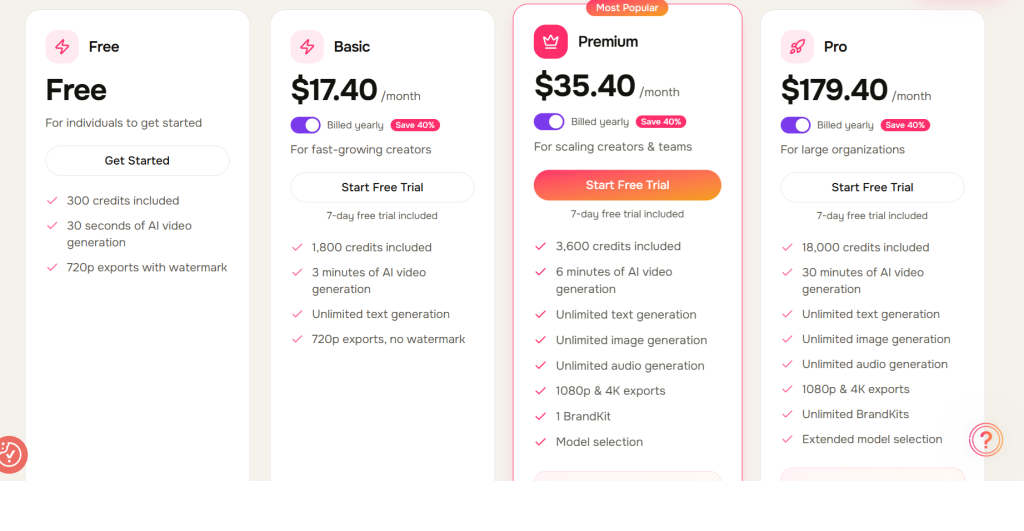
Ngram offers multiple pricing tiers designed for different types of users, ranging from individuals experimenting with AI video creation to larger teams producing content regularly.
The platform includes a free plan for getting started, along with several paid plans that scale based on credits, video generation time, export quality, and advanced features like BrandKits, higher resolutions, and extended model access.
As you move up the tiers, you unlock longer AI video generation limits, higher export quality (up to 4K), and more production flexibility, making the higher plans better suited for teams, marketers, and agencies producing videos at scale.
Below is a snapshot of ngram’s current pricing structure and what each tier includes.
The below pricing information is as of April 12th 2026.
- Free with 300 credits.
- Basic starts at $23.20/month on yearly plan
- Plus starts at $47.20/month on yearly plan
- Pro starts at 239.20/month on yearly plan
What are the Pros and Cons of Ngram?
When you are using an AI tool, it does come with some pros and cons. While the AI is developing leaps and bounds, there is still a lot of room for improvement. The same goes with Ngram. It too has some pros and cons.
So let’s check them out.
Pros
- Converts ideas, documents, or URLs into structured AI videos quickly.
- Provides a clear workflow from script to storyboard to final video.
- Automatically edits screen recordings with zoom, highlights, and cuts.
- Applies brand kits consistently across videos for visual uniformity.
- Generates scripts, visuals, and voiceovers inside one platform.
- Reduces production time compared to manual video editing.
Cons
- AI scripts sometimes need manual rewriting for better flow.
- Generated scene visuals occasionally require regeneration.
- Lower plans limit the amount of AI video generation time.
Ngram vs Competitors
| Platform | Core Approach | Starting Price | Key Strength | Best Use Case |
| Ngram | Automated video workflow (idea → script → storyboard → video) | ~$23.20/month | End-to-end video creation pipeline with screen recording automation | Product demos, tutorials, explainer videos |
| HeyGen | AI avatar video generator | ~$29/month | Highly realistic talking avatars and multilingual voices | Presenter-style marketing videos |
| Synthesia | Enterprise avatar video platform | ~$29/month | Large avatar library and corporate training support | Training and internal communication videos |
| InVideo AI | Template-based AI video creator | ~$20/month | Extensive templates and stock footage | Social media and promotional clips |
| Descript | AI editing platform | ~$12–$24/month | Transcript-based audio and video editing | Podcasts, recorded interviews, editing workflows |
Every platform has its core competencies. HeyGen and Synthesia sit firmly in the avatar video vertical, where a digital presenter delivers the script.
InVideo focuses on templates and stock visuals, which work well for quick marketing content.
Descript operates in the editing wheelhouse, especially for podcasts and recorded tutorials.
This ai video tool sits in a slightly different ecosystem.
Instead of focusing on avatars or templates alone, it offers an end-to-end video creation pipeline that moves from idea to script, storyboard, and final video.
That workflow can become mission-critical for teams producing structured content such as product walkthroughs, SaaS demos, feature launches, and tutorials.
After using ngram ai video tool, I can say that it does not try to compete directly with avatar tools. Its value-add lies in turning raw ideas or documents into a complete video narrative. And that’s exactly what makes it a more practical and perfect choice for those who want a scalable production process.
Who is Ngram AI best for?
Ngram works best for people who produce structured, information-driven videos such as product demos, tutorials, and explainers. The platform focuses on a clear end-to-end workflow, which makes it useful for creators who want to move from idea to finished video without spending hours inside traditional editing tools.
Good Fit For
- SaaS founders: who need regular product walkthroughs, onboarding videos, and feature updates.
- Product marketers: creating launch videos, tutorials, and changelog explainers.
- Marketing agencies: handling multiple client videos while staying bandwidth-efficient.
- Solo creators: producing educational content and software tutorials.
- Blog-to-video creators: converting articles and guides into visual explainers.
- Course creators: Agencies producing explainers or tutorials.
However, ngram is designed for structured communication videos rather than cinematic production. Creators working on highly artistic or film-style content may prefer traditional editing tools that allow deeper visual control.
Less Suitable For
- Cinematic YouTubers: producing storytelling or film-style content.
- High-end animation teams: building complex motion graphics projects.
- Movie-style storytellers: requiring detailed timeline editing and custom animation control.
Final Verdict
Ngram delivers a robust end-to-end system for turning ideas, documents, or blog content into structured videos. The platform handles scripting, storyboarding, voiceovers, and editing inside one workflow, which becomes a strong value-add for teams producing demos, tutorials, and explainer videos regularly.
This Ngram AI video tool sits comfortably in the SaaS and product marketing vertical, where clear communication matters more than cinematic visuals. While scripts or scenes may need small adjustments occasionally, the overall process remains fast and efficient.
For founders, marketers, agencies, and solo creators who publish structured videos frequently, Ngram stands out as a practical and scalable choice in the current AI video ecosystem.
I hope you guys enjoyed this detailed review. I am also bringing a video review of the same tool. So don’t forget to visit our YouTube channel and check that video out.
Till then, happy video creation!
FAQs
What makes Ngram different from other AI video tools?
Ngram focuses on a structured production pipeline where the script and storyboard come first, which helps organize the narrative before the video renders.
Can Ngram convert blog posts or documents into videos?
Yes. The platform can analyze inputs like URLs, PDFs, or written articles and turn them into a scripted storyboard that becomes a finished video.
Do Ngram videos require manual editing?
In most cases, the first version works well, though small adjustments such as rewriting a line in the script or regenerating a scene can improve the final result.
What type of videos work best with Ngram?
The platform performs best for structured business videos such as product demos, tutorials, feature announcements, and explainers.

Read more from Tools