

Key Takeaways
- Content Editor scores content in real time: Surfer’s Content Editor benchmarks your draft against the top-ranking pages for your target keyword, suggesting ideal word count, heading structure, and NLP terms as you write, no manual SERP analysis required.
- AI Tracker monitors brand mentions across ChatGPT, Gemini, and Perplexity: Surfer’s AI Tracker (included in the Scale plan; available as an add-on from $95/month for 25 prompts) tracks how often your content appears inside AI-generated answers, a critical metric as AI Overviews reshape search behavior in 2025.
- Topical Map uses Google Search Console data to find content gaps: By connecting your GSC account, Surfer’s Topical Map identifies which topic clusters you already cover and which gaps are costing you authority, helping you prioritize new content strategically rather than reactively.
- No free trial, but a 7-day money-back guarantee applies: Surfer does not offer a free trial. The 7-day refund policy requires honest feedback but is honored without questions asked, confirmed via Surfer’s published support policy.
- Keyword Surfer Chrome extension is free and covers 70+ countries: The free Keyword Surfer extension surfaces search volume, CPC, and competitor word counts directly inside Google search results, zero cost, no login required.
Today, almost every business owns a website to mark their digital presence. And given the rise of the internet & penetration of digital, websites have become critical. So if you, too, own a business, having a great website is paramount.
On this page
Surfer Review updates as of May 10, 2026
- Updated FAQs, added key takeaways, verdict and updated content as per the latest AI features
- Added information about AI Tracker, Content Editor
- Updated Surfer latest logo
- Added Surfer AI and Surfy sub-sections
- Updated content editor, content audit and topical map
WittySparks Verdict – Surfer SEO Review
Surfer is the most complete AI-powered content optimization platform for SEO teams that publish at scale, but its pricing puts it out of reach for solo bloggers on a budget.
- Best for: Content teams, SEO agencies, and serious bloggers.
- Starting price: Starts at $99/month.
- Not for: Beginners or sites with fewer than 10 articles per quarter.
But make no mistake, building a great website and leaving it as it is will get you no results. You must take steps that enable your potential customers to find your website & reach out to you easily.
And for that, you will need robust SEO strategies in place. SEO or Search Engine Optimization is optimizing multiple on-site & off-site factors that help a website appear at the top of Google’s search results.
SEO can be complex, but with reliable & efficient SEO tools, you can easily optimize your website to rank better on Google. One such tool that is rapidly becoming popular amongst SEO specialists is Surfer.
Many SEO experts have started using this tool to optimize websites & are getting phenomenal results.
But, I don’t always trust what I hear. Hence, I finally decided to put Surfer through rigorous testing to find out.
So, what is Surfer? Is Surfer that great? Is Surfer the best SEO tool ever? How does Surfer fare against its competitors? What are some Surfer Alternatives? Is there any Surfer deal?
Let’s find out!
What is Surfer?
Surfer is an AI-powered & Cloud-based SEO tool that helps SEO experts & website owners write web copies for your web pages, blogs & articles. Surfer also lets you compare your web pages against the pages & the Content that ranks better on Google.
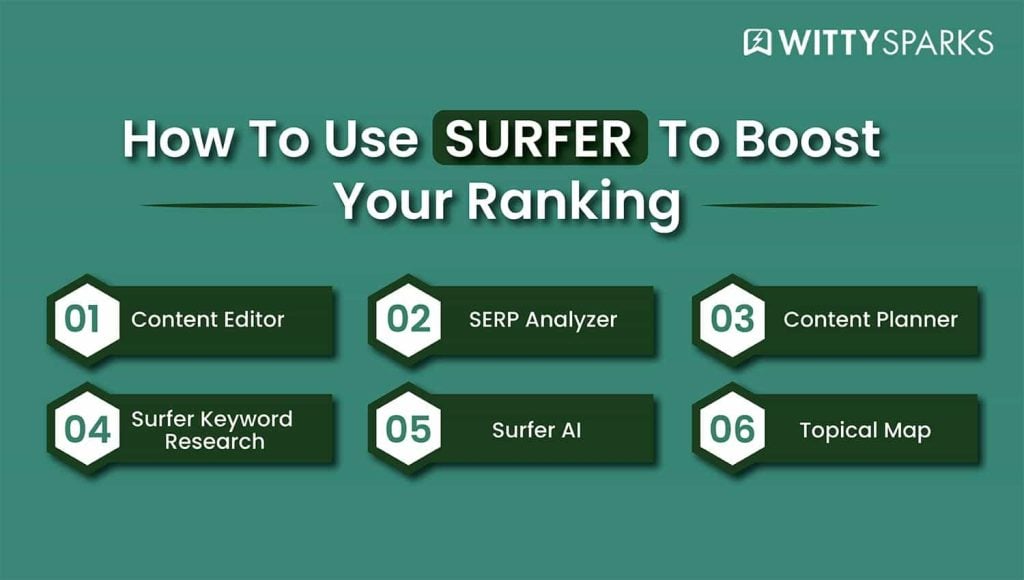
It’s equipped with multiple tools like a Keyword Research tool, Content planner, Content Editor & SERP analyzer. All these tools come together & help you optimize your web pages so they can rank better against your competitors on Google.
Surfer accomplishes this task by utilizing AI (Artificial Intelligence). Surfer analyzes your competitor’s content to identify what makes them rank better.
Later, it uses this data to guide you in creating powerful copies that can easily help your WebPages outrank their competitors. Surfer weighs in multiple factors that can help boost your website’s ranking.
In short, Surfer is your one-stop tool for creating SEO-optimized content that can help you rank above your competitors.
How Surfer works?
Surfer can perform multiple functions like keyword analysis, content editing & optimization, SERP analysis & website audit. All these features can prove to be of great help in improving your SEO.
Surfer – Rank Your Content With the Power of AI
A tool that merges content strategy, creation, and optimization into one process–to grow brands.

Here is how you can use Surfer to boost your ranking with their different tools.
Content Editor
The Surfer SEO content editor review question I hear most is simple: does the real-time scoring actually change how you write? After 90 days of testing, yes, it does. The side-panel layout keeps you optimizing without breaking your writing flow.
But how exactly does Surfer do that?
Well, it analyzes top-ranking pages for your particular target keywords. Once the analysis is complete, it gives you very detailed SEO guidelines. These guidelines cover key information about ideal word count, heading structure, image count, and paragraph depth.
Once you start writing, Surfer keeps track of your content and offers you a real-time content score. And it’s obvious that the better score you have, the better chance your content has to perform well on Google.
Ideally, I recommend a score of around 75-80, but then again, to each their own! Surfer gives you a list of contextual keywords. These are the keywords that your competitors are using to rank higher.
When you integrate these contextual keywords organically in your content, you get well-toned and SEO-ready content.
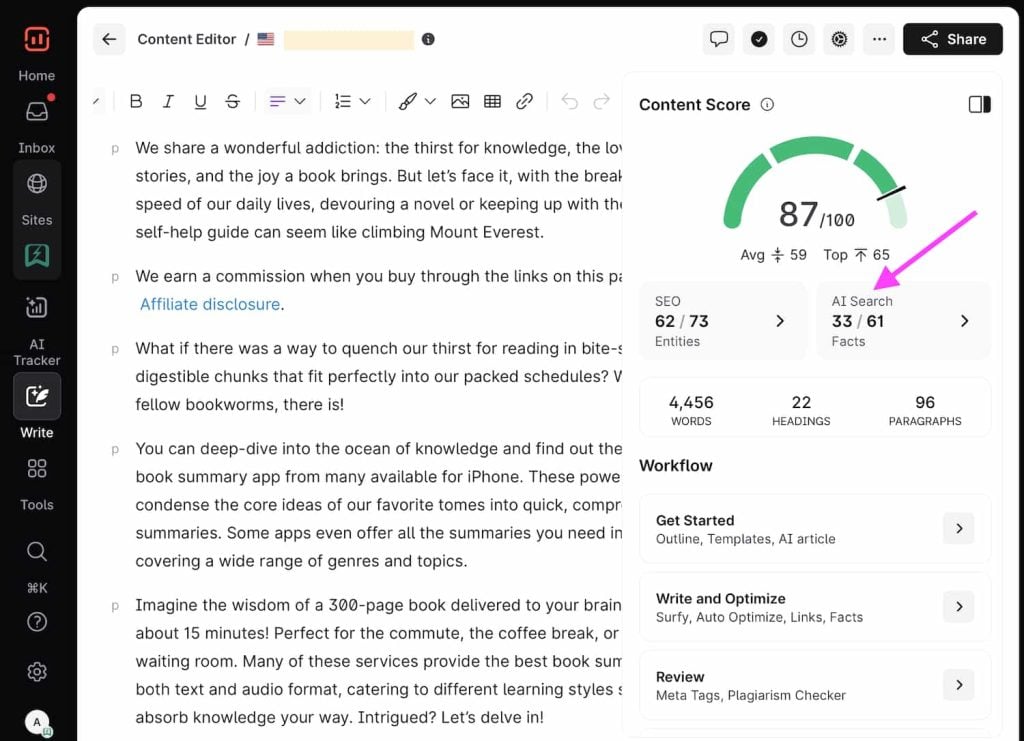
Then comes the smartest addition to the Surfer, a multi-keyword analysis. This feature lets you target up to 20 related keywords in a single article. Well, that’s something very powerful. You can use this feature to build topical relevance around any specific clustered search terms.
Then comes the Auto-optimize feature that can sharpen your content even more. You can add relevant NLP terms and adjust minor elements in your draft. And this happens without changing the core message. This way, you can make your content sharper and more targeted.
Surfer Editor also supports Automated Internal Linking. Just connect your Google Search Console and let the tool suggest and insert 5–10 internal links into the article. You can approve or adjust them before publishing.
For those who want more control, the Customization Panel lets you fine-tune your guidelines. You can modify content structure, edit suggested keywords, filter out irrelevant phrases, add custom topics, or drop notes for your writers.
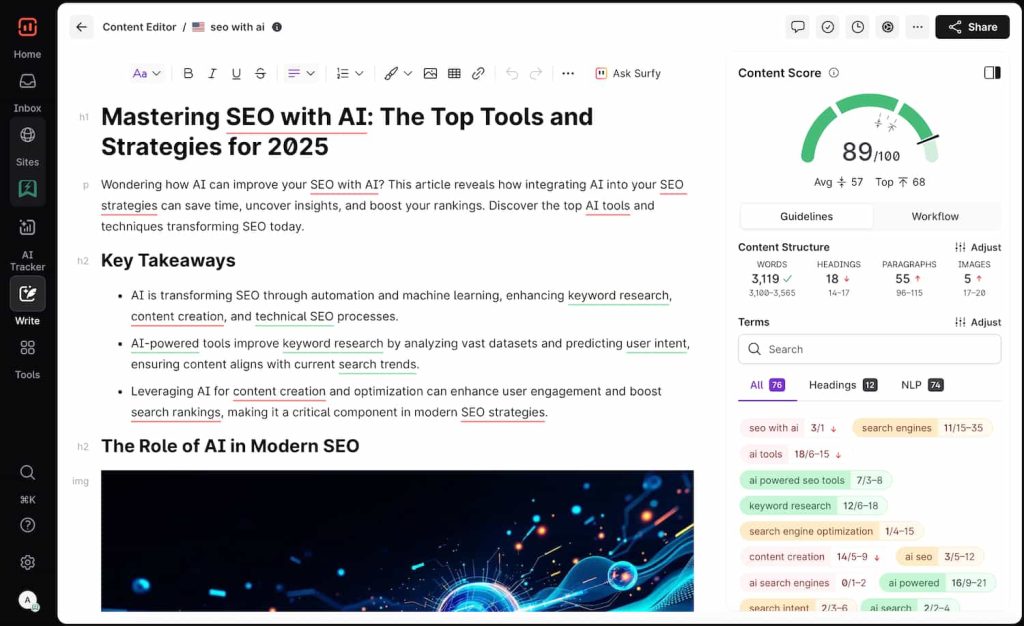
Everything is laid out cleanly in the side panel: your content structure, term usage, NLP filters, heading terms, and auto-suggestions. This way, you’re not just writing blindly; you’re building something that’s optimized at every layer.
If you prefer automation, you can also activate Surfer AI directly within the Content Editor. But if you like to stay in the driver’s seat, the Content Editor gives you all the tools to write smarter, faster, and more strategically.
Content Audit
Publishing new content is great, but what about the older pages that slowly lose traffic without warning? Surfer Content Audit helps you stay on top of that.
It connects with your Google Search Console and instantly shows you which pages are slipping in rankings, losing impressions, or dropping in click-through rate.
You’ll see performance data across:
- Traffic, impressions, and CTR
- Main keyword position over time
- Current vs previous 30-day trends
- Content Score breakdowns for each page
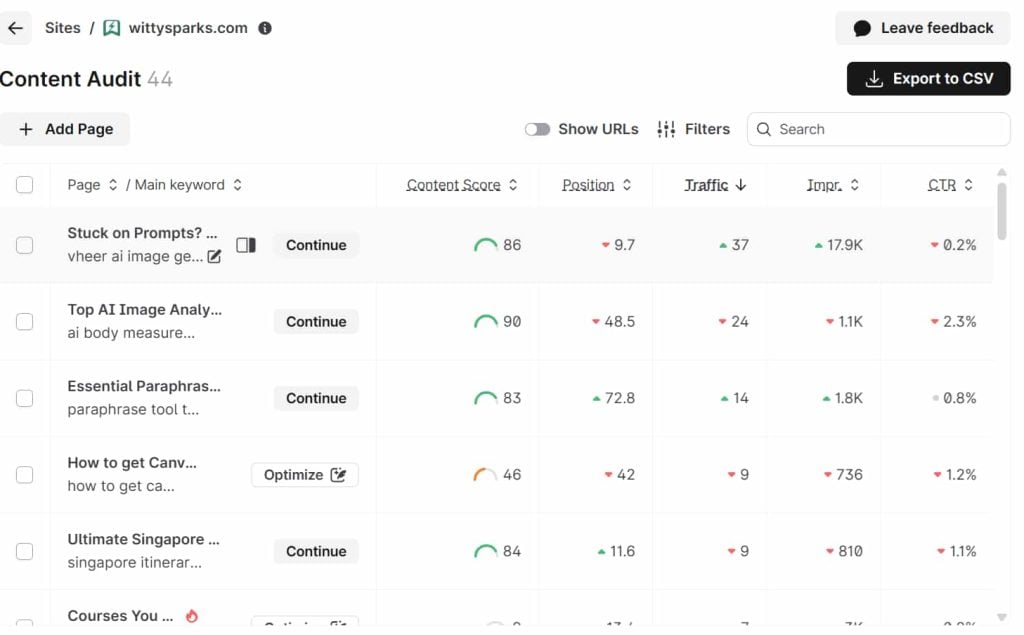
Once you identify a page that needs attention, you can send it directly to the Content Editor. From there, you get fresh optimization guidelines, contextual keywords, and can even use Auto-Optimize to fine-tune your content instantly.
The Internal Linking tool also becomes available inside the same interface, letting you update older content without switching between tabs or tools.
Inside the Recommendations tab, Surfer highlights quick wins:
- Pages currently ranking between #4 and #20
- Content Score below 70
- Topics with strong potential to move up with light rework
You’re also in full control:
- Manually add or remove pages from the audit
- Refresh audits every 7 days for updated data
- Export detailed CSV reports for larger site reviews
Whether you’re managing a content-heavy blog, a SaaS knowledge base, or a service business with dozens of articles, this tool helps you protect the content you’ve already worked hard to publish.
Surfer doesn’t just flag the problems; it guides you through how to fix them. And because it monitors your entire site daily, you’ll never miss out on a ranking drop or optimization opportunity again.
Topical Map
Using Surfer topical map for content clusters changed how I approach site architecture. Instead of picking topics based on gut feel, you get a visual breakdown of where your domain already has authority and exactly which gaps to fill next, tied directly to your Google Search Console data.
Publishing great content is one thing. Building authority across a subject is another. That’s where Surfer’s Topical Map steps in.
It helps you visualize how well your website covers a topic and shows you exactly where the gaps are. This feature is all about helping you create content clusters that search engines recognize as authoritative.
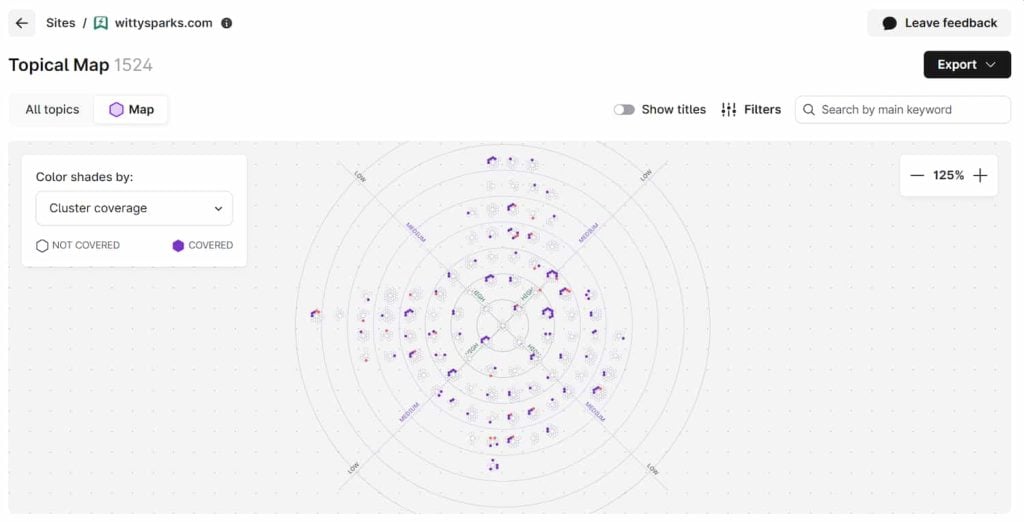
Topical Map pulls data from your Google Search Console and analyzes it using semantic clustering. It doesn’t just hand you a list of keywords; it gives you a full map of your content coverage, showing which topics are already supported and which areas are still missing.
That way, you’re not shooting in the dark; you’re creating content that aligns with what Google already sees as valuable.
You can explore topical coverage using Domain Map, which analyzes your existing GSC data, or use Topic Explorer to research without connecting to any property.
Either way, you get a clear view of how your domain is performing across clusters and which new articles should be created next to strengthen your position.
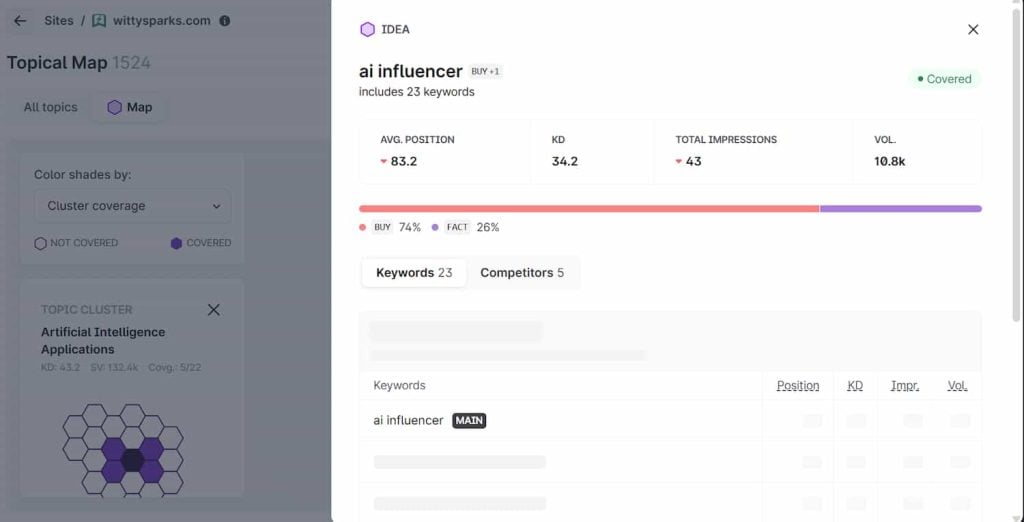
Inside each cluster, you’ll also find insights like keyword positions, impressions, search volume, and difficulty. The tool even lets you compare your topic coverage against your competitors, so you know exactly where you stand and what to prioritize.
If you want to go even deeper, the Topical Map includes a Cannibalization Report that flags overlapping pages targeting similar keywords. That makes it easier to consolidate content and boost rankings without duplicate effort.
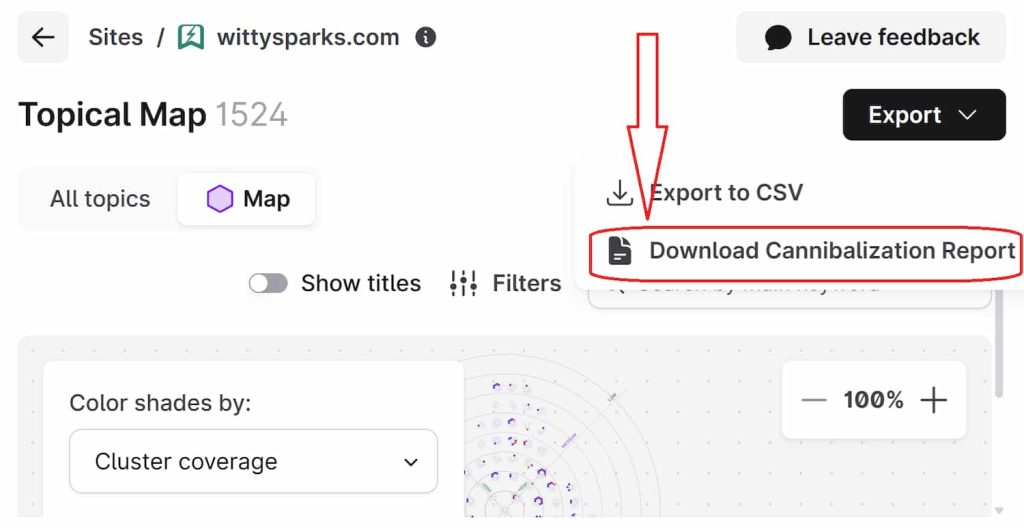
In short, Topical Map transforms your SEO strategy from reactive to strategic. It gives you a roadmap to grow topical authority with purpose, so every new article works harder for your rankings.
Surfer AI and Surfy
Learning how to use Surfer AI to write articles takes about ten minutes. Enter your target keyword, approve the outline Surfer generates, and the tool produces a fully structured draft with optimized headings and NLP terms already embedded, ready for your editorial layer.
Writing high-performance content is no joke. I know this because I’ve been doing this for quite some time now. But what if you could just focus on research and optimization, while a tool can get that job done for you?
Well, Surfer has introduced two smart tools to do exactly that! They can speed things up without cutting corners: Surfer AI and Surfy.
Both these platforms come embedded into the platform and can support different stages of your content workflow. So, if you want to automate your content creation? It can be done automatically.
If you want SEO guidance for writing, Surfer’s AI-powered tools can accomplish that too!
Now, let’s understand what exactly each of these tools does.
Surfer AI
Surfer AI generates complete, ready-to-rank articles. Feed in your target keyword and Surfer does the rest.
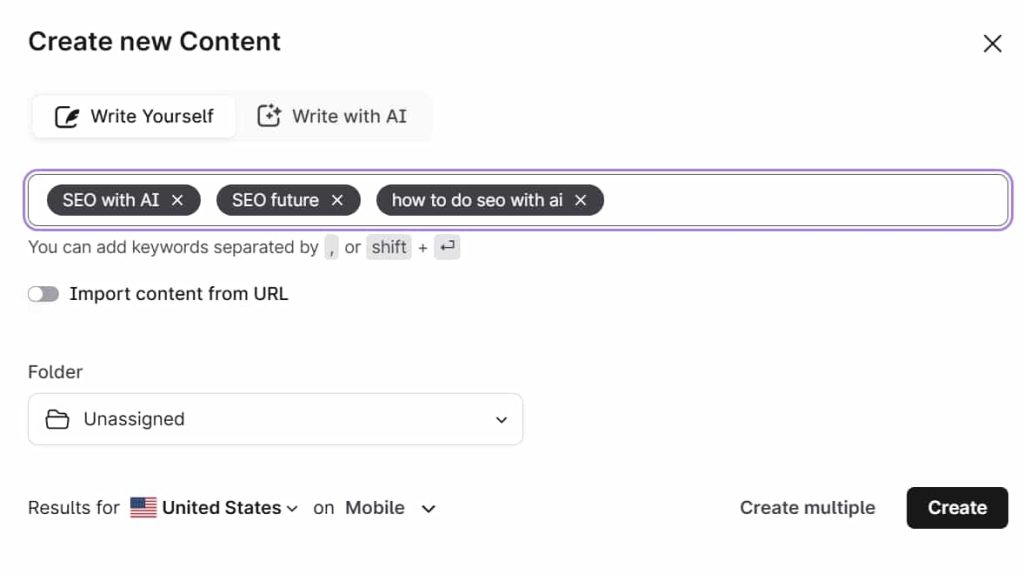
It’s a two-step process. You will in the basic information to create a proper outline of your draft and hit enter.
It gives you a proper draft with optimized headings, keyword usage, and contextual terms. This is extremely helpful as you get a publish-ready article with a single click.
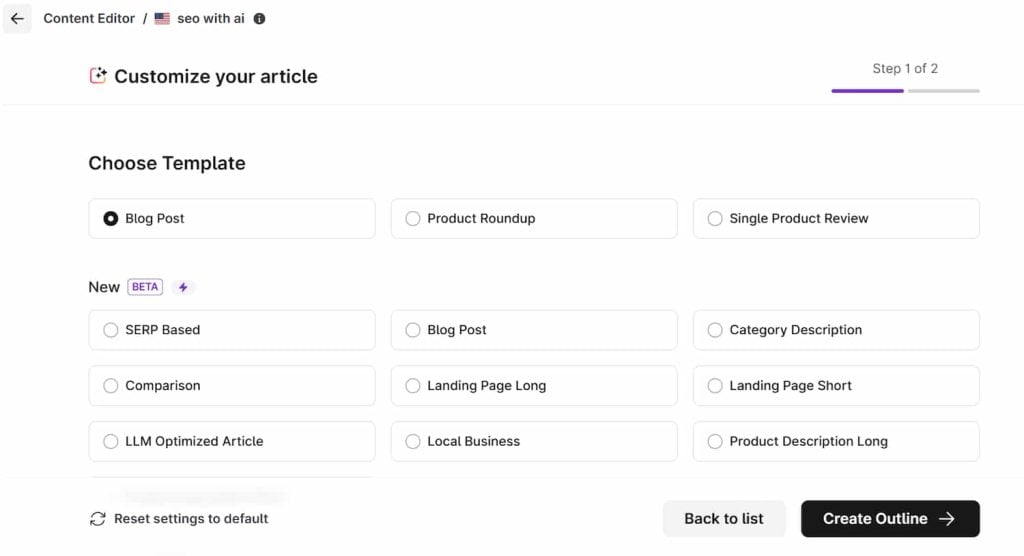
Once the AI draft is ready, you can edit it inside the Content Editor, apply Auto-Optimize, and even customize the tone or structure. For teams scaling production or solo marketers on tight timelines, Surfer AI is a huge time-saver.

The best part? You will have to put in minimal efforts to make sure your blog’s got maximum Content Score.
Surfy – The Writing Assistant
Surfy is your assistant inside the editor. It doesn’t write the content for you, but it helps you write better. Surfy guides your outline, suggests what to cover, and offers real-time SEO tips while you type.
Overall, both tools can help you with your writing. They can help you generate impactful articles and align your content with the SEO policies so that your article ranks better.
SERP Analyzer

When you are creating content for the web, it’s important to analyze how it performs as compared to your competitors. Directly uploading the Content without testing it is a mistake. You’ll lose crucial time & resources over such content. So it’s better to analyze before you take your content live.
This is where a SERP Analyzer of SEO can be of great help. This tool lets you analyze how your content fairs against your competitors. It does so by weighing in multiple SEO factors.
SERP Analyzer can identify the common structure & writing pattern from the top pages. This will help you optimize your content accordingly, without manually visiting each of the top pages.
Here is the list of some top SEO-Factors that the SERP analyzer checks instantly:
- Text length
- Number of headings
- NLP entities’ coverage
- Page speed
- Keyword density
- NLP Sentiment
- Referring URLs
- Referring domains
- Meta tags structure
Use SERP analyzer to discover the optimal keyword density for your target phrase, find link-building opportunities,& can test your Content based on multiple other SEO factors.
Surfer Keyword Research

Keyword Research is an essential part of any copywriting process. To get your Page on the top of SERP, you need to build your Content around the best keywords. And when you use Surfer, you get the best Keyword research tool.
Although not too different from Ahrefs or Semrush in terms of features, the Surfer Keyword Research tool holds its own. It’s easy to use, simple & efficient.
But one thing that annoyed me is you will have to input keywords manually. Once you hit the center, you’ll see the list of keywords with all the other necessary data.
Free AI Content Humanizer
AI-generated content often reads like, well, AI. But if you are using AI and do not want your content to read like that, Surfer’s AI Content Humanizer has you covered.
All you have to do is paste your draft into it, and it will start rewriting your content. You’ll get freshly-written content that feels authentic, emotive, and human.
It cleans up stiff AI tone, adds natural phrasing, and can help bypass AI detectors like Turnitin, Copyleaks, and GPTZero. Yet it does more than just dodge detection.
The rewrites retain SEO value, look polished, and the humanized writing performs in search and connects with readers. You’ll end up with content that reads well, holds originality, and feels genuine.
The best part? This tool is absolutely free for the first 5000 words! So go ahead and give it a try.
AI Tracker
The Surfer SEO AI tracker for brand visibility is one of the most forward-looking features the platform has shipped. It tells you how often your content appears inside ChatGPT, Gemini, and Perplexity responses, not just where you rank on Google.
As large language models increasingly shape how people discover information, this tool helps you understand your brand’s visibility in those evolving ecosystems. It shows which of your pages are mentioned, which competitors are being cited, and how frequently your domain is referenced across AI-driven answers.
The tool’s operation is interesting. It evaluates a set of custom prompts defined by you. It runs them across all LLMs (large language models). Then it uses its self-consistency method and removes any unreliable results. This makes sure only verified mentions are included in your report, quote interesting, right?
On top, each project can include up to 100 prompts. So you can cover a variety of content like branded, informational, and topical queries relevant to your niche.
The best part? The entire data refreshes daily. So it makes a decision on fresh data instead of stale data. This gives you an always-up-to-date view of how your visibility evolves over time.
AI Tracker also offers a wide range of performance metrics like Mention Rate, Average Position, Visibility Score, and Top Sources. These metrics are designed to measure how often, where, and in what context your brand appears in AI responses.
So if you are a marketer, you can use this feature to identify which domains get the most dominant AI answers. Result? You can easily find new opportunities and partnerships to grow your business. You can also optimize your content strategy based on this information.
Result? This feature can enhance your own presence in LLM responses. You can also use it to get an idea about what exactly your competitor is doing to appear more frequently in the AI responses. It does so by analyzing their content and using Surfer’s Content Editor to improve pages that could rank or appear on top.
Over time, you can compare visibility trends, refine prompt sets, and build stronger authority signals within AI ecosystems.
AI Tracker is included in Surfer’s Scale plan with five daily prompts by default. It’s also available as an add-on starting at $95/month for 25 prompts, with discounted pricing for higher volumes such as 100 or 300 prompts.
By monitoring your influence across AI-generated answers, AI Tracker acts as a pulse check for your brand’s authority in the new era of AI search, where visibility now extends.
Facts from SERPs and LLMs
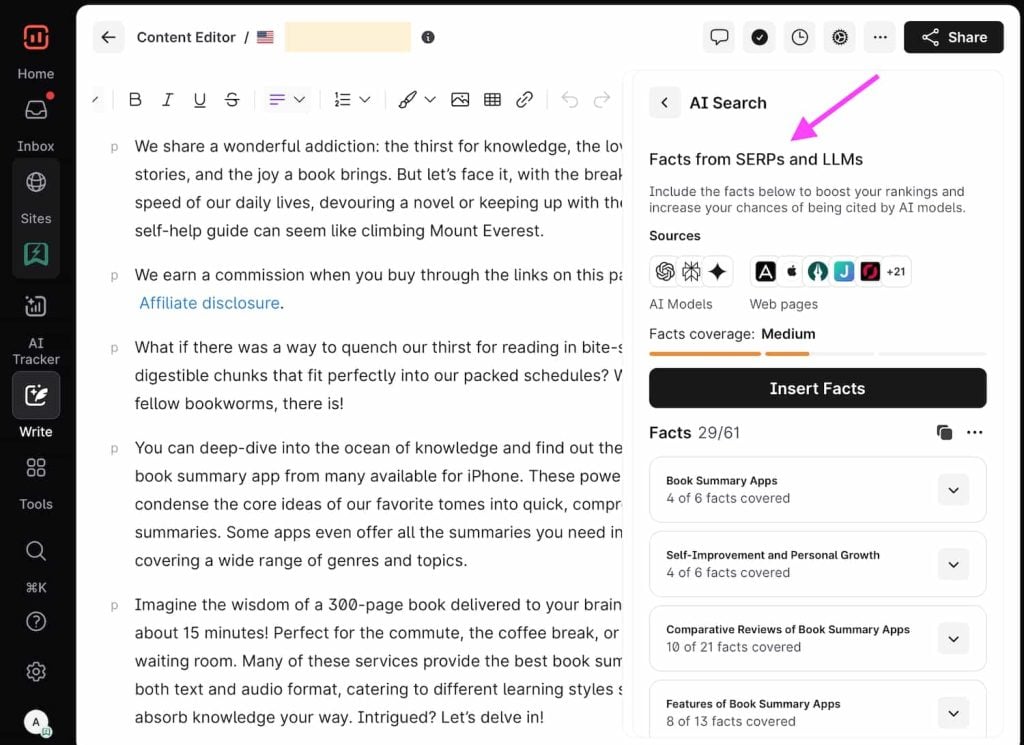
Surfer recently added the Facts Tab, a coverage booster built into the Content Editor. It scans your article’s topics, reviews the top 20 pages in search results, and uses large language models (LLMs) to suggest factual enhancements.
Each suggestion comes with its source, related keywords, and clear placement cues. You can accept or undo changes instantly, compare revisions side by side, and view where every fact originated.
This feature boosts topical coverage, factual accuracy, and LLM visibility while maintaining editorial control. It’s ideal for improving EEAT signals and ensuring your content performs both on Google and within AI-generated summaries.
But if you like to stay in the driver’s seat, the Content Editor gives you all the tools to write smarter, faster, and more strategically.
Keyword Surfer Chrome Extension
If only keyword ideas were always this accessible! But thanks to Keyword Surfer, they are now! This free Surfer Chrome extension is designed to help you find search volume, CPC, estimated traffic, related suggestions, and even rival page word counts. And you get all this in your Google search result itself.
Install it, type a query, and instantly see data that’s usually buried behind multiple tools. You can even group keywords into collections, export them as CSV, or send them to Surfer’s Topic Explorer for deeper planning.
The best part? You don’t have to exit Google to do all this. With usage across over 70 countries and data that’s surprisingly accurate, this is the seamless, zero-cost SEO sidekick you’ve been needing.
You can select any one of them & start churning out SEO-friendly Content.
Now that we have understood some prominent features of Surfer, let’s talk about Surfer Pros & Cons.
Pros and cons of Surfer
| Pros | Cons |
|---|---|
| Content Editor scores 500+ ranking factors in real time. | No free trial – 7-day money-back only. |
| AI Tracker monitors brand visibility in ChatGPT, Gemini, Perplexity. | Entry plan may feel restrictive for high-volume publishers. |
| Topical Map reveals content gaps vs competitors. | AI Tracker add-on costs $95/month extra for 25 prompts. |
| Free Keyword Surfer Chrome extension (70+ countries). | Steep learning curve for Topical Map and SERP Analyzer. |
| 7-day money-back guarantee with no questions asked. | Keyword research lags behind Ahrefs and Semrush in depth. |
Surfer Pricing
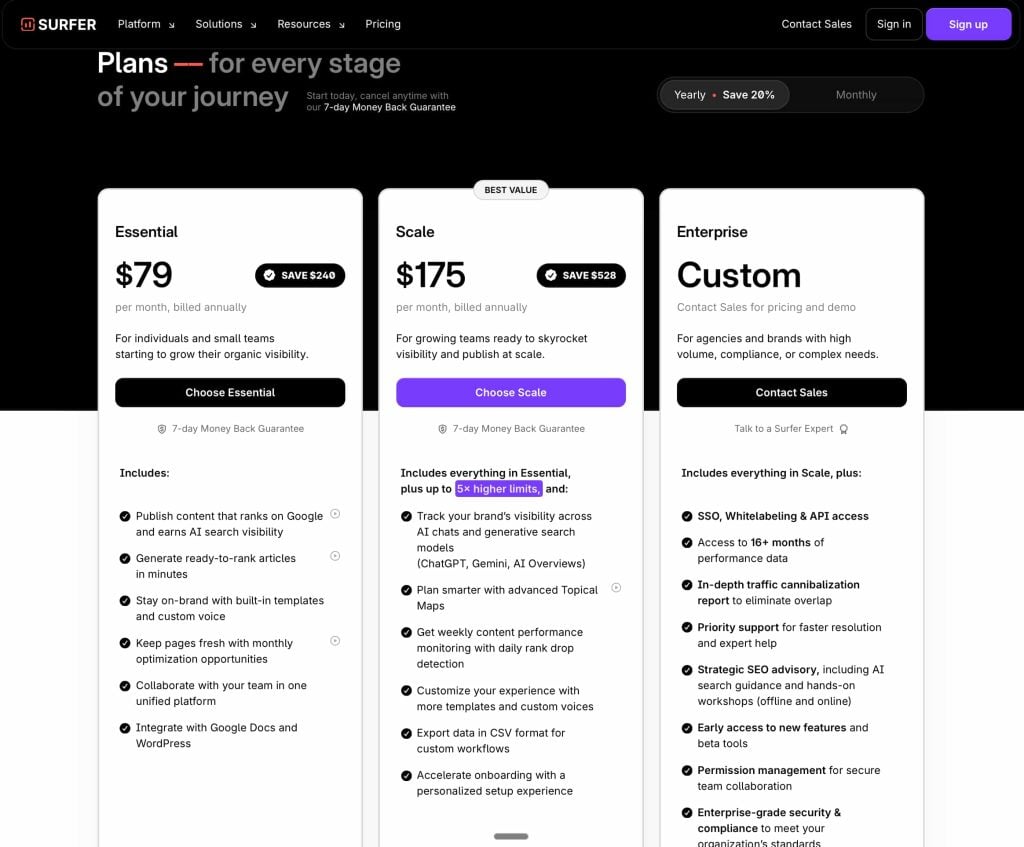
Surfer SEO pricing for small blogs is the sticking point most beginners hit. The entry plan works if you are publishing four or more articles per month – below that threshold, the cost-per-article math gets harder to justify.
Check out the complete Surfer pricing in the image below. Prices change frequently, verify current pricing at Surfer’s official site.
| Plan | Price (Monthly) | Articles/Month |
|---|---|---|
| Standard | $99 | Create or optimize 360 documents, Track 25 AI prompts |
| Pro | $182 | Create or optimize 360 documents, Track 50 AI prompts |
| Peace of Mind | $299 | Create or optimize unlimited documents, Track 100 AI prompts |
Surfer Support
Surfer offers 24×7 live chat support, which is an excellent feature. You can easily reach out to them & their experts will assist you in every possible way. In short, Surfer support is excellent.
Surfer Alternatives
A Surfer SEO vs Clearscope comparison comes down to one trade-off: depth versus simplicity. Surfer gives you more data points and workflow integrations; Clearscope wins on a cleaner interface for teams who just want a content score and a keyword list.
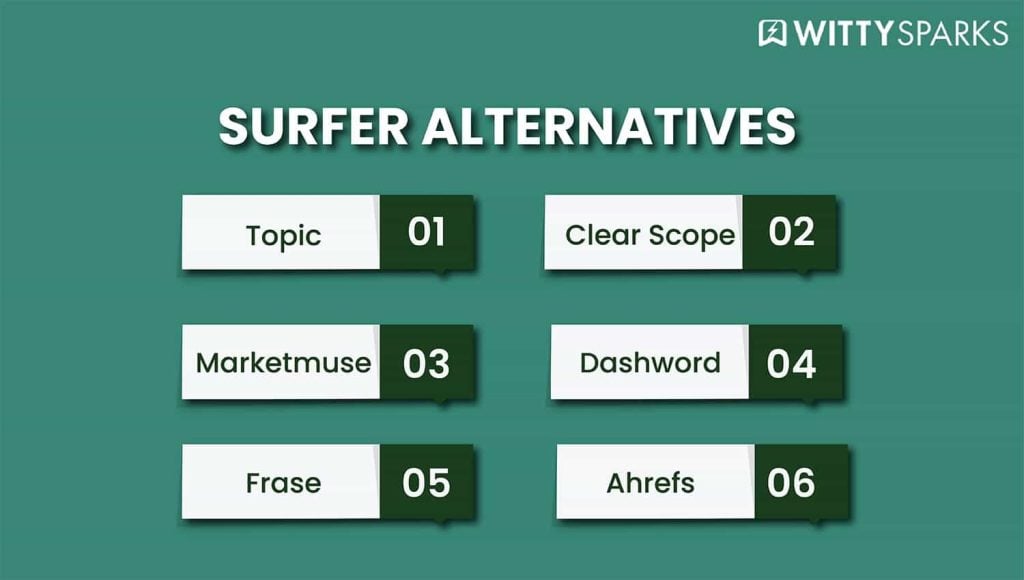
If you are looking for Surfer alternatives, you should surely check out these tools:
- Topic.
- Clearscope
- Marketmuse
- Dashwood
- Page Optimizer Pro
- Frase
- Ahrefs
- Semrush Writing Assistant
- Content Harmony
- seoClarity
- Conductor
- SimilarContent
- WriterZen
Final Thoughts
Surfer is a great SEO tool, loaded with all the necessary features. Its price is a bit expensive, but trust me, it’s worth it.
With the addition of AI Tracker and Facts from SERPs and LLMs, Surfer now bridges traditional SEO with AI search visibility. Marketers can now craft content optimized for AI-driven content discovery.Content Editor
I hope you have found this detailed Surfer review helpful. If you have queries about some other tools, please visit our website here.
FAQs
Does Surfer SEO offer a free trial?
No free trial is available. Surfer offers a 7-day money-back guarantee instead. Submit honest feedback by email and they will refund your payment, no questions asked.
Is the Content Editor of Surfer effective?
Yes, it’s very effective.
Will I get access to Content Audit Tool and Topical Map in basic plan?
Yes, it’s included in basic plan, and AI tracker comes with a Scale plan or as add-on in basic plan.
Are there any plans like Surfer Lifetime Deal?
No, Surfer doesn’t offer any lifetime deals. But they offer a 7-day money-back guarantee, just share your honest feedback and they’ll return your money back with no questions.
Does Surfer have an affiliate program?
Yes, they have an affiliate program and help you earn 25% from their Surfer affiliate program.
What are Surfer free alternatives?
Here are some of the best Surfer competitors which are free and paid: MarketMuseu, Frase.io, Clearscope, Dashword. Content Harmony, Page Optimizer Pro. Read the article for the complete list.
What is Surfer’s AI Tracker and how does it work?
AI Tracker monitors how often your brand and content appear inside AI-generated answers from ChatGPT, Gemini, and Perplexity. You define up to 100 custom prompts per project. The tool runs them daily across major LLMs, removes unreliable results using a self-consistency method, and reports verified mentions with Mention Rate, Visibility Score, and Average Position metrics.
How does Surfer’s Content Editor differ from Clearscope or MarketMuse?
Surfer gives you more integrated workflow tools, internal linking, Auto-Optimize, Surfer AI generation, and GSC-connected audits, all inside one editor. Clearscope is cleaner and simpler. MarketMuse goes deeper on topic modeling. Surfer wins on end-to-end workflow; the others win on focused use cases.
What is the Surfer Topical Map feature?
Topical Map connects to your Google Search Console and maps your existing content against semantic clusters. It shows which topics you cover well and which gaps are limiting your authority. It also includes a Cannibalization Report that flags overlapping pages targeting similar keywords, useful for consolidation without losing rankings.
Save 20% with yearly plan!
This post is also available in:

Read more from SEO Tools