
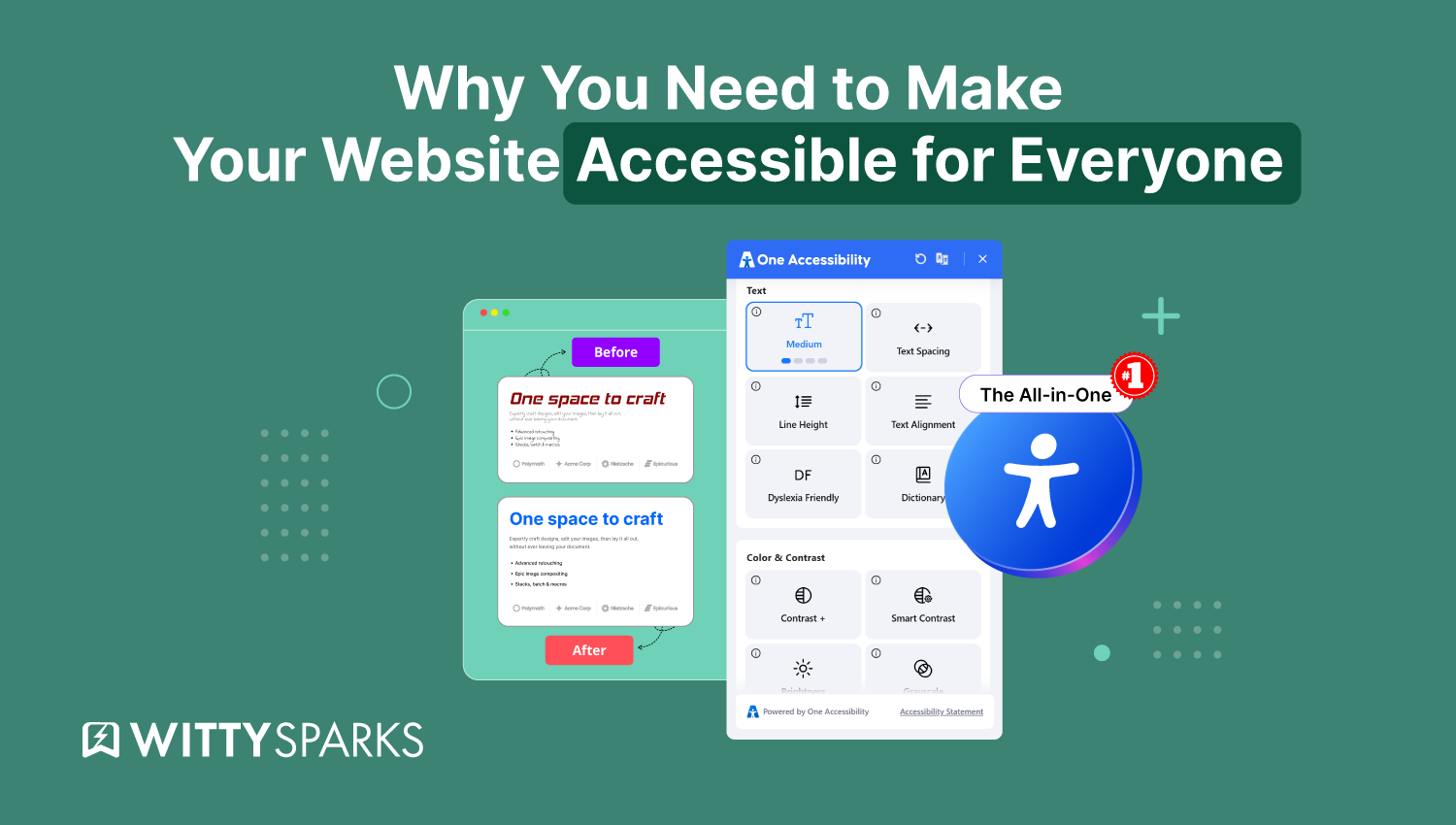

Many websites look good, but they are not easy for everyone to use. People with vision problems, reading difficulties, or mobility issues often struggle to access content. This creates a major problem because many users are left out.
When your website is not accessible, visitors may leave quickly. You can lose traffic, trust, and even potential customers. It can also affect your SEO and limit your growth online.
The good news is that you can fix this easily. By improving accessibility, you make your website simple, clear, and user-friendly for all. Tools like the One Accessibility plugin from BdThemes help you add useful features without coding and create a better experience for every visitor.
On this page
What Is the One Accessibility Plugin?
The One Accessibility plugin is a WordPress tool that helps make your website easy to use for everyone. It is designed to improve accessibility for people with different needs, including those with vision, reading, or mobility challenges. The plugin adds useful features such as text resizing, color-contrast controls, keyboard navigation, and screen-reader support.
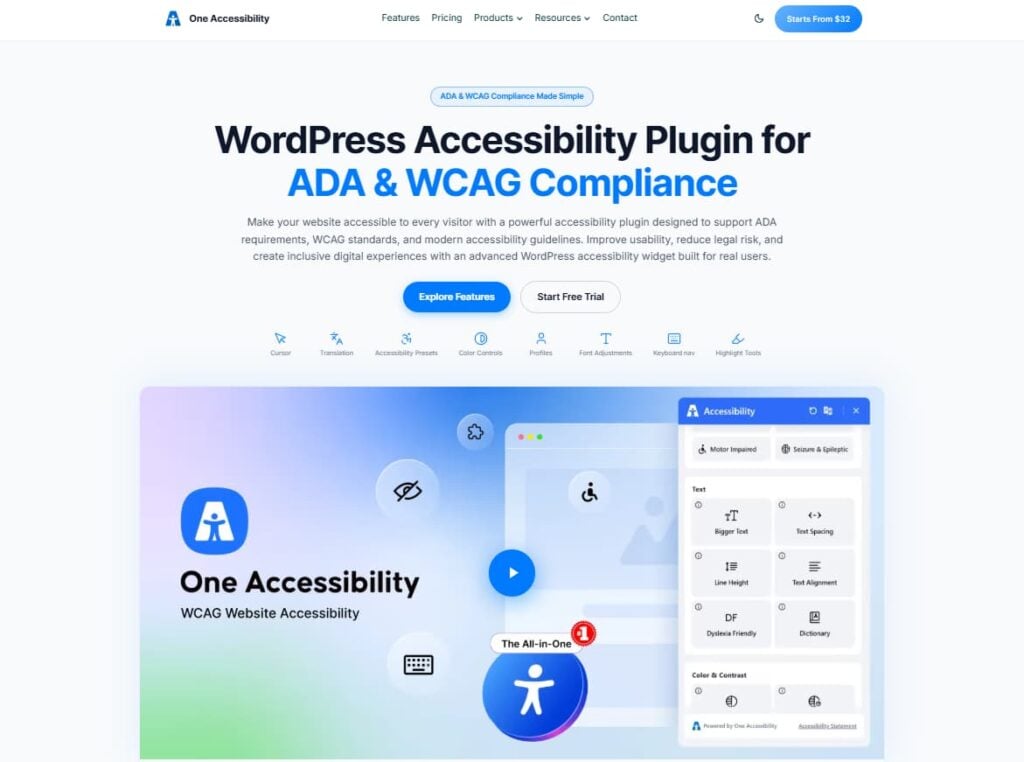
With this plugin, visitors can adjust the website based on their comfort. For example, they can increase text size, change colors, or use audio to listen to content. This makes your website more user-friendly and inclusive.
The best part is that you do not need any coding skills to use it. You can install and set it up easily from your WordPress dashboard. Overall, the One Accessibility plugin helps improve user experience, supports accessibility standards, and makes your website better for all users.
Why Web Accessibility Matters?
Web accessibility is very important today. It means making your website easy to use for everyone, including people with disabilities. Many businesses still ignore accessibility, but it plays a big role in user experience, SEO, and overall success.
Let’s understand why web accessibility matters and how it can help your website grow.
The Global Need for Accessibility
There are more than 1.3 billion people in the world living with some form of disability. These disabilities can be related to vision, hearing, movement, or thinking ability. Each of these can affect how a person uses a website.
In the United States alone, about 1 in 4 adults has a disability. That is over 61 million people. If your website is not accessible, you are missing a very large audience.
Vision problems are also increasing. Around 217 million people have moderate to severe vision issues. This number is expected to grow even more in the future. If your website is not designed for these users, they may not be able to read your content or navigate your site properly.
Accessibility helps you reach all these users. It makes your website usable for everyone, not just people without disabilities.
Today, many website owners use simple tools and plugins to improve accessibility without coding. For example, solutions like One Accessibility help make websites more inclusive with minimal effort.
The Economic Value of Accessibility
People with disabilities have strong buying power. They have nearly $490 billion in disposable income. This means they are active customers who are ready to spend money.
However, many websites are not designed for them. This creates barriers. For example, if a user cannot read your content or click your buttons, they will leave your site.
By improving accessibility, you open your business to a larger market. You make it easier for more people to buy your products or services. This can increase your sales and revenue.
Accessibility is not just about helping people. It is also a smart business decision.
Legal Risks and Brand Reputation
Ignoring accessibility can create serious problems. Many companies have faced lawsuits because their websites were not accessible.
For example, large brands like Domino’s have been involved in legal cases related to accessibility. These cases can cost a lot of money and damage your reputation.
When your website is not accessible, people may feel excluded. This can lead to negative reviews and loss of trust.
On the other hand, when you focus on accessibility, you show that you care about all users. This builds trust and improves your brand image.
It is always better to fix accessibility issues early rather than deal with legal problems later. That’s why many websites take a proactive approach by using accessibility-focused solutions such as One Accessibility.
Technical Benefits of Accessibility
Accessibility also improves your website from a technical point of view. It helps your site perform better and become easier to manage.
Better Website Performance
Accessible websites usually have clean and simple code. This makes them load faster. Faster websites improve user experience and reduce bounce rate.
Search engines like Google also prefer fast and well-structured websites. This means better SEO and higher rankings.
Lower Maintenance Cost
If you build your website with accessibility in mind from the start, you avoid future problems. You do not need to fix major issues later.
This reduces development time and cost. It also makes your website easier to update.
Future-Proof Your Website
Technology and accessibility standards are always changing. Also, the global population is aging.
By making your website accessible now, you prepare for the future. Your website will continue to work well for all users.
Who Benefits from Web Accessibility?
Accessibility not only helps people with disabilities. It improves the experience for everyone.
1. People with Vision Problems
About 2.2 billion people in the world have some level of vision impairment.
When you use larger text, clear fonts, and high contrast colors, it becomes easier to read. This helps not only people with vision problems but also users on mobile devices or in bright sunlight.
2. People with Cognitive Challenges
Around 10% of the global population has some form of cognitive difficulty.
Simple layouts, clear instructions, and easy language help these users understand your content better. It also helps all users who prefer quick and clear information.
3. Multi-Language Users
Many people speak more than one language. Over half of the world is bilingual, and many users are not native English speakers.
When your website uses simple language and offers translation options, it becomes easier for them to understand.
This makes your website more inclusive and user-friendly.
4. Older Adults
The number of older people is increasing. By 2050, 1 in 6 people will be over 65.
As people age, they may face issues with vision, hearing, or movement. Accessible design helps them use your website without difficulty.
For example:
- Larger buttons help with clicking
- Clear text helps with reading
- Simple navigation helps with browsing
5. People with Temporary Disabilities
Sometimes people face temporary problems like a broken arm or eye strain.
They may not be able to use a mouse or read small text. Accessibility features like keyboard navigation and readable content help them.
Many website owners start by using tools like One Accessibility to make their websites more user-friendly and inclusive without a complex setup. Now let’s see how to get started with the One Accessibility plugin.
How to Get Started with the One Accessibility Plugin?
Getting started with the One Accessibility plugin is very easy. You do not need any technical skills to set it up. Just follow a few simple steps, and your website will become more accessible for all users.
Step 1: Install and Activate the Plugin
First, log in to your WordPress dashboard. This is where you manage your website. Once you are logged in, go to the left menu and click on Plugins, then select Add New.
You will see a search bar at the top of the page.In the search bar, type “One Accessibility”. The plugin should appear in the search results.
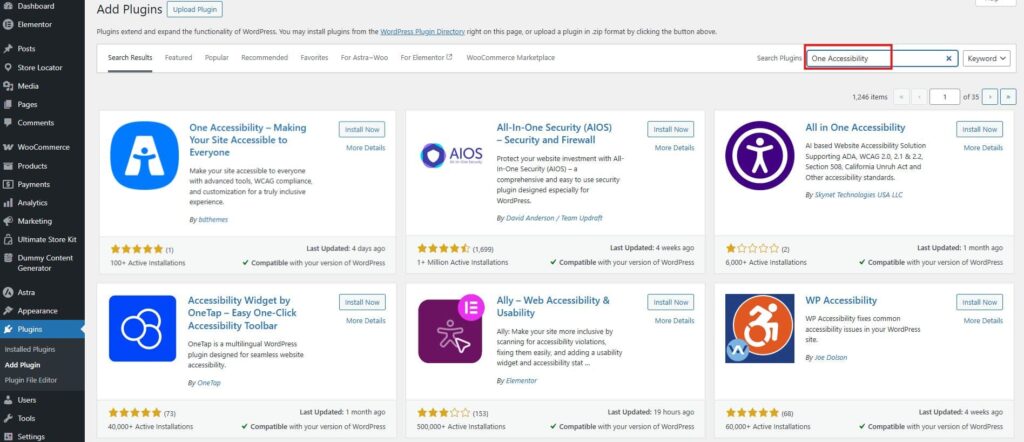
When you find it, click the Install Now button. WordPress will take a few seconds to install the plugin.
After the installation is complete, click the Activate button. This step is important because it turns the plugin on for your website.
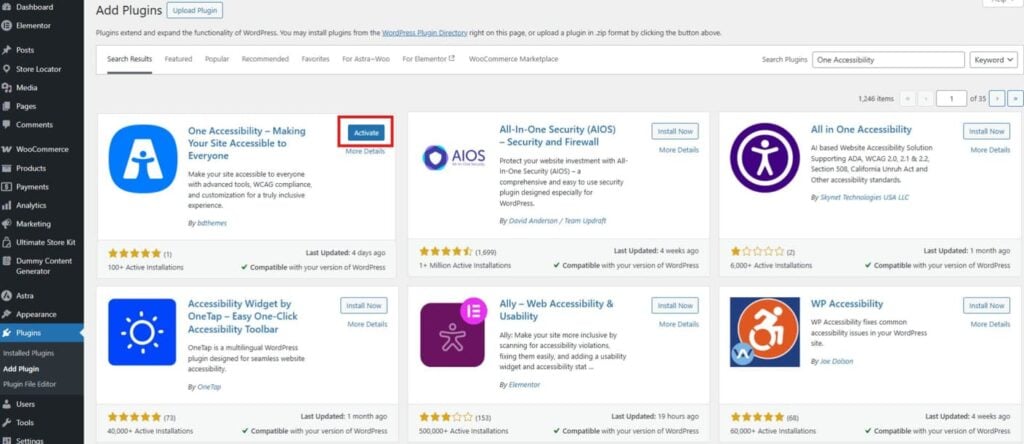
Once activated, the One Accessibility plugin will be added to your system. Now you can start using its features to improve your website’s accessibility and make it easier for all visitors to use.
If you face any issues, you can watch the video below.
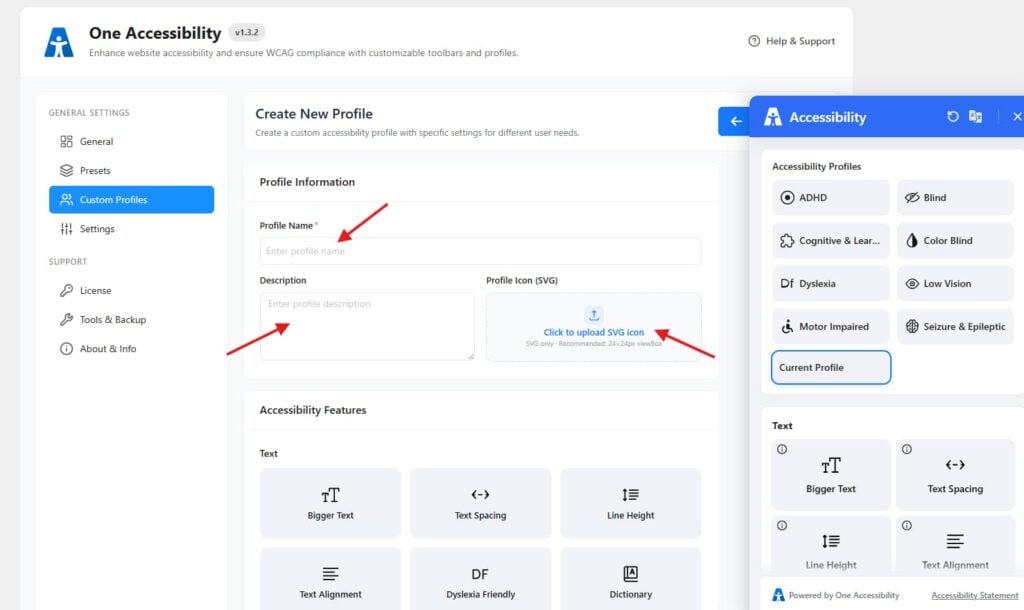
Step 2: Create a Custom Accessibility Profile
After activating the plugin, go to Accessibility → Custom Profiles.
Now you can create a new profile based on user needs.
- Enter a Profile Name
- Add a short Description
- Upload an icon (optional)
Key Features of the One Accessibility Plugin
Many people use the internet every day. But not everyone uses websites in the same way. Some people have trouble seeing. Some find it hard to read. Some cannot use a mouse. If a website is not easy to use, these people may leave.
The One Accessibility plugin helps solve this problem. It makes your website easy for everyone. It adds simple tools so users can adjust the website based on their needs.
You can add these features in just a few steps. Watch the video below for help.
Let’s look at the main features in simple words.
1. Accessibility Profiles (ADHD, Blind, Dyslexia, etc.)
One of the best features of this plugin is accessibility profiles. These profiles are made for different types of users.
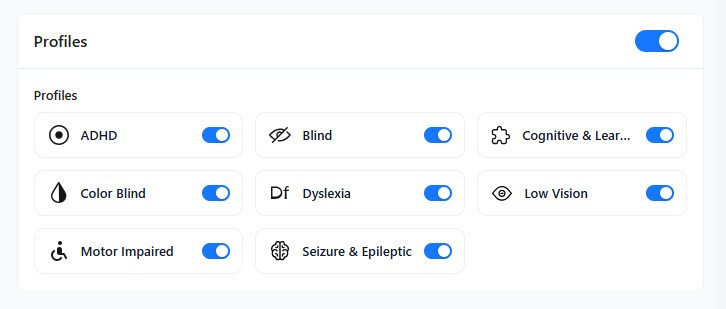
Instead of changing settings one by one, users can choose a profile that fits their needs.
For example, there are profiles for:
- ADHD: Helps users stay focused by reducing distractions. It can simplify the layout and improve readability.
- Blind users: Supports screen readers and audio features so users can listen to content instead of seeing it.
- Cognitive and learning needs: Makes content easier to understand by using simple layouts, clear text, and better spacing.
- Color blind users: Adjusts colors and contrast so users can clearly see text and elements without confusion.
- Dyslexia: Uses special fonts and spacing to make reading easier for users with dyslexia.
- Low vision: Increases text size, contrast, and clarity so users with weak vision can read easily.
- Motor-impaired users: Improves keyboard navigation so users can browse without using a mouse.
- Seizure and epileptic users: Reduces flashing and moving content to create a safe and comfortable experience.
Each profile automatically changes the website settings.
For example:
- Dyslexia profile uses easy-to-read fonts
- Low vision profile increases text size and contrast
- Motor-impaired profile improves keyboard navigation
This saves time and makes the website easier to use.
It helps your website become more user-friendly for all types of users.
2. Text & Readability Controls
Some people find it hard to read small text. Some need more space between lines.
This plugin lets users change text settings.
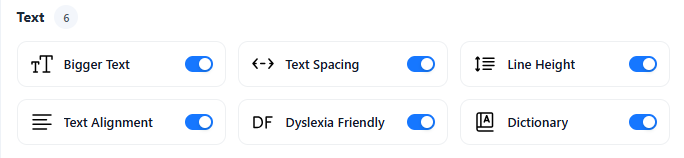
Users can:
- Bigger Text: Increase text size for better visibility
- Text Spacing: Add space between letters and words
- Line Height: Increase the space between lines for easy reading
- Text Alignment: Adjust text position for better comfort
- Dyslexia Friendly: Use special fonts for easier reading
- Dictionary: Get meanings of difficult words
This makes reading easy. It helps users stay longer on your website.
3. Color & Contrast Settings
Colors are important. But sometimes text is hard to see.
This plugin allows users to change colors.
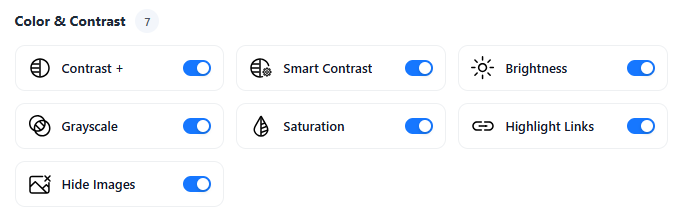
Users can:
- Contrast +: Increase contrast to make text easier to read
- Smart Contrast: Automatically adjust colors for better visibility
- Brightness: Control screen brightness for comfort
- Grayscale: Remove colors to reduce distraction
- Saturation: Adjust color intensity
- Highlight Links: Make links more visible
- Hide Images: Remove images to focus on text
This helps users see text clearly.
It is useful for:
- Low vision users
- Color blind users
- Mobile users
4. Cursor & Tooltips
Some users cannot see small cursors.

This plugin allows:
- Cursor: Increase cursor size to make it easier to see and use
- Tooltips: Show helpful text when hovering over elements
Tooltips show extra information. This makes navigation easier.
5. Pause Animations & Mute Sounds
Some websites have moving elements and sounds. This can be a problem for some users.

This plugin allows users to:
- Pause Animations: Stop moving or flashing content
- Mute Sounds: Turn off all website sounds
- Screen Reader: Listen to content using text-to-speech
This makes the website calm and easy to use.
It is helpful for:
- ADHD users
- Epileptic users
- Sensitive users
6. Keyboard Navigation
Some users cannot use a mouse. They use a keyboard instead. This plugin supports keyboard use.

Users can:
- Move between elements using the keyboard
- Access menus, buttons, and links without a mouse
- Use tab and arrow keys for easy navigation
This is very helpful for users with motor disabilities and improves overall accessibility.
Compliance with Global Standards
When you build a website, design and speed are important. But there is something equally important that many people ignore. That is accessibility.
Accessibility means your website should be easy to use for everyone. This includes people with vision problems, hearing issues, or physical limitations.
Many countries have created rules to make websites accessible. These rules are called accessibility standards. If your website does not follow these standards, it may not be usable for many people. It can also create legal problems.
The One Accessibility plugin helps solve this problem. It helps your website simply follow global accessibility standards. You do not need deep technical knowledge. You can improve accessibility with just a few steps.
Why Compliance Is Important?
Compliance is not just about following rules. It has real benefits.
First, it helps you avoid legal risks. Many companies have faced lawsuits because their websites were not accessible.
Second, it improves user experience. When your website is easy to use, people stay longer and feel comfortable.
Third, it increases your audience. Millions of people have disabilities. If your website is accessible, you can reach them.
Finally, it helps SEO. Search engines prefer websites that are clear and easy to use.
How One Accessibility Helps?
The One Accessibility plugin simply supports these standards. It adds useful features to your website that improve accessibility.
For example, it helps with better contrast, readable text, and keyboard navigation. It also supports screen readers so users can listen to content.
Instead of manually fixing everything, you can use this plugin to improve many areas quickly. It acts as a support tool that makes your website more inclusive.
One Accessibility Plugin Pricing
Pricing is always an important factor when choosing a plugin. You want something that gives value without being too expensive.
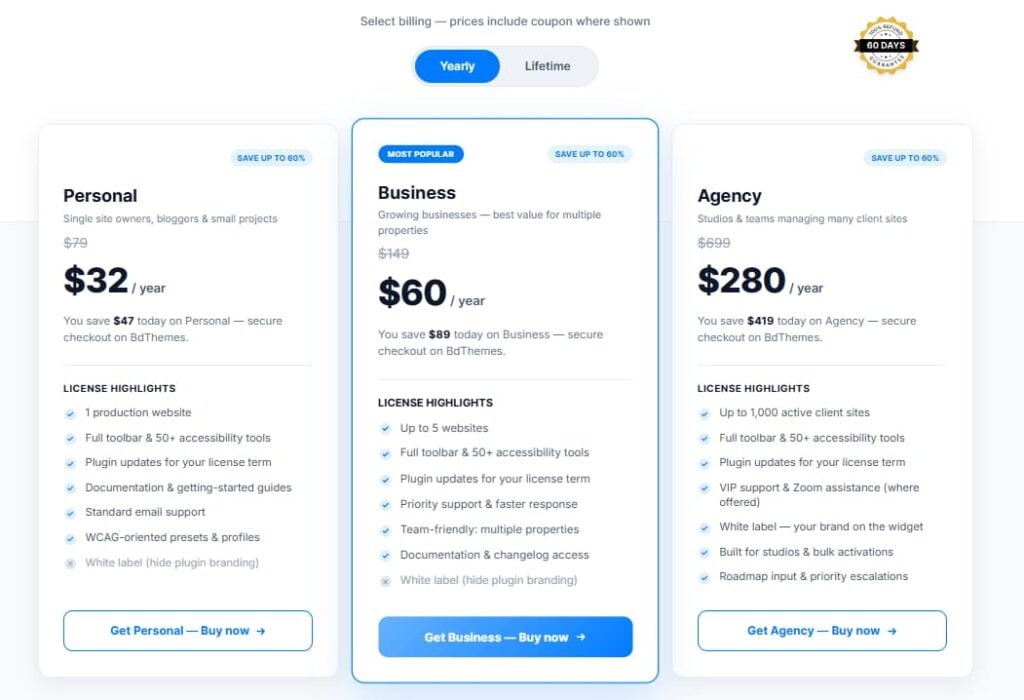
The One Accessibility plugin offers flexible pricing options. It usually comes with both free and paid versions.
Free Version
The free version is a good starting point. It includes basic features that help improve accessibility.
You can use it to test the plugin and understand how it works. It is suitable for small websites or personal blogs.
Premium Version
The paid version offers more advanced features. It gives more control and customization options.
This version is useful for businesses and e-commerce websites. It also provides better support and advanced tools.
| Plan | Personal | Business | Agency |
|---|---|---|---|
| Best For | Bloggers & small sites | Growing businesses | Agencies & teams |
| Price (Yearly) | $32 / year | $59.66 / year | $279.68 / year |
| Price (Lifetime) | $99.50 | $174.55 | $649.55 |
| Websites | 1 website | Up to 5 websites | Up to 1,000 websites |
| Accessibility Tools | 50+ tools | 50+ tools | 50+ tools |
| Plugin Updates | Yes | Yes | Yes |
| Support | Standard support | Priority support | VIP support |
| White Label | Not included | Not included | Included |
| Best Feature | Basic setup | Multi-site support | Full agency solution |
Is One Accessibility Plugin Worth the Cost?
Yes, it is worth the cost. Hiring a developer to make your website accessible can be expensive. This plugin provides many features at a lower cost.
It saves time and effort. It also helps avoid legal risks and improves user experience.
Pros and Cons of One Accessibility Plugin
Every tool has its strengths and weaknesses. It is important to understand both.
Pros
- One of the biggest advantages is ease of use. The plugin is simple and beginner-friendly. You do not need coding skills.
- Another benefit is quick setup. You can install and activate it in minutes. After that, you can start using its features.
- The plugin also offers many useful features. It includes text controls, color settings, screen reader support, and keyboard navigation.
- It works well with popular tools like Elementor and WooCommerce. This makes it easy to use on different types of websites.
- It also improves user experience. Visitors can adjust the website based on their needs. This makes the website more comfortable to use.
- Another important benefit is compliance support. It helps your website follow accessibility guidelines.
- The plugin is also lightweight. It does not slow down your website, which is very important for performance.
Cons
- Some features require proper setup. If you do not configure them correctly, you may not get the best results.
- Also, advanced features may not be available in the free version. You may need to upgrade for full functionality.
Conclusion
Ignoring accessibility can hurt your website more than you think. Users may face problems, leave your site, and never return. Over time, this can reduce engagement and affect your online success.
But when you focus on accessibility, everything changes. Your website becomes easier to use, more welcoming, and more effective. Visitors stay longer, interact more, and trust your brand.
Start making small improvements today. A simple and accessible website can reach more people and create a better experience for everyone.
FAQs
What is the One Accessibility plugin, and how does it help?
The One Accessibility plugin is a WordPress tool that helps make your website easy to use for everyone. It adds features like text resize, color contrast, keyboard navigation, and screen reader support. These features help users adjust the website based on their needs. It improves usability and makes your website more inclusive.
Do I need coding skills to use the One Accessibility plugin?
No, you do not need any coding skills. The plugin is very easy to use. You can install and activate it from your WordPress dashboard. All settings are simple, and you can control everything with a few clicks.
Is the One Accessibility plugin free?
Yes, there is a free version with basic features. This is enough for many websites. There may also be a paid version with more advanced options. You can choose based on your needs.
Does the plugin help with SEO?
Yes, it helps indirectly. When your website is easy to use, visitors stay longer and interact more. This improves user experience, which is important for SEO. Better structure and readability also help search engines understand your site.
Can this plugin make my website fully accessible?
The plugin improves many accessibility features, but it may not make your website fully compliant on its own. Some parts depend on your content and design. You may need to make small manual changes for full accessibility.
Will it slow down my website?
No, the plugin is lightweight and optimized. It does not add a heavy load to your website. It is designed to work smoothly without affecting performance.
Can I use it with Elementor and WooCommerce?
Yes, the plugin works well with Elementor, Gutenberg, and WooCommerce. It is compatible with most WordPress themes and builders, so you can use it easily on any site.
Why is website accessibility important?
Accessibility is important because it helps all users use your website easily. It creates a better user experience, builds trust, and helps you reach more people. It also helps follow legal guidelines and improve your website quality.

Read more from Tools