
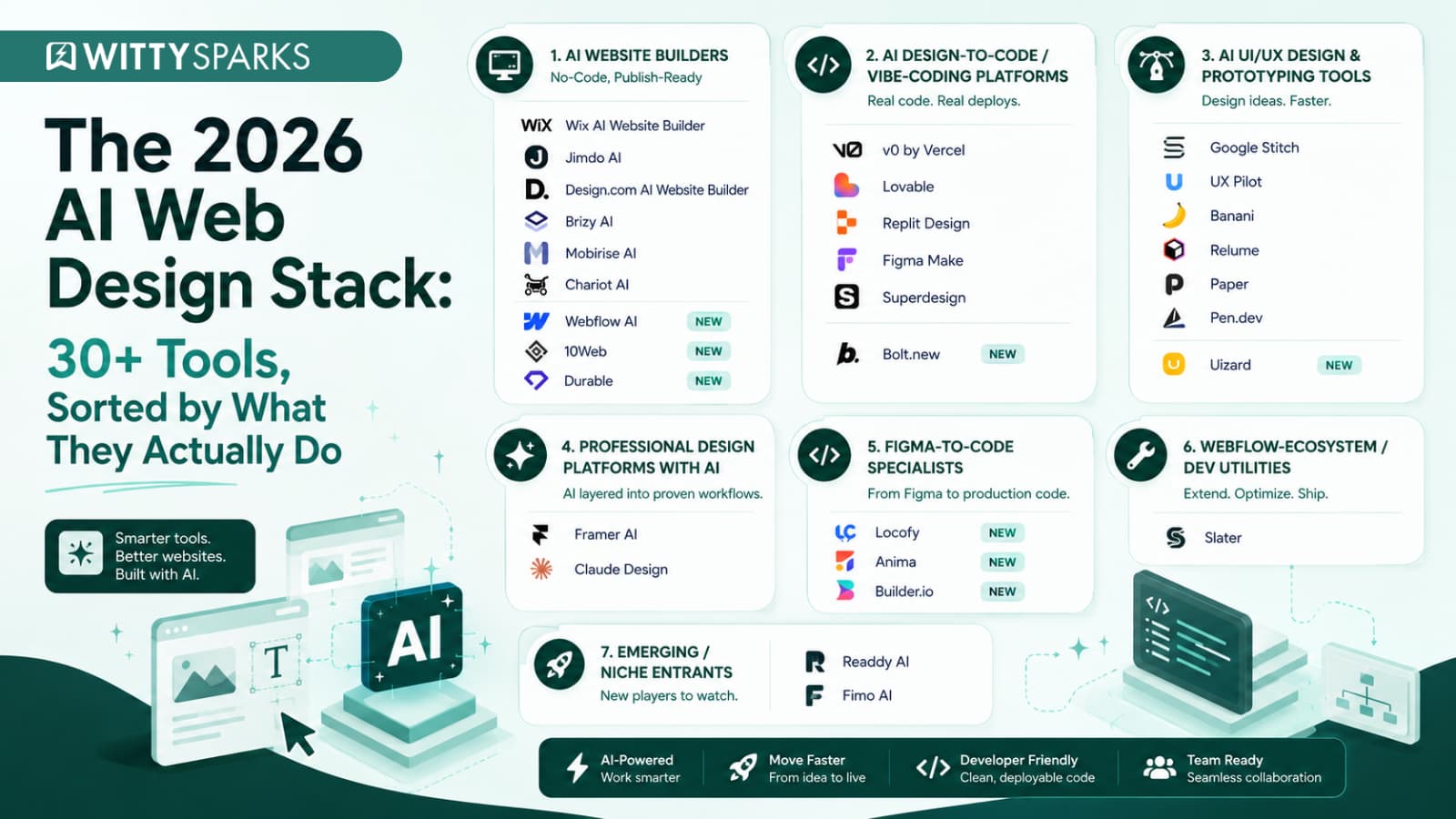

Building a website once meant weeks of planning, designing, coding, and endless revisions. But AI is quickly changing this process.
The global AI-powered website builder market reached $2.69 billion in 2025 and is expected to grow to $17.43 billion by 2035 (Source: PrecedenceResearch. This growth clearly shows how businesses and designers are moving toward faster and smarter ways to create websites.
AI Web Design Tools are revolutionizing the entire design process. They can generate layouts within minutes and transform simple prompts into complete websites. These tools follow industry-level UI/UX Design principles and design frameworks, making the design process faster and more efficient. In this blog, we will explore the best tools that can help you design, build, and launch websites faster.
If you too want to save time and effort and get an exceptionally professional website in just a few hours, you need to know these best AI web design tools in 2026.
On this page
AI UI/UX Design & Prototyping Tools
AI prototyping tools convert sketches, screenshots, or short prompts into editable wireframes and high-fidelity UI concepts in minutes. They’re built for validating an idea fast, before a design or dev team commits real hours to it.
Google Stitch
Google Stitch is an experimental design tool from Google Labs that turns simple text prompts and images into user interface designs. It helps you quickly move from an idea to a visual concept without spending hours creating the first draft manually.
You can describe the type of website or app screen you want, and Stitch generates different UI options. It also allows you to refine designs through prompts, so you can adjust the layout, theme, and overall look based on your requirements.
One useful feature is its connection with Figma. Designers can export their generated designs and continue editing them instead of rebuilding everything from scratch.
Among different AI Web Design Tools, Google Stitch stands out because it focuses on speeding up the early creative process. It works best for designers, developers, and product teams who want to explore multiple ideas before finalizing a design direction.
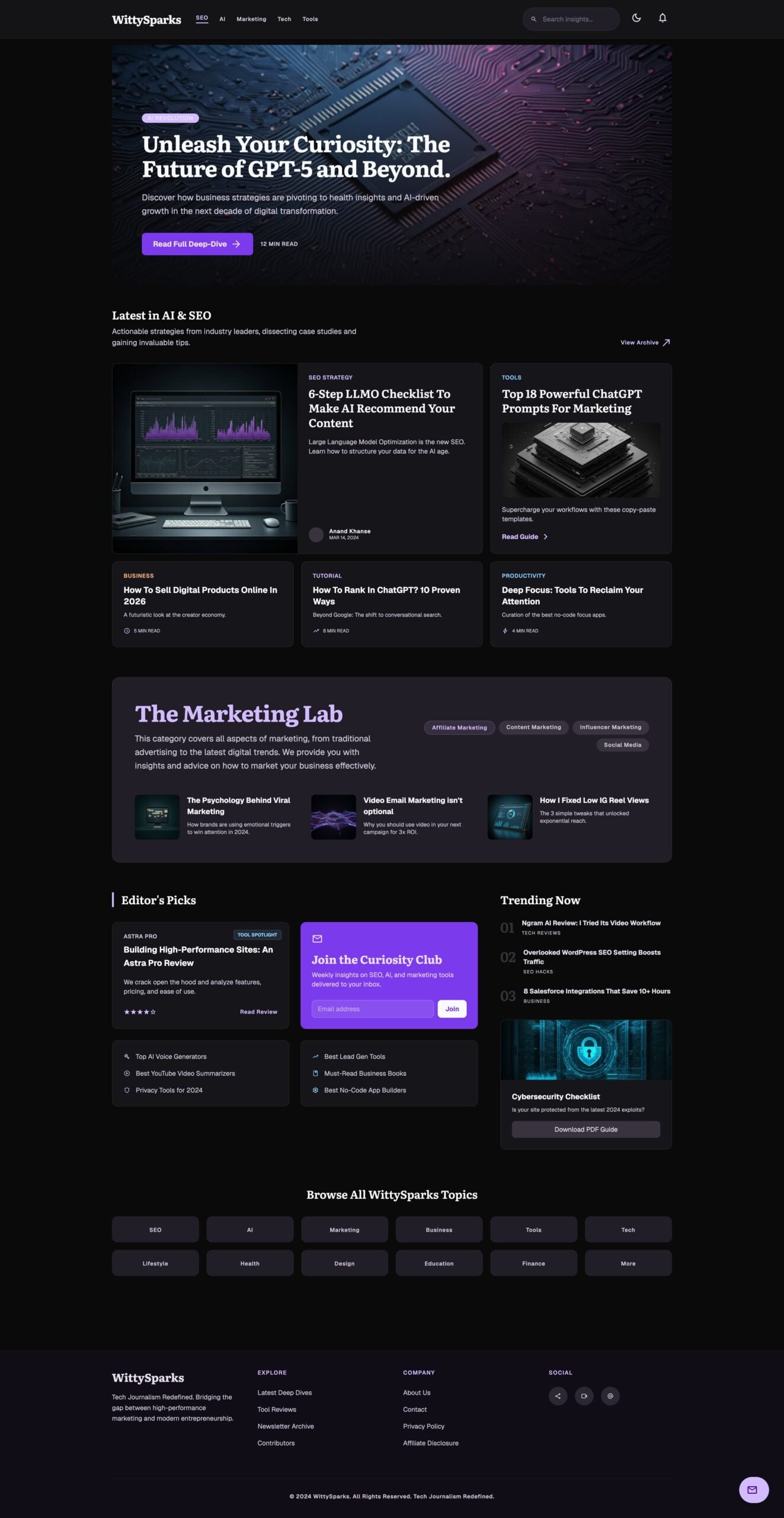
Here’s the initial iteration of redesigning WittySparks using Google Stitch:
Pen.dev (Pencil.dev)
Pen.dev is designed for teams that want to bring design and development closer together. Instead of creating static mockups that developers have to rebuild later, Pen.dev turns visual designs into production-ready code.
The biggest difference is that Pen.dev works directly inside your development workflow. You can use it as a standalone app or inside editors like VS Code and Cursor. The designs are saved as .pen files inside your project repository, making them easy to manage with Git just like regular code.
It also removes the traditional design handoff process. UI elements created in Pen.dev can be converted into HTML, CSS, and React components, helping developers move from idea to implementation faster.
If your team already uses Figma, Pen.dev makes the transition easier. You can import Figma designs while keeping layers, styles, and layouts intact. Its MCP integration also allows developers to connect real data sources like APIs and databases to create more practical interfaces.
Pen.dev is mainly useful for developers and product teams who want design, code, and collaboration in one place instead of constantly switching between different tools. It is one of the best AI web design tools in 2026.
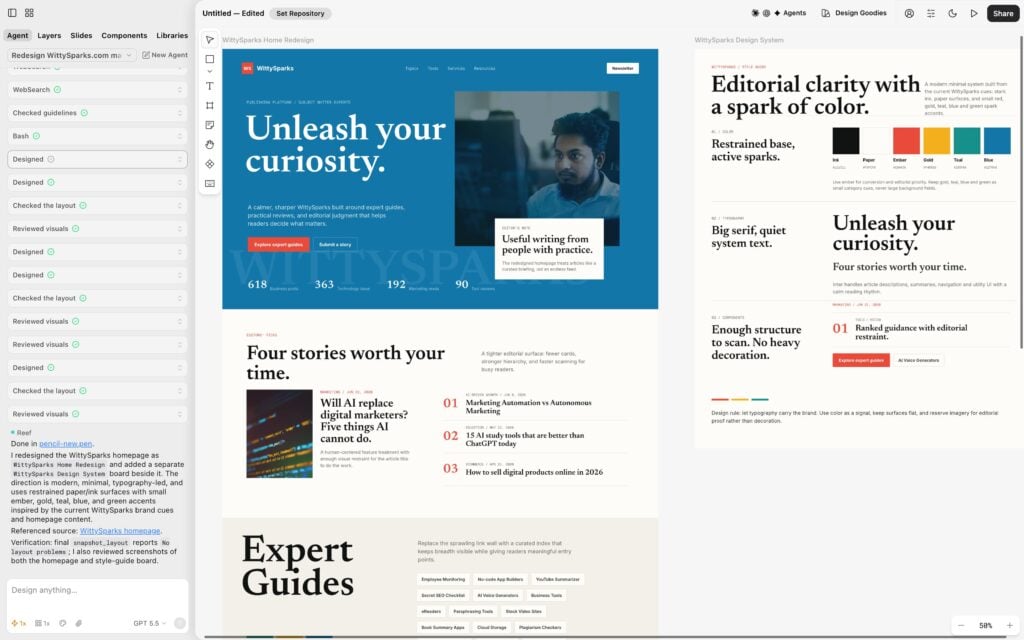
Here is our first attempt to redesign WittySparks using pen.dev:
UX Pilot
UX Pilot is created for designers who want to turn early ideas into proper designs faster. You can start with a simple thought, rough sketch, or even a PRD, and the platform helps convert it into structured design concepts within seconds.
One of its strongest features is rapid wireframing. Instead of manually creating blocks and arranging sections, UX Pilot generates low to high-fidelity wireframes based on your flow and requirements. This helps designers test ideas before investing hours in detailed designs.
Once the wireframe is ready, UX Pilot can transform it into polished, on-brand screens. You can refine layouts, improve visuals, and move from a basic concept to a complete interface inside the same workspace.
The final designs can be exported to Figma for collaboration or handed off as ready-to-build code. It is especially useful for UI/UX designers, product teams, and startups that want to speed up the journey from idea to final design. If you understand design, this can be one of your go-to AI web design tools.
Relume
Relume is built for the stage where most website projects get stuck: planning the structure. Instead of directly jumping into design, it helps you create a proper sitemap and wireframe using AI.
You can simply describe your company, product, or website idea, and Relume generates the complete website structure with pages and sections. It also adds AI-written placeholder copy, so designers don’t have to start with empty boxes.
One of its strongest features is its huge component library. You can quickly convert AI-generated wireframes into polished designs using ready-made sections. It works smoothly with Figma and Webflow, making it useful for professional website workflows.
Relume is especially helpful for agencies and designers who need to plan websites faster, present ideas to clients, and reduce the time spent on early design decisions. It does not replace creativity, but it removes a lot of repetitive groundwork.
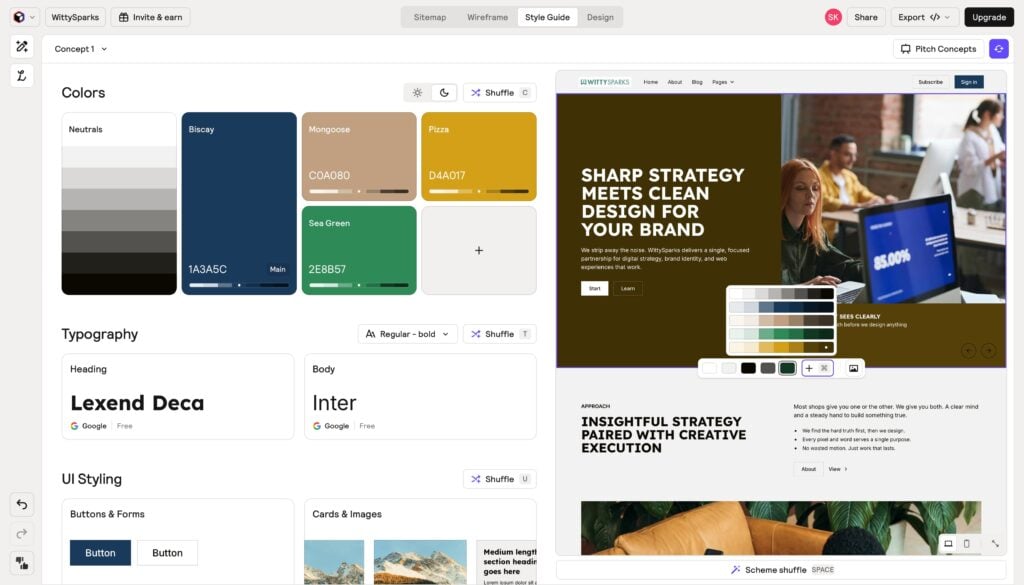
Here’s our initial attempt at redesigning WittySparks using Relume:
Paper
Most AI design tools stop after generating a UI. Paper takes a different approach. It creates a shared workspace where your designs, code, AI agents, and real data stay connected throughout the product lifecycle. If you’re exploring vibe design for real product development instead of static mockups, Paper offers a much more structured workflow.
Paper keeps design and code in sync. Instead of exporting files back and forth, designers and developers work on the same connected canvas. Components, styles, and design tokens stay aligned with your codebase, reducing rework and making collaboration much smoother.
The platform also connects with AI agents, IDEs, APIs, databases, CMS platforms, and local files. Agents can update content, fetch live data, and automate repetitive design tasks while you stay focused on creative decisions. This makes it easier to build interfaces using real content instead of placeholder text.
Another standout feature is its continuous design-to-code loop. Changes made in design can flow into code, and updates from code can flow back into the canvas. For teams adopting vibe design without losing developer accuracy or design consistency, Paper offers a fresh approach that keeps everyone working from the same source of truth.
Banani
Banani is an AI design tool that helps you convert your ideas into interactive designs within seconds. You can simply describe your product, website, or app idea, and Banani creates editable, multi-screen prototypes that you can improve further.
A useful feature is its ability to work with references. You can upload screenshots, images, or Figma links, and Banani understands the visual style, layout, and design direction. This makes it easier to recreate similar experiences or generate fresh ideas without starting from zero.
You can also refine designs through prompts. Whether you want something minimal, playful, modern, or completely different, Banani lets you adjust the style, colors, typography, and overall look until it matches your vision.
Once the design is ready, you can share it with your team or export it to Figma, HTML/CSS, or images. With 100K+ users and companies exploring Banani for UI creation, it is becoming a popular choice among founders, designers, product managers, and teams who want to quickly move from an idea to a usable design.
Uizard
Uizard turns a hand-drawn sketch, a screenshot, or a rough written prompt into an interactive, editable UI in minutes – genuinely useful for the ten-minute window between “I have an idea” and “let’s see if this is worth building.” Designs export as HTML/CSS or hand off directly as prototypes for stakeholder review.
Pricing: A free tier covers a limited number of monthly AI generations; paid seats start around $12/month for expanded limits.
Best for: Product managers and non-designers who need to validate a concept visually before involving a design or dev team.
Worth knowing: This is prototype fidelity, not production code – its value is speed of iteration, not a finished interface.
AI Website Builders – No-Code, Publish-Ready
The fastest AI website builders turn a text prompt into a live, hosted site without a developer or design system. These no-code AI web design tools or no-code app builders are built for solopreneurs and small businesses that need to launch this week, not this quarter.
Wix AI Website Builder
Our old friend Wix has now introduced AI. Wix AI Website Builder is created for people who want a complete website without dealing with complicated design decisions. Instead of choosing templates and arranging sections manually, you can have a conversation with Wix AI about your business, goals, and requirements.
Based on your answers, it creates a personalized website with pages, layouts, images, and content suggestions. You can then edit everything using Wix’s drag-and-drop editor, so you still have full creative control over the final website.
Another advantage is that Wix already has built-in tools for online stores, bookings, blogs, SEO, analytics, and marketing. This makes it useful for businesses that need more than just a good-looking website.
Wix AI Website Builder is ideal for entrepreneurs, creators, and small businesses that want to launch quickly without managing design, hosting, and technical setup separately.
Webflow AI
Webflow AI turns a single prompt into a multi-page, production-grade website inside the Webflow Designer – not a mockup, but real code you can immediately restyle. It’s the difference between Webflow’s older template model and 2026’s “prompt-to-production” approach: describe a fintech landing page or SaaS marketing site, and the AI Site Builder generates a sitemap, design system, and page layouts in minutes.
The AI Assistant (a separate, narrower feature) lives inside existing projects for generating section variants, CMS drafts, and placeholder copy on demand. Both ship on paid Workspace plans starting at Core ($19/month), with a monthly AI credit pool, 300 credits on Core, 400 on Growth, before overage charges kick in.
Best for: Teams already committed to Webflow’s CMS who want AI to kill the blank-page problem without leaving the platform.
Worth knowing: Field reports from agencies running client work are consistent, treat the output as a strong first draft, not a finished site. Brand differentiation, accessibility, and conversion-focused UX still need a human pass before launch.
10Web
10Web generates a complete WordPress site – pages, copy, images, layout – from a text description in under a minute, then hands you an Elementor-based visual editor to refine it. Unlike most AI builders that lock you into a proprietary platform, the output is a real WordPress install, hosted on Google Cloud with a guaranteed 90+ PageSpeed score.
An AI Co-Pilot stays active inside the editor for rewriting headlines, expanding sections, or adjusting tone without switching tools, and 10Web can also clone and rebuild a competitor’s layout from a URL as a starting point.
Pricing: Site generation is free to preview before you commit. Paid hosting-and-editing plans start around $10/month (billed annually); Business tiers scale to $30–$60+/month for higher traffic and multi-site management.
Best for: Teams who want WordPress ownership and portability but don’t want to start from a blank theme.
Worth knowing: Generated images pull from stock libraries rather than creating original visuals, and customization outside 10Web’s own hosting is more limited than a standard WordPress build.
Chariot AI
Chariot AI helps users create websites and landing pages by simply describing what they want to build. Instead of choosing a template first, you start with your idea, and the platform generates a website structure, design, and content based on your requirements.
It works like a conversation with a designer. You can explain your business, target audience, preferred style, and features you need. Chariot AI uses those details to create a customized starting point that you can continue improving. The ease makes it one of the reliable AI web design tools.
One useful part is that it focuses on the complete website creation process. It can help with layouts, sections, visuals, and copy, reducing the time spent moving between different tools.
Chariot AI is suitable for founders, creators, and businesses who want to quickly test website ideas or create professional-looking pages without starting from scratch. It gives you a strong first version that can later be refined with your own branding and strategy.
Jimdo AI
Jimdo AI focuses on helping small businesses create a website that is ready to attract customers, not just look good. Instead of manually selecting templates and writing every section yourself, you answer a few questions about your business, and Jimdo creates the structure, copy, images, and calls-to-action for you.
The process is quick and beginner-friendly. Share your business details, choose the design direction, and Jimdo AI builds a personalized website that you can customize using its editor. You can update sections, add your branding, and make changes without coding knowledge.
A major advantage of Jimdo is its focus on online visibility. It helps create SEO-friendly content and supports business presence across platforms like Google Maps, directories, and even AI assistants where customers might search for recommendations.
Jimdo also offers features like Jimdo Local, online stores, social media connections, and marketing integrations. It is a good choice for small businesses, freelancers, and entrepreneurs who want a website along with tools to help more customers discover their brand online.
Brizy AI
Brizy AI is made for users who want to create professional websites quickly without handling design or coding from scratch. You just answer a few questions about your business, and it generates a complete website structure with relevant pages, sections, images, and content.
The process is straightforward. Enter details like your industry, business name, and website requirements. Brizy AI analyzes the information and creates a ready-to-edit website that you can customize using its visual builder.
A useful part of Brizy is that it combines AI generation with manual editing. Once the first version is ready, you can change layouts, update content, adjust branding, and fine-tune every section instead of being locked into the AI output.
Brizy AI works well for small businesses, freelancers, and entrepreneurs who need a website faster but still want control over the final design. It reduces the initial setup time and makes website creation easier for non-technical users.
Mobirise AI
Mobirise AI is designed for people who want a simple website without going through complex design tools. You describe your business, idea, or project, and it creates a website draft with layouts, content, and images that match your requirements.
The workflow is beginner-friendly. Add a prompt about the type of website you need, choose the generated version you like, and then customize it using Mobirise’s visual editor. You can change sections, colors, images, and text without touching code.
One interesting part about Mobirise AI is its offline website builder approach. Users can create and edit websites through its desktop app and publish them when ready, giving more control over the website creation process.
It works best for small businesses, personal websites, portfolios, and landing pages where users need a quick, clean website without hiring a complete design and development team. If you are a solopreneur who is exploring the best AI web design tools, you can try Mobirise AI.
Design.com AI Website Builder
Design.com AI Website Builder makes website creation feel more like exploring ideas than building from a blank page. You start by entering a simple prompt about your business, industry, or website idea, and it instantly offers multiple website options based on your requirements.
Instead of giving you only one AI-generated result, Design.com lets you browse different design directions and pick the one that matches your brand. Once selected, you can customize everything using its editor, including templates, content, background, logo, colors, and overall style.
The platform is also useful because it connects website creation with branding. Users can create logos, social media graphics, business cards, and other brand materials from the same place, making it easier to maintain a consistent identity.
It works best for entrepreneurs, creators, and small businesses that want to quickly experiment with different website ideas and launch a professional-looking site without handling the complete design process manually.
Durable
Durable generates a live website – copy, images, layout – from a single prompt in under a minute, then bundles it with a built-in CRM and invoicing so solopreneurs don’t need a second tool to run the business side. It’s built specifically for consultants, coaches, freelancers, and other service providers who need something professional online today, not a design system.
Sites are hosted on Cloudflare with SSL and DDoS protection included, and Durable supports seven languages out of the box.
Pricing: Free to start; the Launch plan (~$22/month, billed annually) adds a custom domain and expanded AI tools.
Best for: Single-operator service businesses that need speed and simplicity more than design flexibility.
Worth knowing: There’s no ecommerce support – no product catalogs, no cart. If you need to sell physical or digital products, this isn’t the tool.
AI Design-to-Code or Vibe-Coding Platforms
Vibe-coding tools generate real, deployable frontend code – React, Next.js, Vue – straight from a plain-language prompt, closing the gap between idea and working app. This is the fastest-growing category of AI web design tools in 2026 for developers who want a functioning build, not a static mockup.
Figma Make
Figma Make brings AI directly into the world’s most popular design platform. Instead of starting with a blank canvas, you simply describe what you want to build, and Figma Make generates interactive prototypes, web apps, and UI screens that you can immediately edit and refine.
One thing that makes it different is the amount of context you can give AI. Along with a prompt, you can attach existing Figma designs, images, videos, PDFs, text files, and even complete design systems. It also supports MCP connectors, reusable custom skills, and Make Kits, helping AI generate designs that stay consistent with your brand instead of producing generic layouts.
Figma Make is built for collaboration. You can annotate specific elements, leave comments, attach reference files, compare version history, and even create an editable project plan before generation begins. If you’re working with a development team, you can also connect it to your local codebase and continue building from the same workflow.
Another thoughtful addition is its mobile support. You can review prototypes, check version history, reply to comments, and even use voice-to-text prompting directly from your phone. It is a great choice for designers, product teams, and developers who already work in the Figma ecosystem and want to turn ideas into realistic, interactive products much faster.
Replit Design
Replit Design is built for people who want to skip the blank canvas. Instead of manually arranging sections or choosing templates, you simply describe what you want to build. AI then creates a complete website with layouts, pages, copy, images, and responsive design, giving you a strong first draft within minutes.
One feature that really stands out is how many ways you can start. Besides writing a prompt, you can import an existing website URL, upload a Figma design, recreate a screenshot, or even begin with your own design system. This makes it much easier to redesign existing websites or build something that already matches your brand.
Editing is equally simple. You don’t need to jump between design software and code editors. You can continue refining the generated design through AI prompts, updating layouts, content, colors, and other elements without starting from scratch.
After the first version is generated, you can continue refining the design using AI. Update layouts, rewrite content, modify sections, and improve the overall look without rebuilding everything manually. Since Replit combines AI-assisted design with development and deployment, it is a great choice for founders, agencies, and developers who want to move from an idea to a live website much faster.
Superdesign
Superdesign is an AI-powered design tool built for creating UI concepts directly from your ideas. Instead of spending hours experimenting with different layouts, you can describe what you want, and Superdesign generates multiple design directions that you can explore.
One interesting part about Superdesign is that it works inside your development environment. It is available as an extension for tools like Cursor, allowing developers and designers to create, edit, and iterate on interfaces without constantly switching platforms.
The workflow is simple. Give your requirements, generate the first version, and then refine the design through prompts. You can ask it to change the style, adjust components, improve layouts, or explore completely different variations.
Superdesign is especially useful for builders who work closely with code. It helps founders, designers, and developers quickly experiment with UI ideas and move faster from concept to implementation.
OpenDesign
OpenDesign is an open-source, local-first design workspace that turns a coding agent you already run – Claude Code, Codex, Cursor, Gemini CLI, and 17+ others – into a full design engine for prototypes, landing pages, dashboards, slide decks, and even short HTML-based video, all generated as real files on your own machine rather than inside a vendor’s cloud.
It’s BYOK (bring your own API key), so the software itself is free under an Apache-2.0 license, you pay only whichever AI provider you connect. Brand consistency comes from a portable DESIGN.md system: once your palette, type, and spacing are defined, every generated artifact, website, slide, dashboard, inherits it automatically.
Pricing: Free and open source; cost is limited to the API usage of your connected model provider.
Best for: Technical teams or solo builders already using a coding agent daily who want design output that lands as owned, editable files instead of a locked SaaS project.
Worth knowing: There’s no hosted version, a local daemon and at least one coding agent are required to run it, so this isn’t a fit for non-technical users looking for a point-and-click builder.
v0 by Vercel
v0 by Vercel is built for people who want to move from an idea to a working interface quickly. Instead of designing every section manually, you can simply describe what you want, and v0 creates responsive website layouts, UI components, and frontend code.
One thing that makes v0 powerful is its huge collection of ready-made templates and examples. From SaaS platforms and dashboards to portfolios, eCommerce websites, landing pages, and business websites, you can find templates for almost every industry and customize them based on your needs.
Using v0 is simple. Start by entering a prompt explaining your website idea, required sections, style, and functionality. v0 generates the design with a live preview. You can then continue chatting with it to change layouts, improve sections, adjust styling, or add new features.
For developers, v0 goes beyond just visuals. It generates React, Tailwind CSS, and shadcn/ui-based components that can be used as a foundation for real projects. It is especially helpful for teams who want to prototype faster without starting every design from scratch. Such features put this tool on the list of the best AI web design tools.
Lovable
Another one from the popular AI web design tools: Lovable is an AI-supported platform that helps you create websites and web apps by simply explaining your idea. Instead of starting with blank designs, wireframes, and code files, you can describe what you want, and Lovable turns it into a working project.
The best part about Lovable is that it does not stop at creating a static design. It can generate the frontend, connect databases, add features, and help you build functional products. You can create landing pages, SaaS tools, dashboards, internal apps, and prototypes without building everything manually.
Using Lovable feels more like working with a developer. You start with a prompt explaining your project, review the generated version, and keep improving it through chat. You can ask it to redesign sections, add new pages, change functionality, or fix issues.
It is especially useful for founders, startups, and teams who want to test ideas quickly. Developers can also use it to speed up repetitive work and create the first version of a project much faster.
Bolt.new
Bolt.new runs an entire development environment – Node.js, package manager, build process – inside the browser via StackBlitz’s WebContainer technology, so there’s no local setup between a prompt and a working app. Describe what you want, and Bolt scaffolds real React, Vue, Svelte, or Next.js code with a live preview updating in real time.
Bolt V2 closed the platform’s biggest early gap by adding Bolt Cloud: built-in databases, authentication, file storage, and hosting, so generated apps don’t need to be stitched to external services to go live. It runs on a multi-model backend (Claude, GPT, Gemini), letting you switch reasoning engines mid-project.
Pricing: Free tier includes 1M tokens/month (300K daily cap). Pro runs $25/month for 10M tokens with rollover; Teams is $30/member/month.
Best for: Developers who want fast, framework-flexible full-stack scaffolding rather than a polished, hands-off finished product.
Worth knowing: The token system scales with project complexity, not just prompt count – costs get harder to predict as builds grow past prototype scale.
Professional Design Platforms with AI Layered In
Established design platforms now ship AI features inside familiar workflows, so teams get automation without abandoning their existing toolchain. These AI-assisted design tools suit agencies and in-house teams that already have a process AI needs to fit into.
Claude Design
Claude Design is an experimental feature from Anthropic Labs that helps users create websites, app interfaces, and visual designs directly inside Claude. Instead of switching between multiple tools for ideas, design, and code, you can describe what you want, and Claude creates an interactive output.
It uses Claude’s Artifacts feature, where you can generate and preview designs in a separate workspace. You can create landing pages, dashboards, UI components, and prototypes using technologies like HTML, CSS, React, and Tailwind.
However, the final output depends heavily on your instructions. A simple prompt usually creates a clean but common-looking design with familiar layouts, rounded sections, dark themes, and standard UI patterns.
The real power comes from detailed prompting. You can upload brand colors, logos, screenshots, website references, and explain the exact experience you want. Claude can then understand your design direction and create something closer to your vision.
For designers, developers, and founders, Claude Design is useful for quickly converting ideas into working concepts without spending hours on the first version.
How To Use Claude Design?
Using Claude Design is simple, but getting high-quality results depends on how well you guide it.
Step 1: Start With Clear Context
Don’t just ask Claude to “create a website”. Explain your business, target users, brand personality, sections required, and overall design direction.
Step 2: Share Visual References
Upload your brand assets, color palette, logo, screenshots, or websites you like. This helps Claude understand the style you want instead of creating a generic design.
Step 3: Mention Technical Requirements
Tell Claude what you need. For example, a simple HTML/CSS page, React components, Tailwind-based UI, or a responsive prototype.
Step 4: Generate and Preview the Design
Claude creates the output inside Artifacts, where you can view your interface and check the structure, layout, and functionality.
Step 5: Improve With Follow-Up Prompts
The first result does not have to be final. Ask Claude to adjust spacing, improve mobile views, change sections, rewrite copy, or modify the design style.
Real Example:
This entire website is designed with Claude. Look at the perfection! learnandupskillwithai.com
Framer AI
Framer AI is built for creating modern, high-quality websites without starting from an empty canvas. You can describe your website idea, and Framer generates a complete design with sections, layouts, styling, and copy that you can customize further.
Unlike basic website generators, Framer gives more creative freedom after the first AI draft. You can visually edit every element, adjust animations, refine responsive layouts, and create a website that feels custom instead of template-based.
The workflow is simple. Add a prompt explaining your brand, website type, and design style. Framer AI creates the first version, and then you can improve it using its visual editor, CMS, effects, and publishing features.
Framer is especially popular among designers, startups, and creative teams who want fast website creation without compromising on design quality. It combines AI speed with professional-level control, making it useful for building polished marketing websites, portfolios, and landing pages.
Framer is already helping creative teams save hours of back-and-forth work. For example, Dribbble earlier depended on developers for creating and updating landing pages. Even small changes needed engineering support. With Framer, their designers and marketers can now build, edit, and publish pages themselves while keeping the designs consistent.
Another example is i-D Magazine’s campaigns created by the studio 27b. Their team used Framer to build highly visual pages with smooth animations and storytelling effects within days. It helped them experiment faster and bring creative ideas online without a long development process.
Figma-to-Code Specialists
Figma-to-code tools convert finished, production-ready Figma files into clean React, Vue, or HTML/CSS components, cutting the design-to-dev handoff from days to hours. This category matters most for agencies and product teams with disciplined, well-structured design files.
Locofy
Locofy is a design-to-code specialist built for one job: turning a finished Figma file into real front-end code. Lightning mode does one-click automated conversion; Classic mode allows manual tagging for more control over the output. Supported export targets include React, Vue, Angular, Next.js, Gatsby, plain HTML/CSS, React Native, and Flutter, a wider framework spread than most competitors in this category.
Pricing: Token-based – a free tier (600 tokens), then Starter (~$33/month), Pro (~$100/month), and custom Enterprise.
Best for: Agencies with clean, well-structured Figma files who want the closest thing to a genuine design-to-dev handoff.
Worth knowing: Output quality depends heavily on how disciplined the source Figma file is – unstructured files produce noticeably weaker code, and token costs can be hard to predict on larger conversions.
Anima
Anima also converts Figma designs into code, but its differentiator is a visual IDE that plugs directly into an existing codebase, so teams can keep making layout tweaks with natural-language prompts after the initial export rather than treating the conversion as a one-time handoff. It’s Figma’s own launch partner for Dev Mode, with more installs on the Figma plugin marketplace than any other design-to-code tool.
Pricing: A free tier covers smaller projects; paid plans run roughly $30-$50/month depending on team size and export volume.
Best for: Teams that want to keep iterating on a converted design without leaving the codebase.
Worth knowing: Exports often need real restructuring before they’re commit-ready – plan for a developer cleanup pass, not a copy-paste deployment.
Builder.io
Builder.io splits into two connected products: Fusion, which converts Figma frames or plain-language prompts into production React or Next.js components, and Publish, a visual headless CMS that lets marketers build and edit pages using a team’s real, developer-defined components, without needing a developer for every page change. That split is the point: developers keep code ownership, non-technical teammates ship pages.
Pricing: A free tier suits individuals and small teams; paid plans start around $19-$30/user/month depending on tier, with custom Enterprise pricing for high-traffic or compliance-heavy deployments.
Best for: Product and marketing teams who want to decouple “who can publish a page” from “who can write code.”
Worth knowing: The AI Accelerator works best once developers have registered your design-system components – it’s a setup-once, build-fast tool rather than a point-and-generate one.
Penpot
Penpot is an open-source, self-hostable design platform built as a full Figma alternative, wireframes, interactive prototypes, CSS Grid/Flexbox-based layouts, native design tokens, and shared component libraries, all in one collaborative canvas. Its AI workflows run through a dedicated MCP server, letting any connected agent or LLM read and generate designs across code-to-design, design-to-code, and design-to-design workflows rather than locking AI features to one vendor’s model.
Because output is built on open web standards, CSS, HTML, SVG, JSON, plus Penpot’s own open file format, designs inspect and hand off to code more directly than in most proprietary tools.
Pricing: Free to use and self-host; hosted/enterprise plans available for teams needing managed infrastructure and support.
Best for: Design teams that want Figma-equivalent collaboration and design-system tooling without vendor lock-in, especially teams already standardizing on MCP for AI-agent workflows.
Worth knowing: This is a general UI design and collaboration platform first, AI-assisted second, it belongs next to Framer AI and Claude Design in your list, not next to the vibe-coding builders.
Webflow-Ecosystem / Dev Utilities
These tools extend Webflow’s native builder with AI-assisted custom code, closing gaps the visual editor can’t reach on its own. Essential for any team running production Webflow builds beyond basic templates.
Slater
Slater is built for Webflow developers who want more control without constantly switching between multiple coding tools. It acts as an AI-powered development environment that helps you write, manage, and improve custom code inside your Webflow projects.
Unlike basic code assistants, Slater understands your Webflow setup. You can ask it to create JavaScript interactions, fix errors, explain code, or modify existing features based on your website requirements.
Another useful feature is team collaboration. Developers can organize scripts, maintain different versions, and work together without losing track of custom changes added to Webflow sites.
Slater is especially helpful for agencies and Webflow professionals who build advanced websites. It combines the flexibility of custom development with AI assistance, making complex Webflow projects faster and easier to manage.
Emerging / Niche Entrants
Newer AI web design tools worth watching bring chat-first site generation and hybrid CMS-plus-visual-editor workflows to the category. Early-stage, but worth testing against established players before committing budget.
Readdy AI
Readdy AI helps you create complete websites from simple text prompts. You can describe your business, portfolio, store, or project idea, and it generates responsive layouts, pages, copy, images, and website structure within minutes.
The best part is that Readdy gives you multiple ways to start. You can generate a website from scratch, choose from 500+ professionally designed templates, upload reference images, add a Figma frame, or even provide a website URL so AI can understand the structure and visual style you want.
After creating the first version, you can customize everything using Readdy’s visual editor. Change sections, edit content, replace images, adjust styles, add animations, and improve the design using AI suggestions without writing code.
Readdy also supports built-in hosting, custom domains, SEO, analytics, forms, and integrations with platforms like Shopify, Stripe, Calendly, and Supabase. It works well for businesses, creators, and teams who want to move from an idea to a live website without managing multiple tools.
Fimo AI
Fimo AI focuses on making the design process faster by helping teams create websites and interfaces from ideas, references, and prompts. Instead of spending hours exploring different concepts, you can use AI to quickly generate a strong starting point.
You can describe your design requirement, upload inspirations, and experiment with different directions. Fimo helps create layouts and visual concepts that can be refined further based on your brand style and project goals.
It is also useful during the brainstorming stage. Designers can explore multiple versions, compare different approaches, and improve ideas before moving into the final design process.
Fimo AI works best for designers, creators, and teams who want to speed up creative exploration while still keeping control over the final output. It reduces repetitive design work and gives more time for strategy and creativity.
Key Takeaways
- AI Web Design Tools can create layouts, wireframes, prototypes, and websites within minutes.
- Tools like Claude Design and v0 help convert simple ideas into working interfaces with code.
- Platforms like Wix AI, Framer AI, and Readdy AI make website creation easier for non-technical users.
- The best results depend on clear prompts, brand guidelines, references, and human creativity.
- AI speeds up web design, but strategy, user experience, and creative decisions still need human input.
- Google Stitch works well if you describe your design requirements in detail and you can keep on improving it eventually.
Final Words
The best AI web design tools in 2026 fall into four practical categories: no-code builders that publish a live site in minutes, design-to-code platforms that hand developers real deployable code, prototyping tools built for fast concept validation, and Figma-to-code specialists that cut the design-to-dev handoff from days to hours. This guide breaks down 30+ tools across all four, with real pricing and the trade-offs each one comes with.
A few years ago, building a website was a long process. Designers, developers, and strategists spent weeks brainstorming layouts, deciding where CTAs should appear, choosing the right colors, and converting ideas into working sites.
That timeline has collapsed. What once needed multiple meetings and rounds of revisions can now start with a single prompt, AI generates layouts, drafts copy, and in several of the tools below, ships a functional website within minutes.
Great websites still need human creativity and strategy, AI hasn’t changed that. What it has removed is the slow, repetitive groundwork that used to eat the first two weeks of every build.
At WittySparks, we believe AI isn’t here to replace creative thinking. It’s here to remove repetitive work and give creators more room to experiment. The tools below won’t pick your brand voice or your information architecture for you, that’s still the job. What they’ll do is get you to a working first draft fast enough that the real work can start sooner.
AI Web Design Tools by Category, Use Case & Pricing
A side-by-side view of all 30 tools makes it easier to jump straight to what fits your workflow instead of reading every entry. Use the category column to match a tool to your stage – planning, prototyping, building, or handoff – before comparing price.
| Tool | Category | Best For | Starting Price |
|---|---|---|---|
| Wix AI Website Builder | No-Code Builder | Beginners wanting a full ecosystem (apps, ecommerce) | Free plan + paid |
| Jimdo AI | No-Code Builder | Fastest basic site launch | Free (Dolphin plan) |
| Design.com AI Website Builder | No-Code Builder | Branding-first site generation | Paid plans, no free tier |
| Brizy AI | No-Code Builder | Drag-and-drop with AI assist | Free tier + paid plans |
| Mobirise AI | No-Code Builder | Offline, downloadable site builder | Free + paid extensions |
| Chariot AI | No-Code Builder | Chat-first iterative site building | Free tier + paid plans |
| Webflow AI | No-Code Builder | Teams needing production-grade code, not just a draft | Workspace Core $19/mo |
| 10Web | No-Code Builder | WordPress ownership with AI speed | From $10/mo (annual) |
| Durable | No-Code Builder | Solo service businesses, CRM + invoicing bundled | Free to start + Paid |
| v0 by Vercel | Design-to-Code / Vibe-Coding | Developers generating React/Next.js UI fast | Free tier + paid plans |
| Lovable | Design-to-Code / Vibe-Coding | Full-stack app generation, beginner-friendly polish | Free tier + paid plans |
| Replit Design | Design-to-Code / Vibe-Coding | In-browser app generation and hosting | Free tier + paid plans |
| Figma Make | Design-to-Code / Vibe-Coding | Prompting inside an existing Figma design system | Included in Figma plans |
| Superdesign | Design-to-Code / Vibe-Coding | Open-source design agent inside Cursor/Claude Code/VS Code | Free, open source |
| Bolt.new | Design-to-Code / Vibe-Coding | Fast full-stack scaffolding, multi-framework | Free + Paid |
| Google Stitch | AI Prototyping | Fast multi-screen UI exploration (Gemini-powered) | Free (Google Labs) |
| UX Pilot | AI Prototyping | Multi-screen prototype flows | Free tier + paid plans |
| Banani | AI Prototyping | Prompt/screenshot/Figma-link to multi-screen layouts | Free + Paid |
| Relume | AI Prototyping | Wireframes and sitemaps at planning stage | Free tier + paid plans |
| Paper (paper.design) | AI Prototyping | Design canvas synced to real HTML/CSS | Free tier + paid plans |
| Pen.dev (Pencil.dev) | AI Prototyping | Vector UI canvas built for IDEs | Free tier + paid plans |
| Uizard | AI Prototyping | Sketch-to-prototype concept validation | Free tier + paid |
| Framer AI | Pro Platform with AI | Animation-heavy, design-led marketing sites | Free + paid |
| Claude Design | Pro Platform with AI | Prototypes, mockups, and presentation design | Included in Claude plans |
| Locofy | Figma-to-Code | Agencies with clean, structured Figma files | Free + paid |
| Anima | Figma-to-Code | Iterative editing after conversion, inside the codebase | Free tier + paid |
| Builder.io | Figma-to-Code / Visual CMS | Marketers publishing pages without developer time | Free tier + paid |
| Slater | Webflow Utility | Custom code (JS/CSS) inside Webflow builds | Paid, Webflow-specific |
| Readdy AI | Emerging / Niche | Chat-to-website, code or Figma export | Free tier + paid plans |
| Fimo AI | Emerging / Niche | CMS-first builds with dev/non-dev dual editing | Free tier + paid plans |
Frequently Asked Questions
Are AI-generated websites good for SEO?
Yes, AI-generated websites can perform well in search results if they follow SEO best practices. However, you still need to optimize page speed, keywords, content quality, user experience, internal linking, and technical SEO. AI can create the foundation, but proper optimization makes the website search-friendly.
Can I create a website with AI without knowing coding?
Yes. Many AI platforms now allow users to create websites without coding knowledge. You can generate layouts, edit content, change designs, and publish websites visually. However, coding knowledge can still help if you want advanced customization.
What information should I provide to an AI tool for better website designs?
The more context you provide, the better the results. Share details like your business type, target audience, brand colors, preferred style, required pages, competitor references, and the goal of your website. A detailed prompt usually creates a better first version.
What’s the difference between an AI website builder and a design-to-code tool?
An AI website builder (like Wix AI or Durable) generates a complete, hosted site from a prompt – ideal for non-technical users who want to publish immediately. A design-to-code tool (like Locofy or v0) generates raw frontend code for developers to integrate, customize, and deploy themselves. Builders trade flexibility for speed; design-to-code tools trade speed for control.
Can AI web design tools replace a professional web designer in 2026?
No. AI tools handle layout generation, wireframing, and first-draft copy well, cutting build time from days to hours. But brand differentiation, accessibility compliance, conversion-focused UX, and complex functionality still require human design judgment – most 2026 tools are best used as an accelerator for the first draft, not a replacement for the final one.
Which AI web design tool is best for a non-technical founder?
Chat-first, no-code builders – Wix AI, Durable, Chariot AI, or 10Web – are best for non-technical founders, since each generates a live, publishable site from a plain-language description without requiring design or coding skills. Durable and Chariot AI both publish in minutes; 10Web adds full WordPress ownership if portability matters.
What’s the best AI tool for converting a Figma design into code?
Locofy and Anima are the leading Figma-to-code specialists in 2026. Locofy produces the cleanest, most developer-readable component structure across React, Vue, Angular, and more; Anima pairs its export with a visual IDE for continued iteration inside the codebase. Both require a well-structured source Figma file to produce usable output.
Do AI web design tools work well for e-commerce sites?
It depends on the tool. Wix AI and 10Web (via WooCommerce) support full e-commerce, including product catalogs and checkout. Durable explicitly does not support e-commerce, it’s built for service businesses. Developer-facing tools like Lovable and Bolt.new can integrate Stripe and carts, but that requires manual configuration rather than a one-prompt setup.

Read more from Design