


Tidio – Grow your sales effortlessly
A live chat software that caters to all the needs of its users.

TL;DRExplore the Features, Pricing Pros & Cons of Tidio, a WordPress plugin, in this detailed Tidio Review.
Customer support software can often feel like a choice between two extremes: clunky enterprise tools that overwhelm smaller teams, or lightweight chat apps that can’t scale when you need them to.
Tidio aims to bridge that gap. It’s designed to be powerful enough to handle ecommerce and multichannel support, while staying approachable for startups, solo entrepreneurs, and midsize businesses.
In this expanded review, we’ll dive into what Tidio offers, how it actually works day‑to‑day, where it shines, and a few caveats to keep in mind if you’re considering it for your team.
On this page
Now the question is how to offer exceptional customer support. Well, one of the most convenient & popular ways is to provide live chat support on your website. Integrating website chat as a real-time communication tool directly into your website allows you to engage visitors instantly and streamline your support workflows.
As your website is the first point of contact between 90% of your customers & you, it’s the best place to offer support. A robust chat support structure will ensure you can deliver an excellent first impression.
Now there is a lot of software available for creating a live chat support system for your WordPress website. But not all of them are efficient.
Enter Tidio. Touted as one of the best live chat support for WordPress websites by many industry specialists, Tidio is rapidly making its presence felt in the market. If you are looking for a perfect Tidio Review, you are in the right place.
But is Tidio worth your money? Is it the best live chat & support software ever? What are Tidio’s Pros & Cons? I will answer all these questions in this hands-on Tidio Chat Review.
So, let’s get started.
What is Tidio?
Tidio is an all-powerful, one-stop software to offer excellent Customer Support Services, providing a comprehensive suite of customer service tools. It’s arguably the quickest & easiest way to integrate chatbots & live chat with your prospects.
In simpler terms, Tidio can be described as a customer relation-builder tool with some useful CRM functionalities.
Tidio helps users to reach out to more potential customers, engage them smartly, offer more conversions & solve specific issues by providing chat support. It has received numerous accolades from the likes of Forbes & HubSpot.
It’s compatible with multiple website platforms, including Wix, Shopify, WooCommerce & WordPress. Tidio is particularly well-suited for small and medium businesses, including medium businesses and smaller businesses, due to its affordability and ease of use.
The best part is that it does not require any unique technical know-how. In short, Tidio is an easy-to-use, efficient & powerful Customer Support Software.
From the very first login, Tidio positions itself as “ready when you are.” The onboarding process is guided and smooth: connect your site with a snippet or plugin, link a channel or two (Messenger, Instagram, WhatsApp, email), and you’re already handling conversations.
Unlike more complex platforms that require weeks of configuration, Tidio can be set up in under an hour. That speed-to-value is one of the platform’s strongest selling points.
But easy setup is just the beginning. What makes Tidio compelling is how it layers live chat, automation, and AI into a single workflow without forcing you to compromise.
What are the key features of Tidio?

Now, let’s take a look at some of the critical features of Tidio. Tidio’s features, such as live chat, AI-powered chatbots, ease of use, automation capabilities, and flexible pricing plans, are designed to improve customer support and engagement, making it a strong choice for small and medium-sized businesses seeking comprehensive website chatbot solutions.
Let’s dive in
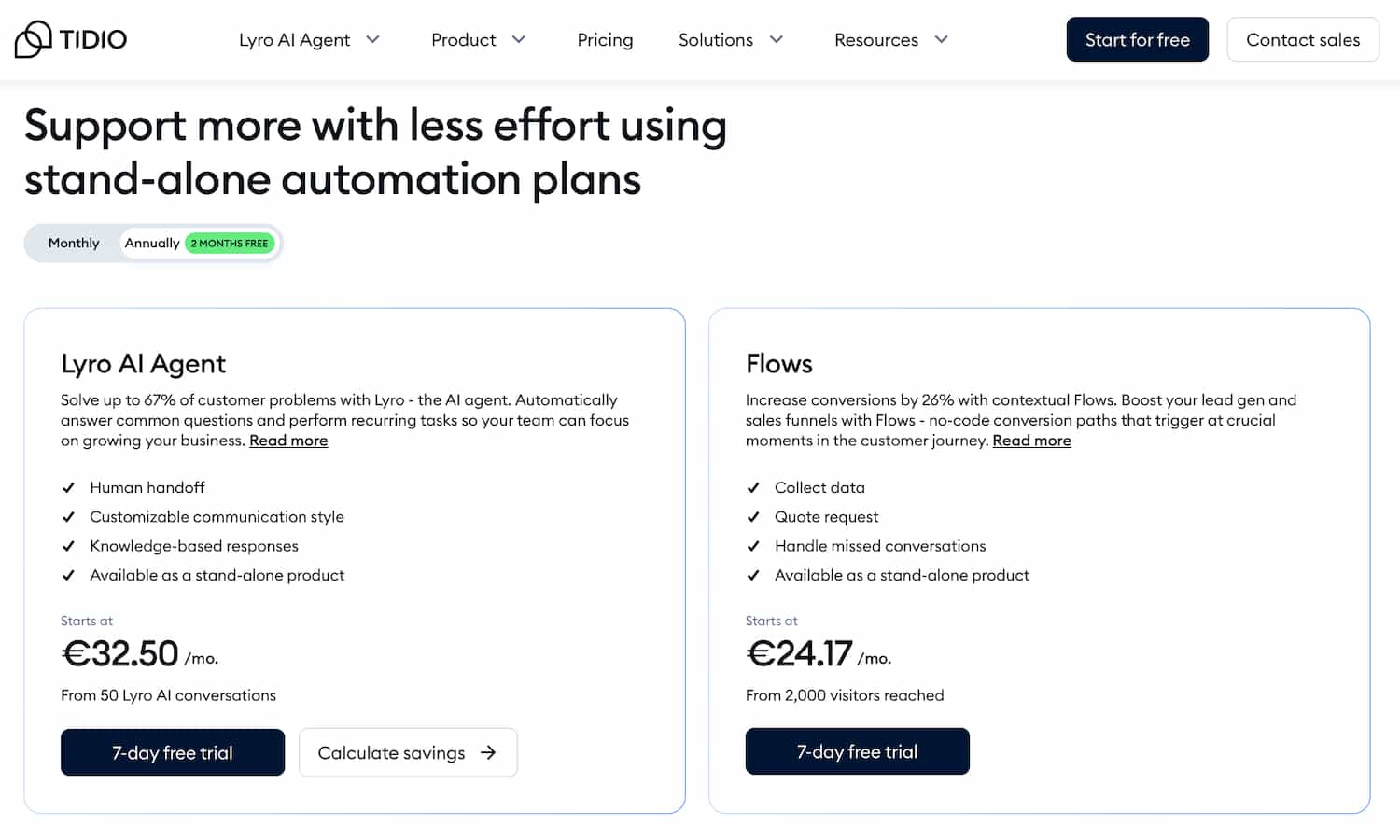
1. Lyro: The AI Agent That Lightens the Load
At the heart of Tidio is Lyro, its conversational AI. Lyro can converse in 12 languages, making it a useful companion for international stores. It’s trained on your FAQs, documentation, and site content — so when a customer asks “How long is shipping to Spain?” Lyro answers immediately.
What sets it apart is the smooth escalation: if Lyro can’t help, it instantly hands the chat to a human agent or creates a ticket for later follow‑up. For Shopify users on Growth plans and above, Lyro pairs with native order actions like refunds or shipping changes. This means a routine support request can be resolved in seconds, not days. Customers get fast answers, and your team spends less time repeating themselves.
2. Flows: Automation You Control
Automation is often where tools either overpromise or overwhelm. Tidio takes a middle road with Flows — a visual, drag‑and‑drop builder that lets you automate greetings, FAQs, lead capture, and even cart recovery. Want to ping a visitor who’s stalled at checkout? Or send a quick survey after a chat ends? Flows make this simple.
The real win is scalability: Flows can handle thousands of interactions simultaneously. That means even during busy hours, customers get a consistent experience. Agents focus on unique, high‑value cases while Flows quietly resolve the repetitive stuff.
3. Live Chat and Video Calls
Live chat is Tidio’s bread and butter, and it’s polished. The widget supports typing previews, file sharing, pre‑chat surveys, and visitor info. But the standout feature is video calling.
Agents can start a video session directly from a chat, on any plan. Imagine a customer hesitating over a purchase – being able to hop on a quick video can turn doubt into confidence. Only agents can initiate calls, which keeps misuse at bay.
Of course, this one comes at the top of the list. This feature allows you to connect with your potential customers & offer them support on your website. It’s super easy to set up & customize. You can use numerous other features of Live Chat for the ultimate customer experience.
Tidio helps manage all customer chats in one place, consolidating interactions from your website, social media, and email into a unified inbox. For more complex queries, Tidio allows seamless escalation from automated responses to a live agent, ensuring your customers always receive the support they need.

Live Preview:
When some visitor is interested in your services or product, you do not want to miss an opportunity to connect with them. And Tidio offers the ultimate way to do so.
In their Live Preview section, you can view contact info and other details of that particular visitor. The best part is you can also view the last page they have visited to offer a personalized user experience.
Once visitors initiate the Live Chat with your website, their details, including contact info, will be saved. So they do not have to introduce themselves every time.
Customer Profile:
With Tidio, you can create an individual customer profile for your potential customers. This information includes their contact details, the last pages they have visited, & other additional information.
If you are running an online store, you can integrate Tidio with your store. This will enable you to know what your customers are interested in & what they are looking for.
A detailed customer profile helps you better understand your customers. Equipped with this information, you can market the products they are looking for.
Help Desk and Shared Inbox:
Customer support often falls apart when conversations scatter across tools. Tidio avoids this by bringing everything into one shared inbox. Live chat, social DMs, WhatsApp messages, and email all land in the same queue. From there, you can assign tickets, tag issues, add internal notes, and collaborate.
It’s particularly handy for small teams juggling many hats – nobody has to wonder, “Did anyone reply to that Instagram message?”
Offering support across multiple platforms is a great way to deliver a great user experience. But this makes it difficult for support agents to locate old messages from old customers. Thankful; Tidio is here to assist you.
With Tidio, you get access to one shared inbox. This shared inbox syncs all the messages from different customer support channels, including Emails, Instagram, & Facebook Messenger, and consolidates them into one dashboard for easy management.
Such detailed information ensures you can offer better support to your customers.
What are the benefits of the Tidio Live Chat feature?
- Visitor Tracking: You can easily track your website visitors, monitor user behavior, see how much time they are spending on your website & track conversion rate. This enables targeted support based on customer actions.
- Smart Trigger: Tidio notifies your support staff about a returning customer so that they can offer your customer a personalized support
- Chat routing: Tidio offers an efficient chat routing facility. This means when one of your agents gets too much inbound traffic, they can transfer it to the free agent.
- Canned Response: This is a set of pre-fabricated responses. E.g., “Hello, How may I assist you” or “Thank you for choosing us?” These messages facilitate quick answers to common customer inquiries, allowing your support staff to respond rapidly.
4. Chatbot
Another excellent feature of Tidio is its AI chatbot. Tidio’s AI chatbot is designed to automate responses and answer questions, including basic questions, making it super helpful for automating support and improving customer engagement.
AI chatbots can efficiently handle customer inquiries, even when no support agent is available, and take off a lot of load from your support executives for some common & Frequently Asked Questions.
Tidio offers 35+ Chatbot templates for automating your support process. These automation features streamline support processes and improve efficiency. But if unsatisfied with the templates, you can fully customize your Chatbot, and additional features are available as add-ons to extend its capabilities.
With Tidio, you can automate specific standard solutions like tracking your order, return processing, return policies & others. During the conversations, Tidio collects all this vital information, including lead info, & passes it on to your customer support staff.
In addition, Tidio also offers a Customer Segmentation facility. Using this service, you can send them customized messages. Such custom messages provide a personal touch to your potential buyers.
E.g., if your old buyer is returning to your online store to search for something. You can share a personalized welcome message. This will establish a great start to your customer’s buying journey.

Here is the list of template elements that you can edit in a chatbot.
- Order Placement
- Automatic Discounts
- Recommendation for Products
- Up sales
- Recovery of Abandoned Cart
- Customer Satisfaction Survey
In short, Tidio can offer highly customizable & intuitive Chatbot services. Using this tool will help you deliver a memorable user experience.
What are the benefits of Tidio Chatbot?
- Lead Generation: Chatbot automatically collects the contact information when a visitor reaches out to you. This gives you a massive collection of leads.
- Order Placement: You can integrate the order placement button into the chat widget. So the customer can order directly from the chat, delivering a great buying experience.
- Automate Responses: You can automate many support actions like return processing or shipment tracking. This reduces the burden on your support staff.
- Reduce the burden on Customer Support: You can save a lot of resources by automating multiple FAQs via Chatbot.
5. Reporting & Analytics
In this section, you can easily access various metrics like website visitors, lead generations, & the number of messages you receive. Tidio also allows you to see how many conversations your team handles, providing a clear view of customer engagement.
You also get access to the data about each operator, how many customers they have talked with, their response time, & how many messages they have sent.

This detailed reporting can be of great assistance as using it; you can focus on the operators that are not performing well & boost their efficacy. Monitoring these metrics helps improve service quality by identifying areas for better support and efficiency.
But to be frank, this could have been better. The reporting offers basic details instead of great insight. Some Tidio reviews mention the need for more advanced analytics to gain deeper understanding.

What are the benefits of reporting & analysis?
- Better Transparency: You can easily keep an eye on how each one of your operators is performing, resulting in better transparency
- Improved efficacy: Tidio helps you monitor each operator’s performance & hence, you can improve their effectiveness.
- Better strategies: Based on the lead generation & conversion reports, you can create better plans for the future
6. Ticketing for Accountability
For issues that don’t resolve instantly, conversations can be converted into structured tickets. Tickets stay visible until resolved, with full history and context intact. This ensures no customer query is left hanging — something growing businesses often struggle with as chat volume increases.
7. Third-Party Integration
Tidio offers a wide range of Third-Party tools integration to boost performance. These tools are categorized as Customer Relationship Management, Email Marketing, Help-Desk & E-commerce.
The primary & most useful integrated tools include Mailchimp, Zappier, WordPress, Hub Spot, Google Analytics, Shopify, and eesel ai – a customizable AI support tool that can be easily integrated with Tidio to enhance help desk systems.
The seamless integration of these tools ensures improved customer experience, better lead generation & higher conversions. These integrations are especially valuable for online business operations, helping entrepreneurs manage and scale their ventures efficiently.

AI Capabilities
Tidio’s AI capabilities are at the heart of what makes the platform a standout choice for businesses looking to streamline customer interactions and boost customer satisfaction.
The Lyro AI agent is a sophisticated tool that tidio enables businesses to automate responses to customer questions by learning from your website content, FAQs, and other custom data.
This means that even when your support agents are busy or offline, the Lyro AI agent can step in to provide quick, accurate answers, handling up to 70% of customer inquiries automatically.
What sets Tidio’s AI apart is its ability to understand intent and analyze sentiment, allowing for more personalized and effective customer interactions. By recognizing what customers are really asking and how they feel, the AI agent can tailor its responses to improve the overall experience.
This not only reduces response times but also frees up your support team to focus on more complex issues, enhancing operational efficiency.
For businesses aiming to deliver high-quality service around the clock, Tidio’s AI features are a game-changer. The platform’s AI capabilities ensure that your customers always receive timely, relevant support, helping to build trust and loyalty while reducing the workload on your human agents.
Beyond the Basics: Extra Tools That Add Value
- Analytics Dashboard: Reports on conversation volumes, response times, agent performance, and AI deflection. This helps managers spot patterns and optimize staffing.
- Visitors List Tool: See who’s on your site in real time. If you notice someone hesitating on a checkout page, your team can jump in with a proactive chat.
Together, these features make Tidio more than just a reactive support tool – it becomes a proactive sales and retention engine.
Tailored for Key Use Cases
- Ecommerce: Shopify users on Growth+ plans can cancel unfulfilled orders, process refunds, and change shipping addresses directly in Tidio. Combine that with Lyro’s ability to recommend products and Flows for cart recovery, and you’ve got a support tool that actively drives revenue.
- Customer Service: Centralizing chat, email, and social DMs into one inbox simplifies team workflow. Automations help maintain low response times, while ticketing ensures follow‑through on complex cases.
- Marketing & Sales: Beyond support, Tidio captures leads, qualifies them through Flows, and routes them to the right team. That makes it a dual‑purpose tool for both customer care and sales enablement.
Integrations: Plays Well With Others
Tidio integrates with a wide range of platforms and tools:
- Channels: Messenger, Instagram, WhatsApp, Email
- Platforms: Shopify, WooCommerce, WordPress, Wix, Squarespace, PrestaShop, BigCommerce, and more
- CRM & Marketing: HubSpot, Salesforce, Pipedrive, Zoho CRM, Klaviyo, Mailchimp, ActiveCampaign
- Other Tools: Google Analytics, Zapier, Zendesk, Judge.me
And for teams that want more, Tidio provides OpenAPI, a Widget SDK, Webhooks, and a Mobile SDK. This means developers can extend functionality, integrate with proprietary systems, or even embed chat + AI into mobile apps.
E-commerce Integration
Tidio’s e-commerce integration is designed to help online businesses manage customer interactions and sales seamlessly from one platform.
With direct integration to popular e-commerce platforms like Shopify, Tidio enables businesses to provide real-time, personalized support that can significantly improve conversion rates and customer engagement.
The customizable chat widget can be tailored to match your e-commerce store’s branding, creating a cohesive and professional look that builds trust with shoppers.
The Lyro AI agent can be trained to answer common customer questions, recommend products, and even assist with order tracking and shipping updates – all within the chat interface.
This level of automation not only enhances the shopping experience but also helps businesses capture more leads and boost sales.
By centralizing customer communication and automating routine inquiries, Tidio’s e-commerce integration empowers businesses to deliver faster, more efficient service.
Whether you’re a small business or a growing online retailer, Tidio’s platform makes it easy to keep customers informed, engaged, and satisfied throughout their buying journey.
Security, Data Protection and Compliance
When it comes to customer communication, security and data protection are non-negotiable. Tidio understands this, which is why the platform employs robust security measures to safeguard your chat transcripts and sensitive customer data.
All communications are protected with 256-bit SSL encryption, ensuring that information exchanged between your business and your customers remains private and secure.
Tidio stores all data on secure servers with regular backups, so you can rest assured that your information is safe from loss or unauthorized access. The platform is fully compliant with major data protection regulations, including GDPR and CCPA, giving businesses and their customers peace of mind.
Data security is a must in modern support platforms. Tidio is SOC 2 Type II certified. That puts it on par with bigger enterprise tools in terms of trust and governance.
In addition, Tidio’s dedicated security team is available 24/7 to address any security concerns or incidents, further reinforcing the platform’s commitment to data protection.
For businesses that prioritize trust and compliance, Tidio’s security features provide a solid foundation for safe and reliable customer interactions.
Templates and Customization
Tidio offers a wealth of templates and customization options, making it easy for businesses to get started and tailor the platform to their unique needs. The chat widget can be fully customized to reflect your website or e-commerce store’s branding, ensuring a seamless customer experience from the first interaction.
With the Lyro AI agent, you can train the system on your own data, allowing it to provide personalized responses to customer questions that are specific to your business.
Tidio also provides a variety of pre-built templates for common scenarios such as customer support, lead generation, and product recommendations. These templates help businesses quickly set up automated flows without the need for technical expertise.
The user-friendly interface and drag-and-drop editor make it simple to modify chatbot flows, add new features, or adjust the look and feel of your chat widget.
Whether you’re a small business just starting out or a medium-sized company looking to scale, Tidio’s customization options ensure that you can create a customer communication solution that fits your brand and operational needs perfectly.
Why should you choose Tidio over competitors?
There are thousands of chatbots & Live chat tools available out there. So why should you choose Tidio? Well, there are numerous reasons to select Tidio & a lot of them have been answered in this Tidio Review.
The primary one is Tidio bags with 4.6/5 Ratings on G2 and 4.8/5 Ratings on Capterra. And for good reasons. It offers a clutter-free & clean user interface. This guarantees your visitors will not find it hard to use Tidio for any support. Even managing Tidio from the backend is also effortless.
Tidio is a great tool for improving customer support and engagement, thanks to its intuitive design and helpful features.
Tidio offers a lot of customizable templates for chatbots. So no matter what business you are running, you can easily customize your Tidio Chatbot. This makes Tidio more flexible.
Additionally, Tidio saves you and your support team a lot of time as you can easily automate a variety of repetitive tasks & FAQs.
Tidio also ensures your visitors & customers can get solutions to their problems, even when your support team is unavailable. Such quick responses ensure your customers enjoy buying from you & keep coming back to you.
Tidio Pricing: What You’ll Spend (and What You’ll Unlock)
Tidio’s pricing is structured to offer flexibility for businesses of all sizes, with a range of paid plans and a free version that is free forever for basic use.
The free version includes essential live chat, chatbot, and email marketing features, making it a great entry point for small businesses or those testing the platform before upgrading.
As your business grows, you can move to one of Tidio’s paid plans, which are designed to scale with your needs and provide predictable costs – even during a busy month.
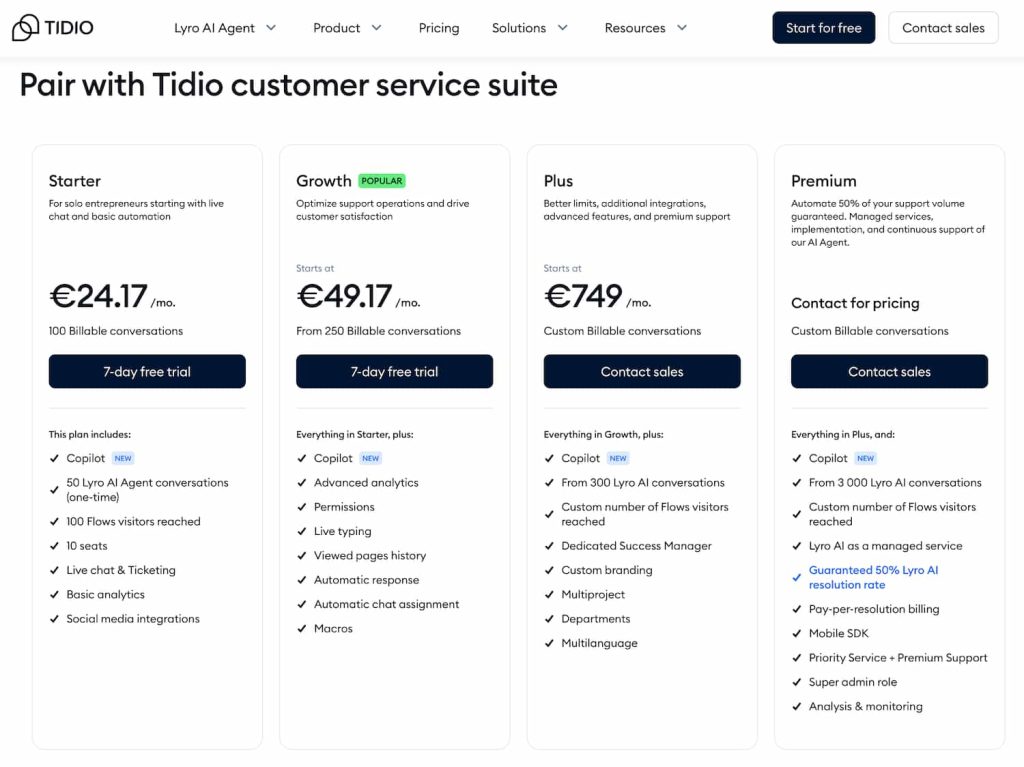
- Free ($0/mo): 50 billable conversations, core live chat, ticketing, email management, and a small allowance of Lyro and Flows. Perfect for testing or very small operations.
- Starter ($24.17/mo): 100 conversations, plus features like visitor lists and operating hours. Ideal for small teams that want more control.
- Growth (from $49.17/mo): 250–2,000 conversations, advanced analytics, canned responses, satisfaction surveys, and Shopify order actions. This is the “sweet spot” plan for serious ecommerce stores.
- Plus (from $749/mo): Higher quotas and advanced features like Lyro Connect, multiproject setups, departments, multilingual packs, OpenAPI, and a dedicated success manager. Designed for growing teams that need structure.
- Premium (from $2,999/mo): Unlimited conversations, enterprise controls, custom branding, managed Lyro services, and priority support. Best for complex businesses with strict requirements.
Upgrades are available for more Lyro conversations (50–300 per month) and expanding Flow reach (2,000–100,000 visitors).
For detailed pricing, you can check out their Pricing page.
Now in this Tidio Review, let’s check out some pros & cons of it.
Tidio Pros & Cons
Finally, let’s check out some pros & cons of Tidio in this detailed Tidio Review
Pros:
- Clutter-free & clean interface
- Flexible pricing plans depending on your needs.
- Great free plan for the starters
- Especially beneficial for small businesses due to its affordability and ease of use
- Automation helps you save a lot of time
- You can use a wide range of third-party integrations
Cons:
- Reporting and Analytic tool of Tidio is quite basic
- A lot of users complain about delayed notifications, which can be a significant issue for the support team
- The number of marketing tools with Tidio is limited & basic
- Tidio suffers from a lack of control
Mobile Apps: Support on the Go
Tidio’s iOS and Android apps give agents core functionality wherever they are: notifications, real-time chat responses, and ticket management.
Some advanced features are web-only, which is intentional – not everything translates well to small screens. The mobile apps are best seen as a companion for responsiveness, not a replacement for the full web panel.
Who Will Get the Most Value
- Ecommerce brands that want to connect sales and support by managing orders inside chat.
- Small to midsize support teams that need one inbox for every channel without complexity.
- International companies that benefit from Lyro’s 12 languages and pre‑translated widget UI.
- Businesses that need quick deployment — Tidio installs in minutes and scales as you grow.
On the flip side, if your team is heavily mobile-first or requires deep enterprise workflows out of the box, you may need to evaluate carefully. Tidio can scale up, but it keeps simplicity at the core.
Final verdict on Tidio Review: Should you buy it?
After going through this detailed Tidio Review & helping you understand its features & drawbacks, I hope I have cleared a lot of air on Tidio.
There is no doubt Tidio is an excellent customer support tool that can help you automate many tasks and boost your efficacy. But just like other tools, it does have some limitations too.
If you are a small or growing business & need the best support tool without spending too much money, Tidio could be your choice.
Tidio succeeds where many platforms struggle: blending simplicity with power. Lyro handles repetitive inquiries, Flows automate predictable tasks, and the shared inbox keeps all channels organized.
For ecommerce stores, features like Shopify order actions and proactive cart recovery make support a direct contributor to revenue.
The pricing tiers make it accessible at every stage, from solo entrepreneurs to enterprise organizations. And with SOC 2 certification, multilingual support, and developer tools, Tidio has the credibility to support serious operations.
If your goal is to provide faster, smarter, and more personal support – without adding unnecessary complexity – Tidio is one of the smartest bets you can make today. It doesn’t just help you answer customers; it helps you turn those conversations into long-term growth.
To answer the common question, “Is Tidio legit?” – yes, Tidio is legit. It has a strong positive reputation, years of operation, and consistently good customer feedback, making it a trustworthy platform.
I hope this detailed Tidio Review will help you make the right decision if you want to explore similar tools. You will find a lot of insightful reviews on various devices.
FAQs
Does Tidio offer a free plan?
Yes, the basic plan of Tidio is free.
Can I automate replies using Tidio?
Yes, Tidio offers automated reply facilities that you can use to automate responses for many repetitive tasks.
Can I integrate Mailchimp with Tidio?
Yes, apart from Mailchimp, you can integrate hundreds of other tools too.
Is Tidio worth the money?
It offers excellent services as compared to its pricing. But first, I would recommend using its free plan to get a better idea.
Read more from Marketing
- 7 Ways to Market Your Brand with Visual Marketing
- 30 Best Marketing Tools for Small Business Growth!
- How to Effectively Automate Your Marketing Processes
- Hello Bar Review: Is it worth your money?
- Tidio Review: Is it the best Chatbot tool?
- What are chatbots? Why does your streaming business need one?
- Boost Your Conversion Rate: How 3D Design Prove Saviour
- 10 Best Landing Page Builders to Create Your Own One-Page Website
- 5 Ideas for a Successful Brand Marketing Presentation in 2022
