
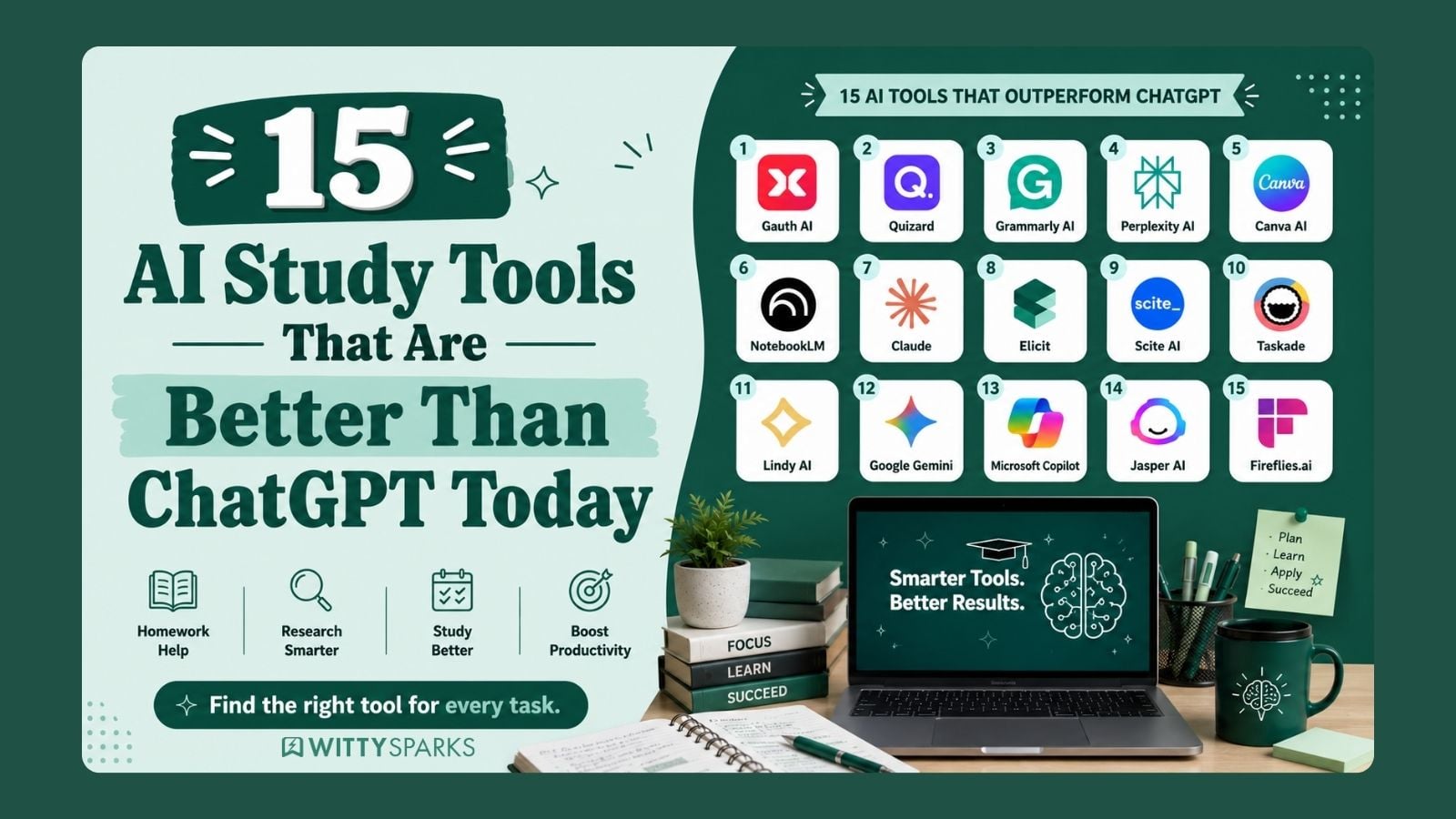

If you are searching for AI study tools that are better than ChatGPT, you are not alone. Many students feel that ChatGPT is helpful, but not always enough.
Students today are using tools like Gauthmath, Canva AI, Claude, Scite AI, and Microsoft Copilot for different study needs.
ChatGPT is powerful. But it is not perfect for everything. Many students and working professionals are still using ChatGPT for everything. Let me introduce you to some great AI tools that will make your everyday tasks easier.
TL;DR
- ChatGPT is useful, but not enough for every task
- Students now use multiple AI study tools that are better than ChatGPT
- School students: tools for homework, writing, and basics
- College students: tools for research, notes, and planning
- Professionals: tools for automation, content, and meetings
- Use the right tool for the right task instead of depending on one
On this page
5 Best AI Tools for Students
If you know a school kid who struggles with everyday homework, show these 5 tools to them. They will thank you from the heart. I have curated a list of 5 AI tools for school students that will help them and not completely replace their sense of curiosity.
1. Gauth AI
Gauth AI, earlier known as Gauthmath, is an AI homework helper made for students. It helps solve questions in subjects like math, physics, chemistry, biology, economics, literature, calculus, and more. The main benefit is simple: students can scan or upload a question and get step-by-step answers instead of only a final answer. Gauth also says it offers AI calculator support, real-life tutors, and expert assistance for homework help.
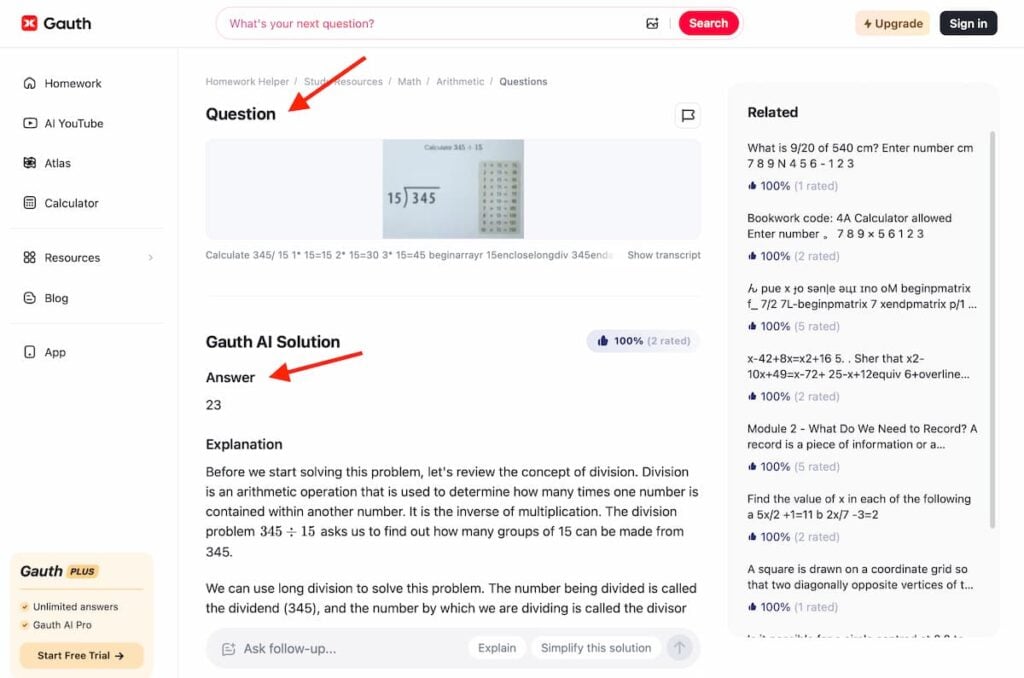
To use Gauth AI properly, students should not treat it like a shortcut machine. The best way is to scan the question, read the full explanation, understand each step, and then try solving a similar question on their own. This is where it can become one of the AI study tools that are better than ChatGPT for homework-style learning.
ChatGPT can explain, but Gauth is more focused on scanned questions, quick solving, and step-by-step academic answers. Its app listing also highlights quick answers with detailed explanations and animated instructions.
For example, a class 9 student stuck on algebra can scan the question and see how each step is solved. A class 11 student preparing for physics can use it to understand a numerical problem instead of just copying the answer. A student who has homework in chemistry can use Gauth to break down the logic behind the equation. This makes it useful for daily learning, revision, and exam practice.
But one thing is important. Students should use Gauth AI as a learning support tool, not as a cheating tool. If they only copy answers, it will not help much. But if they use it to understand where they made a mistake, practice similar questions, and revise weak topics, Gauth can be a very useful ChatGPT substitute for school students.
2. Quizard
This is my favorite ChatGPT substitute. Though it is perfect for students, anyone can use it. Quizard is an AI study tool designed to turn your notes, PDFs, and topics into quizzes and practice questions. Instead of just giving answers like ChatGPT, it focuses on active learning. It helps students test what they actually remember. That is a big difference.
To use Quizard properly, you should upload your study material or enter a topic, and let the tool generate quizzes. Then attempt those quizzes honestly. The real benefit comes when you review your mistakes and understand weak areas. This makes it one of those AI study tools that are better than ChatGPT for revision and exam preparation. ChatGPT explains things, but Quizard forces you to think and recall.
For example, a college student preparing for exams can upload class notes and generate multiple quizzes before exams. A school student can revise chapters by testing themselves instead of rereading the same content. Even someone preparing for competitive exams can use it daily to build consistency and improve memory.
In simple words, Quizard is not for getting answers. It is for checking whether you actually know the answer. And hence, it is powerful. It is a great tool for learning with fun. Parents can use Quizard as an assistant and make their kids understand complex concepts with ease.
3. Grammarly AI
Grammarly AI helps students write better. It checks grammar, spelling, punctuation, and even improves sentence clarity. It also gives suggestions for tone, so your writing sounds more confident and clear. For school students, this is very useful for essays, answers, emails, and even basic assignments.
Grammarly – AI-powered writing assistant
The most popular AI-based spelling and grammar checkers.
Flat 50% off this black friday on Grammarly Pro.

I see many adults, even from the US and UK, struggle to draft formal emails. Providing such AI tools for students can help them get a grip on the language at a young age. This expertise will help students throughout their lives.
To use Grammarly properly, students should not just click “accept all changes.” The real benefit comes when you read each suggestion and understand why it is wrong. Over time, this improves your writing naturally. Hence, it is one of the AI study tools that are better than ChatGPT for writing. ChatGPT can generate text, but Grammarly improves your writing in real time.
Grammarly also has a free version, which is enough for most school students. It covers basic grammar checks, spelling corrections, and simple clarity suggestions. The paid version (Grammarly Premium) goes deeper. It gives advanced suggestions for tone, sentence rewriting, vocabulary improvement, plagiarism detection, and full-sentence rewrites. This is useful for students who want to write high-quality essays or prepare for exams where writing matters.
For example, a student writing an English essay can use Grammarly to correct mistakes and improve sentence flow. A student preparing emails or project submissions can make sure their writing looks neat and professional. Even simple answers become clearer and easier to read. Over time, this builds strong writing skills without much effort.
4. Perplexity AI
Perplexity AI is not just another chatbot. It is an AI search engine. It gives you answers with sources. That is the biggest difference. Instead of guessing or giving generic replies, it shows where the answer is coming from. Today, Perplexity has 45+ million active users each month, underscoring how quickly students are moving towards smarter research tools.
To use Perplexity properly, treat it like your research partner. Ask clear questions. Open the sources it gives. Read and verify. You can even ask follow-up questions to go deeper into the topic. This is where it becomes one of the AI study tools that are better than ChatGPT. ChatGPT gives explanations. Perplexity gives explanations with proof.
For example, if a student is working on a history project, Perplexity will not just explain the topic. It will show articles, references, and links to explore further. If you are studying science, you can quickly find verified explanations instead of random answers. Even for general knowledge, it helps you learn faster because you can trust what you are reading.
In simple words, Perplexity is built for students who want correct answers, not just quick answers. It saves time, improves research quality, and helps you learn with confidence. A good ChatGPT substitute.
5. Canva AI
This one is my favorite. I use Canva AI for my presentations and social media posts. Canva AI helps students create presentations, posters, charts, and projects in minutes. It is not just a design tool anymore. With AI features like Magic Write, text-to-image, and auto-design suggestions, students can turn ideas into proper visuals without design skills.
Canva – Design your content
A ready-made library of templates for creating graphic content.

To use Canva AI properly, start with a topic. Use Magic Write to generate content. Then pick a template and let Canva suggest layouts, colors, and visuals. You can also create images and icons using text prompts. This is where it becomes one of the AI tools for students that is better than ChatGPT for visual work. ChatGPT can give content. Canva helps you present it.
For example, a student making a science project can create a full presentation with charts, images, and clean slides in one place. A school student can design posters for competitions or extracurricular activities. Even simple assignments look more professional when presented visually.
In simple words, Canva AI helps students not just learn, but also show their work better. And in school, presentation matters as much as content.
Key Takeaways:
- Tools like Gauth AI and Quizard improve learning and revision, not just answers
- Grammarly builds strong writing skills from a young age
- Perplexity helps with research using real sources
- Canva AI improves presentation and creativity
- These tools support learning without killing curiosity
5 Best AI Tools for College Students
1. NotebookLM
NotebookLM is an AI tool by Google that helps you study from your own notes. You upload PDFs, documents, or lecture material, and it works only on that content. It does not pull random information. It sticks to what you give.
To use it properly, upload your study material and start asking questions. You can ask for summaries, key points, explanations, or even sources. This is where it becomes one of the best AI tools for college students. ChatGPT gives general answers. NotebookLM gives answers based on your syllabus.
For example, a student preparing for exams can upload all notes and revise faster without reading everything again. A student working on assignments can quickly extract important points from long documents. Even last-minute revision becomes easier.
In simple words, NotebookLM helps you study smarter using your own content.
2. Claude
Claude is an AI tool made for deep thinking and long answers. It is very strong when it comes to reading long content, writing essays, and explaining complex topics in simple words. Compared to many tools, it handles large text much better and does not lose context easily. A good ChatGPT substitute for simplifying complex data.
To use Claude properly, give it detailed input. You can paste long notes, research content, or even full chapters and ask it to explain, summarize, or simplify. This is where it becomes one of the best AI tools for college students. ChatGPT works well, but Claude is often better for long-form understanding and detailed explanations.
For example, a college student can paste a full research article and ask Claude to break it down into simple points. Someone preparing for exams can use it to understand difficult subjects in easy language. It is also very useful for writing assignments, reports, and even coding explanations.
In simple words, Claude is like a patient teacher who can handle long content without getting confused. It helps you understand things deeply, not just quickly.
3. Elicit
I have tried ChatGPT and Gemini for research. I have caught multiple errors. Same with Google AI Overview. There are some AI study tools that are better than ChatGPT for deep research work.
Every college student spends hours and hours in research. Wouldn’t it be great to get all the data on a single platform? Elicit is an AI tool made for research. It helps you find research papers, summarize them, and extract key points. Instead of searching manually, it gives structured answers based on academic sources.
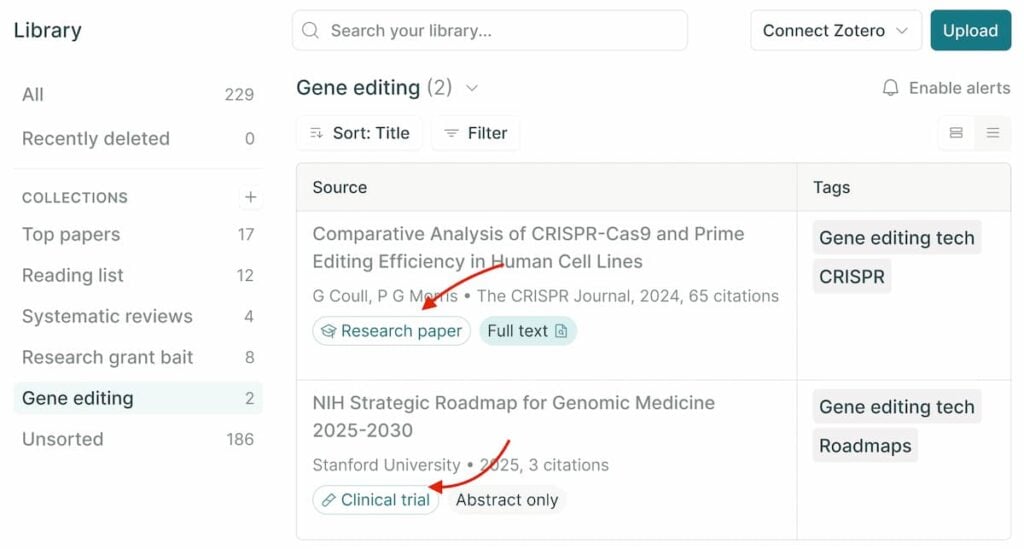
To use Elicit properly, type your research question instead of just keywords. It will show relevant papers, summaries, and important insights. You can compare multiple studies in one place. This is where it becomes one of the best AI tools for college students. ChatGPT explains topics, but Elicit helps you work with real research data.
For example, a student writing a research paper can quickly find studies related to their topic. A college student can use it to understand multiple viewpoints without reading full papers. Even for assignments, it helps add strong references and better content.
In simple words, Elicit saves time and makes your research smarter. If you are looking for an AI tool that helps with evidence-based scientific research, Elicit is a good ChatGPT substitute.
4. Scite AI
Scite AI is an AI tool that helps you check if a research paper is actually reliable. It does not just show citations. It tells you whether a study supports, contradicts, or mentions a claim. This is very useful when you are working on academic content.
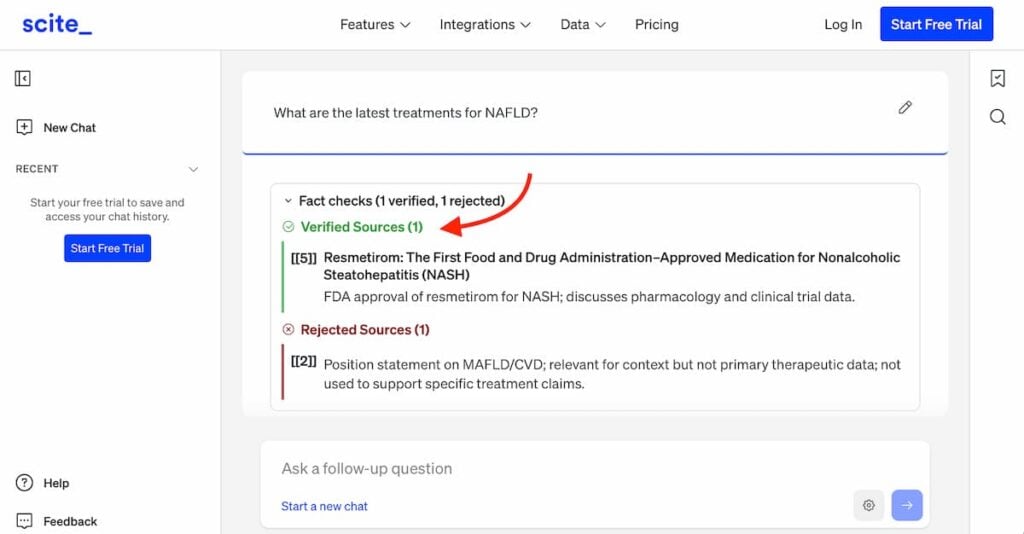
To use Scite AI properly, search for a topic, paper, or claim. It will show you how that paper has been cited by other research. You can quickly see if the information is strong or weak. This is where it becomes one of the AI tools for students that is better than ChatGPT for research. ChatGPT gives answers. Scite helps you verify them.
For example, a college student writing an assignment can check if a source is trustworthy before using it. A student working on a research project can avoid weak or outdated studies. Even while preparing presentations, it helps you use correct and supported data.
Also, read: https://wittysparks.com/amazing-benefits-of-blogging-for-students/
5. Taskade
Taskade helps you build AI apps, agents, and workflows. You can create tools, automate tasks, and manage projects in one place. It is not just a planner. It is a full AI system.
To use Taskade properly, start with a simple prompt. You can create AI agents, build workflows, or set up systems for your work. You can also connect it with other tools and automate tasks. This is where it becomes one of the best AI tools for college students. It helps you build and execute, not just study.
For example, a college student can create a system to manage assignments and deadlines. A student learning marketing can build a content workflow or lead tracking system. Even a small team can create apps for projects without coding.
Key Takeaways:
- NotebookLM helps you study from your own notes and syllabus
- Claude improves deep understanding and long-form learning
- Elicit saves time in research and literature review
- Scite AI ensures research accuracy and credibility
- Taskade helps with planning, consistency, and productivity
5 Best ChatGPT Alternatives for Working Professionals
1. Lindy AI
Lindy AI is an AI tool that helps automate daily work. It can assist with emails, scheduling, follow-ups, and task management by connecting with other tools. It is not just a chatbot. It is built to reduce manual work.
To use Lindy AI properly, you need to set up workflows. For example, you can create rules for email replies, meeting scheduling, or reminders. Once set, it can handle repetitive tasks in the background. This is where it becomes a strong ChatGPT substitute. ChatGPT gives answers. Lindy helps execute tasks.
Example: A working professional can use Lindy to manage email follow-ups without doing it manually every time. A freelancer can automate client communication. Teams can reduce repetitive work and save time.
2. Google Gemini
Google Gemini is a strong ChatGPT alternative that works deeply with Google tools. It can help with writing, research, coding, and even understanding images. The biggest advantage is its connection with Google Search and tools like Docs, Gmail, Sheets, and Ads.
To use Gemini properly, use it along with your daily tools. You can draft emails in Gmail, create content in Docs, or ask questions and get updated answers from the web. It can also guide you in marketing tasks like planning campaigns, writing ad copy, and understanding keywords. This is where it becomes a useful ChatGPT substitute. It fits directly into your workflow.
For example, a working professional can draft emails inside Gmail and refine them instantly. A marketer can use Gemini to generate Google Ads headlines, descriptions, and keyword ideas before launching a campaign. A student learning digital marketing can understand campaign structure and strategy step by step.
3. Microsoft Copilot
Microsoft Copilot is an AI tool built into Microsoft apps like Word, Excel, PowerPoint, Outlook, and Teams. It helps you write, analyze data, create presentations, and manage emails. The biggest advantage is that it works directly inside the tools people already use every day.
To use Copilot properly, use it within your work tools. In Word, you can generate and edit documents. In Excel, you can analyze data and get insights without complex formulas. In PowerPoint, you can create full presentations from simple prompts. This is where it becomes a strong ChatGPT substitute. It does not just give answers. It helps you complete tasks.
For example, a working professional can create a full presentation in minutes instead of hours. A marketer can analyze campaign data in Excel and get insights quickly. A team member can draft emails and replies in Outlook without switching tools.
4. Jasper AI
Jasper AI is an AI tool built mainly for marketing and content creation. It helps you write ads, blogs, social media posts, and brand content. It also supports brand voice, so your content stays consistent. It uses its 100+ specialized AI agents and connected content pipelines for all the marketing tasks. Think of it like this: you get a team of 100+ marketing experts.
To use Jasper properly, give it clear instructions. You can define your brand tone, target audience, and goal. Then ask it to generate content like ad copy, captions, or blog ideas. This is where it becomes a strong ChatGPT substitute for marketers. It is focused on content that actually converts.
For example, a business owner can create Google Ads copy in minutes. A social media manager can generate multiple post ideas quickly. A content writer can speed up blog writing and maintain consistency across content.
5. Fireflies.ai
Fireflies.ai is an AI tool that records meetings, transcribes them, and creates summaries. It captures key points, action items, and decisions without manual note-taking. It works with platforms like Zoom, Google Meet, and Microsoft Teams.
To use Fireflies properly, connect it to your meeting tool and let it join calls. After the meeting, review the transcript and summary. You can search for keywords, highlight important parts, and share notes with your team. This is where it becomes a strong ChatGPT substitute for meetings. ChatGPT can summarize text. Fireflies captures and structures it for you.
For example, a working professional can attend a meeting without worrying about notes. A team can track action items clearly after every call. A student can record lectures and revise from clean summaries.
Key Takeaways:
- Lindy AI helps automate repetitive work
- Gemini supports real-time work + marketing use cases
- Copilot works inside tools like Word, Excel, and PowerPoint
- Jasper AI focuses on marketing and content creation
- Fireflies.ai handles meeting notes and summaries automatically
Final Words
ChatGPT is powerful. But it is not the only option. Today, there are many AI study tools that are better than ChatGPT for specific tasks.
Some tools help you solve homework faster. Some help you research with real sources. Some improve your writing. And some help you plan, create, and even automate real work. That is the real shift. Students are no longer using one tool for everything.
The smart way is simple. Do not depend on one AI tool. Use the right tool for the right task. That is how you save time, learn faster, and get better results.
If you start using these tools the right way, you will not just study better. You will stay ahead. Follow WittySparks for more such helpful tips.
Frequently Asked Questions
What are the best AI study tools that are better than ChatGPT?
Gauth AI, Perplexity AI, Grammarly AI, NotebookLM, and Elicit are some of the best AI study tools that perform specific tasks better than ChatGPT.
Are there free AI tools for students?
Yes, tools like Grammarly, Canva AI, Perplexity AI, and NotebookLM offer free versions for students.
Which AI tool is best for homework?
Gauth AI is one of the best tools for homework as it provides step-by-step solutions.
Which AI tool is best for research?
Perplexity AI and Elicit are best for research because they provide source-based answers.
Can AI tools replace ChatGPT?
It depends on your requirements. You can use Gemini or Claude as a ChatGPT substitute.

Read more from Education