



Your site publishes regularly. Your content is solid. But your organic search visibility barely moves. You’re not alone. Most WordPress sites run at half-power because the core SEO settings that control how Google reads, indexes, and displays your content were never activated.
It’s not a content problem. It’s not a keyword problem. It’s a structure problem.
Key Takeaways
- Module activation is the visibility trigger: WordPress SEO plugins like Rank Math include powerful modules (schema, sitemaps, 404 monitoring, redirects) that stay dormant until you enable them. Once activated, search engines gain clarity, and visibility can jump within a few crawls.
- Schema controls how you appear, not just if you appear: Structured data tells Google exactly what your content represents, leading to rich snippets, FAQ dropdowns, and higher click-through rates. According to Search Engine Journal (2023), pages with schema markup rank an average of 4 positions higher than those without.
- Real-time on-page analysis prevents visibility loss before publishing: Rank Math’s live content scoring catches keyword misplacement, missing internal links, and weak snippet previews as you write, so your pages launch already optimized instead of needing post-publish fixes.
- Technical fixes produce fast results: Broken links, redirect chains, and orphan pages disrupt crawl efficiency. Fixing them improves indexing speed and ranking stability, often within the next crawl cycle (typically 3-7 days for active sites).
- Content refreshing leverages existing authority: Updated pages outperform new posts because Google already knows the URL. Fresh content signals trigger re-evaluation, and visibility gains appear faster than starting from scratch.

On this page
Deep inside your WordPress dashboard sits a panel that quietly controls everything search engines care about: your schema, your sitemaps, how redirects work, which pages get priority, how Google interprets your internal links, and how your site responds to crawl issues.
Tools like Rank Math (launched 2018 by MyThemeShop) surface these settings in one place, but most site owners skip them. So the site runs, but it runs half-blind. Search engines crawl it, but without guidance. Content exists, but without the structure that helps it shine. Once these modules flip on, everything changes.
Google starts understanding your content themes, your hierarchy, and the relationships between your pages. That clarity is what lifts search visibility. This guide breaks down the overlooked setting, why it matters, and how flipping a few switches can create results that feel almost overnight.
What WordPress SEO Setting Do Most Sites Miss?
WordPress gives you a lot to look at, menus, settings, tabs, and sub-tabs. It’s no surprise users stick to the parts they recognize: write a post, pick a focus keyword, adjust a title, hit publish. Easy.
But deeper in the dashboard sits a panel that quietly handles everything search engines care about:
- Your structured data
- your XML sitemap
- how your redirects work
- which pages get priority
- how Google sees your internal links
- how your site responds to crawl issues
Rank Math enhances this panel with features like schema, sitemaps, and 404 monitoring, but those features stay dormant until you enable the modules behind them. If you’re interested in effective internal link building strategies for SEO, consider using tools specifically designed for the task. That’s the part people miss, the switches aren’t on by default.
So the site runs, but it runs half-blind. Search engines crawl it, but without guidance. Content exists, but without the structure that helps it shine. Regularly updating and optimizing existing web pages is essential for improving their performance in search engine rankings and user experience.
Once these modules switch on, everything becomes clearer. Google starts understanding your content themes, your internal hierarchy, and the relationships between your pages. And that clarity is exactly what lifts Organic Search Visibility.
Keyword Research Fundamentals
Keyword research is the backbone of any effective SEO strategy. It’s the process of discovering which relevant keywords and phrases your target audience is actually typing into search engines.
By understanding search intent and analyzing search volume, you can pinpoint the target keywords that will drive more organic traffic to your site.
Using keyword research tools like Google Keyword Planner, Ahrefs, or SEMrush, you can uncover which terms have the highest potential for your niche. These tools reveal not only the popularity of specific keywords but also how competitive they are and what kind of content currently ranks for them.
This insight allows you to build a list of target keywords that align with your audience’s needs and your business goals.
Once you have your list, it’s time to weave those relevant keywords naturally into your website’s content, meta tags, and headings. This helps improve your search engine rankings and ensures your pages show up for the right search queries.
Remember, keyword research isn’t a one-time task, it’s an ongoing process that keeps your content strategy aligned with what your audience is searching for, helping you capture more organic traffic over time.
How Do You Activate Rank Math Modules for Better Visibility?
Boosting discoverability doesn’t always require a new strategy. Sometimes, it’s just about turning on the parts of your SEO setup that were sitting quietly in the background. This is where tools like Rank Math really shine; they give you all the switches in one clean place.
Rank Math consistently ranks as the best WordPress SEO plugin for beginners because it simplifies complex SEO tasks into toggles and wizards. You don’t need to know what an XML sitemap is or how schema works – the setup wizard handles it. Within 10 minutes, your site is configured with schema, sitemaps, redirects, and Search Console integration, all without hiring a developer.
While some businesses choose to hire an SEO agency for setup and optimization, many can successfully implement these best practices in-house using tools like Rank Math.
Here’s the setup flow that consistently unlocks better visibility:
Step 1: Start With the Setup Wizard
Before anything else, let the Setup Wizard do the heavy lifting. Think of it as your SEO “grounding wire.” It scans your theme, checks your basic WordPress configuration, and aligns your site with search engine expectations.
It also handles important behind-the-scenes tasks:
- Verifies your site with Google.
- Sets up your metadata defaults.
- Configures foundational indexing rules.
- Ensures your URLs and permalinks play nicely with crawlers.
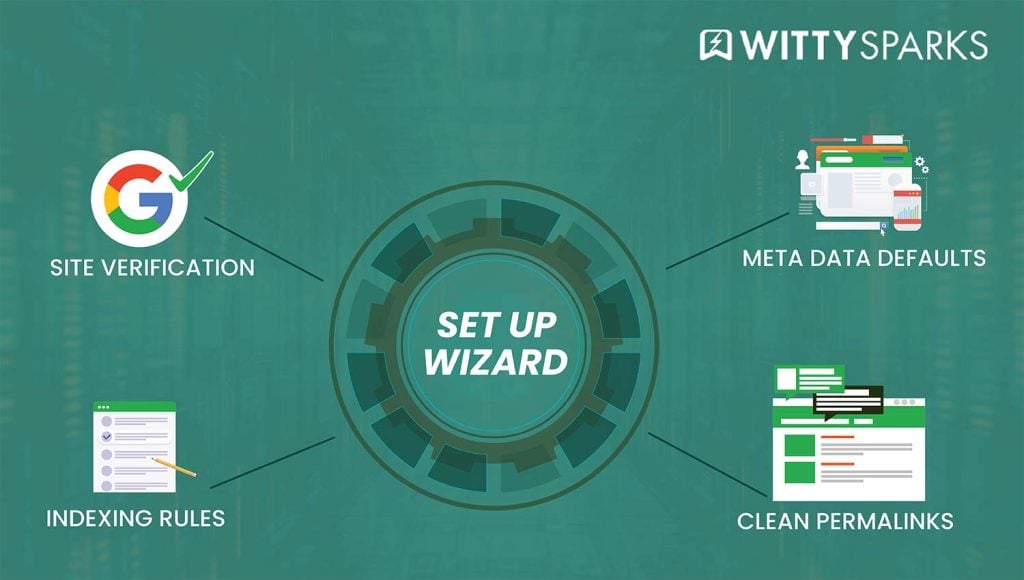
A snapshot of the essential SEO settings managed through the Rank Math setup wizard.
And the best part? It takes a few minutes, tops.
You click through a handful of screens, make a few decisions, and suddenly your site has a stable, search-friendly foundation. It’s the kind of step people rush through, but when done right, it directly influences how cleanly your site communicates with search engines later.
Step 2: Turn On the Modules That Drive Visibility
This is where everything starts to feel “real.”
WordPress alone gives you a basic canvas, but turning on the right SEO modules transforms that canvas into a fully equipped workspace.
Here’s what actually moves the needle:
- Schema for rich snippets: Gives Google context about your pages, which boosts how your content appears.
- XML sitemaps: Creates a clean, structured map of your content so crawlers know exactly where to go.
- 404 monitor: Flags broken pages you probably didn’t know existed but still affect your visibility.
- Redirect manager: Helps fix those broken paths instantly, keeping your authority intact.
- Internal link suggestions: Makes it easier to strengthen the connective tissue of your site.
- Analytics integration: Brings search performance data into WordPress so you can monitor everything in one place, allowing you to track key seo metrics and organic metrics, such as keyword rankings, impressions, and click-through rates.
- On-page SEO analysis: Helps you polish your content in real time before it even goes live.
Once these modules flip on, your site shifts from “just a collection of posts” to a structured, SEO-driven system that supports stronger search presence and increase in organic traffic across every corner of your content.
Enabling these features also supports effective keyword targeting, helping you optimize content for specific keywords to improve organic search visibility.
Step 3: Clean Up the Sitemap
According to Screaming Frog’s 2023 crawl analysis, 68% of sites include low-value URLs in their XML sitemaps. – archive pages, tag pages, thin content, attachment URLs, and random leftovers from past updates.
If you’re looking to improve your site’s visibility and structure, it can also be helpful to use dedicated keyword research tools like those found in this detailed analysis of Semrush Keyword Research Tools.
A good sitemap is curated. It tells search engines:
“Here are the pages that matter. Focus here.”
Cleaning it up means:
- Removing outdated or low-value URLs.
- Excluding thin pages or auto-generated archives.
- Highlighting your strongest categories and top-tier content. Including location-specific pages in your sitemap can also help improve visibility in local search results.
- Ensuring only crawl-worthy pages are included.
When your sitemap becomes a curated guide instead of a cluttered dump, Google’s crawl patterns sharpen. Your important pages get discovered faster. And your organic search visibility improves without writing a single new article.
Step 4: Set Default Schema Types
Schema is your content’s name tag; it tells search engines exactly what they’re looking at. If you’re wondering how to enable schema in WordPress without touching code, Rank Math’s schema module does exactly that.
You pick a schema type from a dropdown – Article, FAQ, Recipe, Product – map it once, and every new post automatically inherits the structure. No JSON-LD editing, no Schema.org documentation diving, just clean structured data that Google reads instantly.
- Setting the default schema means you don’t have to do this manually every time.
- New posts automatically get the right structure.
- Pages get the right context.
- Google gets a clean, predictable signal each time it crawls your site.
This not only improves the structure of your search appearance but also increases click appeal. People trust results that look complete, FAQ dropdowns, ratings, steps, product highlights, all triggered by schema.
Once this is set, your content goes live, already aligned with how search engines prefer to index it.
Step 5: Connect Google Search Console and Analytics
This is where everything comes together.
When your Google Search Console and Google Analytics data flow into WordPress, your dashboard turns into a visibility cockpit.
In one place, you can now see:
- Which keywords are gaining traction? (via tracked keywords and keyword rankings in Google Search Console)
- Which pages suddenly dipped? (monitored through Google Analytics and Search Console)
- Which URLs need internal links?
- What Google discovered recently? (from Google Search Console reports)
- Where impressions grew, but clicks didn’t? (analyzed in Google Analytics and Search Console)
- Which content deserves an update?
Tracking keyword rankings for your tracked keywords helps you monitor your site’s visibility score, which reflects how often and prominently your site appears in relevant search results.
Instead of guessing what Google sees, you now see what Google sees.
Search visibility is calculated by estimating the click-through rate (CTR) based on ranking positions for tracked keywords. A good organic visibility score typically means ranking in the top 10 for primary keywords and seeing a steady increase in organic traffic.
It’s a huge shift because optimization stops being reactive and becomes intentional. Once you know how each page behaves, you can strengthen your organic visibility with accuracy instead of assumptions.
After This Setup…
Your site stops behaving like a loose collection of pages and starts functioning like a structured, search-ready ecosystem. Crawlers move through it more easily. Signals make more sense. Your content becomes easier to interpret.
That’s why visibility jumps.
Reason? Because you finally aligned your site with how search engines actually work.

Diagram showing how connected web elements like blog posts, FAQs, and content types improve search visibility.
A visual map of how different content types support a stronger, interconnected website.
Real-Time On-Page Analysis Could Be The Fastest Visibility Trigger
Once your site’s core structure is in place, the next big leap in Organic Search Visibility comes from something far more immediate: real-time on-page analysis. This isn’t a “review it after publishing” feature or a post-mortem tool you check when rankings flatten.
This is a live layer that guides your writing as you create it, shaping each page into something search engines understand instantly.
The beauty of real-time analysis is simple:
You make improvements at the exact moment they matter the most, during your writing flow. No guessing. No rework. No waiting until the page ships with errors already baked into it.
This system highlights things that usually slip through unnoticed:
- Keyword placement
- Proper keyword usage, ensuring natural and relevant placement without overstuffing
- Header clarity and hierarchy
- Internal link opportunities
- Meta preview strength, including crafting compelling and keyword-rich meta descriptions to improve click-through rates
- Image alt text
- Content depth and topical completeness
- Readability signals
- Schema alignment with page intent
Most writers, even experienced ones, miss at least two or three of these on any new page. That’s normal; writing and optimizing require two different mental modes. Real-time on-page analysis bridges that gap beautifully.
It’s like having a quiet, SEO-conscious editor leaning over your shoulder, nudging you gently whenever something improves your visibility.
Rank Math’s real-time scoring is especially good at this. It doesn’t interrupt. It doesn’t overwhelm you with dozens of suggestions. Instead, it adds a layer of awareness:
- Maybe add one more internal link.
- This header feels out of sequence.
- You haven’t used the key phrase in the intro.
- Your snippet preview could be more compelling.
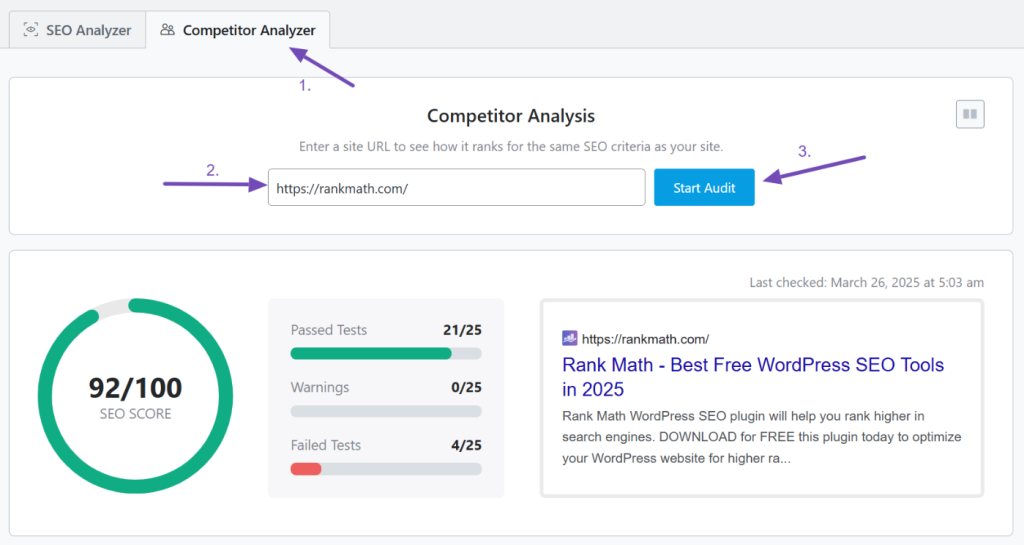
Rank Math competitor analyzer showing URL input, Start Audit button, and SEO score results for improving search visibility.
The competitor audit shows the overall SEO score along with passed, warning, and failed tests.
These tiny nudges add up. By the time your draft is complete, your content is structured, intentional, and aligned with search engine expectations by design.
The result is dramatic:
- Google processes the page faster
- It understands the topic more clearly.
- It sees the relationships between your sections.
- Your snippet looks stronger.
- Your crawl signals become cleaner.
- Your relevance becomes more obvious.
And when search engines understand your content cleanly, your Search Visibility reacts almost immediately. This is why seasoned SEO professionals rely heavily on real-time optimization, it preemptively fixes issues that would otherwise cost you visibility weeks later.
Think of it like publishing with a safety net. Your content lands in search already optimized instead of waiting for a round of corrections after the damage is done. That’s what makes this step the fastest visibility trigger.
It transforms your writing environment into a visibility engine, and the effect can be felt from the moment your page goes live.
Technical Fixes That Quietly Boost Organic Search Visibility
Every website, no matter how well-built, carries small technical flaws in the background. Most are harmless to users, a broken link here, a redirect loop there, an outdated URL structure, a few pages that accidentally slipped into “noindex.”
But while users rarely see these issues, search engines do. And they quietly reduce your organic visibility far more than people realize. Search engine algorithms consider these technical factors when ranking sites, so addressing them is essential for maintaining and improving your visibility.
Understanding the difference between impressions and clicks in SEO is critical for diagnosing visibility issues. Impressions mean Google showed your page in search results; clicks mean someone chose it. High impressions with low clicks signal a weak title or meta description. Low impressions mean Google isn’t ranking you at all – usually a content or technical issue.

A visual representation of how broken links and 404 errors weaken a site’s visibility signals.
The reason is simple: search engines rely on clean pathways.
Every crawl is a journey. The smoother that journey is, the more of your site gets understood and indexed. The rougher it is, the more of your content goes unseen.
Consider just a few common issues:
- Broken URLs – Google reaches a dead end.
- Redirect chains – Crawlers waste time navigating unnecessary steps.
- Soft 404s – Pages look valid but hold no real value.
- Unindexed URLs – Content exists but never enters search.
- Duplicate metadata – Search engines struggle to assign the right relevance.
- Orphan pages – High-quality content sits disconnected with no signals pointing to it.
Individually, these issues seem tiny. Collectively, they weaken your search visibility because they disrupt the way search engines interpret your site.
This is where tools like Rank Math’s 404 monitor and redirect manager help quietly but effectively. They reveal problems you would never catch manually. A single broken link in your header menu, for example, affects every crawl session.
A redirect chain from an old blog post wastes precious crawl budget. A hidden page that returns a “soft 404” confuses Google into thinking your site isn’t maintained.
When you fix these barriers, something almost magical happens: your site becomes easier for search engines to trust. They move more confidently. They index more pages. They revisit updated content more often. Authority flows more predictably from one page to another.
Off page SEO, such as building high-quality backlinks through outreach and relationship-building, also contributes to your site’s authority and search visibility.
And because crawlability and clarity directly influence how your content is evaluated, your visibility in search rises naturally.
Another reason these fixes work so fast is because Google detects technical improvements quickly. Most technical issues get reviewed on the next crawl cycle. That means visibility can jump within days of making structural improvements, no waiting months for a major update.
Core Web Vitals, such as ensuring Largest Contentful Paint is under 2.5 seconds, are critical for both ranking and user retention.
Technical SEO isn’t glamorous. You don’t see it. You don’t “feel” it. But it is often the difference between a site that performs well and one that disappears quietly under the noise.
When the background is clean, your content shines in the foreground. And that clarity translates directly into stronger search presence.
Why Does Schema Improve Organic Search Visibility?
What is schema markup and why does it matter?
Schema is structured data that tells search engines exactly what your content represents – whether it’s an article, FAQ, recipe, product, or event. It matters because schema controls how your result appears in search: rich snippets, FAQ dropdowns, ratings, and product highlights all come from schema. Without it, your content blends in. With it, you stand out.
Schema is the invisible language of search engines. It doesn’t change how your page looks to users, but it transforms how Google understands and displays it.
Without a schema, your content might still get indexed, but it blends in. With schema, your search visibility often jumps because your content gains structure, context, and prominence.
Schema helps your site stand out in organic search results, making it more noticeable among unpaid listings in the search engine results pages (SERPs).
The power of schema lies in precision. It tells Google exactly what your page represents:
- Is it an article?
- A FAQ?
- A recipe?
- A product?
- A service page?
- A review?
- An event?
This classification leads to higher indexing accuracy, better ranking alignment, and richer snippet formats, all of which elevate your visibility. High visibility in search engine features ensures brand recognition and can influence user decisions even if they don’t immediately visit your site.
Schema also boosts CTR (click-through rate), which is directly tied to visibility in search. When your result includes FAQ dropdowns, rating stars, price ranges, how-to steps, or service highlights, users tend to click more often. Google sees the engagement improvement and treats your page as more relevant.
Rank Math makes schema easy without forcing you to touch a single line of code. You choose your schema type, fill a few fields, map it once, and each new page automatically inherits the structure it needs. This consistency is what helps Google interpret your content without guesswork.
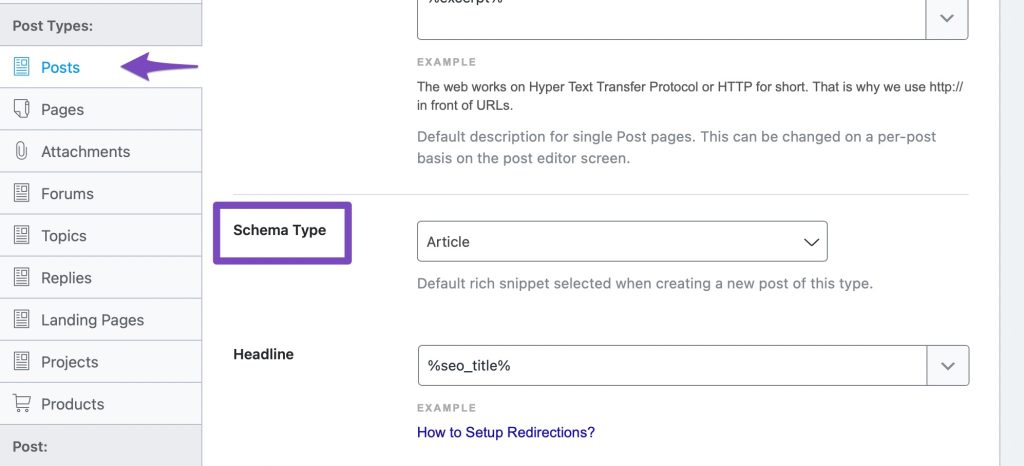
Schema’s effect on visibility often appears “overnight” because Google constantly refines how it presents results. Once your structured data is in place, the search engine starts displaying more detailed snippets, increasing impressions and elevating your placement for related queries.
The end result is simple but powerful:
Schema helps you get seen, and once seen, it helps you get chosen. It elevates the quality of your search presence, strengthens your organic visibility, and positions your pages for more meaningful click engagement.
Featured Snippets and SEO
Featured snippets are the coveted “position zero” on Google’s search results page, a spot above the first organic search result that delivers a direct answer to a user’s query. Securing a featured snippet can dramatically increase your discoverability and drive a surge of organic traffic to your site.
To optimize for featured snippets, focus on creating high-quality, concise, and informative content that directly answers common questions in your niche. Use clear header tags, bullet points, and short paragraphs to make your answers easy for search engines to extract and display.
Structuring your content this way not only helps with featured snippets but also improves the overall user experience.
Don’t forget the technical side: ensure your website loads quickly (page speed), is mobile-friendly, and uses secure protocols. These factors all contribute to your chances of landing a featured snippet and standing out in the search results.
By targeting featured snippets, you position your content to capture more organic search traffic and become the go-to resource for relevant search queries.
How Fast Can Internal Linking Boost Rankings?
Internal linking is one of the simplest ways to lift your search visibility, yet most sites barely use it. Without internal links, your pages float independently. With them, your site becomes a fully mapped ecosystem that Google can navigate confidently.
An internal linking strategy for new websites should prioritize pillar pages and topic clusters. Write a comprehensive guide on your main topic, then create 5-7 supporting posts that link back to it. This signals topical authority to Google faster than scattered posts. Rank Math’s link suggestions make this easy by highlighting relevant pages as you write, so your internal structure builds itself.
Why Internal Linking Matters
Search engines use internal links to understand:
- Which pages matter most?
- Which topics belong together?
- How authority should be distributed?
Better structure equals stronger visibility in search, especially for pages that were stuck on page two.
Building topic clusters—linking a central pillar page to detailed subtopic articles—signals authority to search engines and further boosts your site’s relevance.
Rank Math’s Role
Rank Math’s link suggestions highlight relevant pages you can connect instantly.
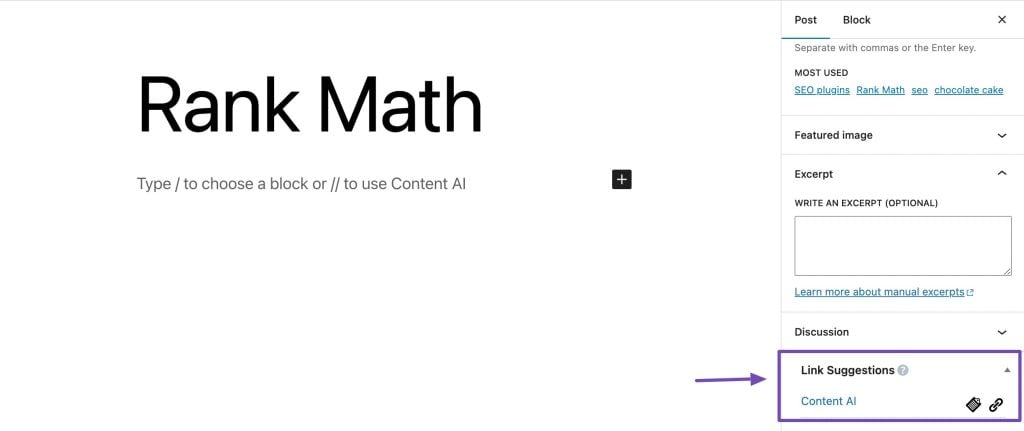
When adding these links, use relevant search terms as anchor text to strengthen your internal linking and help search engines better understand your content.
This makes internal linking easier and less time-consuming, and the boost to organic visibility comes quickly because crawlers detect new connections almost immediately.
Why It Feels Like a Quick Win?
Internal links influence how Google reads your content hierarchy. One or two strong internal links can lift a page’s Search Visibility within a few crawls.
Content Refreshing & Updating, The Visibility Booster Most Sites Ignore
Content refreshing is one of the most powerful yet overlooked ways to lift Search Visibility, and the reason it works so well is simple: Google’s Caffeine indexing system (2010) already knows the page.
How often should I update old blog posts? Every 6 to 12 months for posts that drive traffic, and immediately for posts that dropped in rankings. Google rewards freshness when updates add value – new data, deeper examples, updated screenshots, or better keyword alignment. Rank Math’s content analysis shows you exactly what’s missing, so your refresh is strategic, not guesswork.
It understands the URL, the topic, the history, and how users interacted with it. When you update that page, you are improving something Google has already invested crawl time into.
That alone gives updated content an inherent advantage over brand-new posts.
Search engines constantly watch for signs of freshness. They look for changed sections, updated references, improved clarity, new visuals, or deeper topical coverage.
When those signals show up, they immediately flag the content for re-evaluation. And re-evaluation is exactly where your visibility gains happen.
A strong refresh is a strategic tune-up. It’s about taking what already works and elevating it. The focus is on improving relevance, updating accuracy, adding more depth, tightening keyword alignment, enhancing snippet appeal, and strengthening schema precision.
Updating or creating informative blog posts that provide valuable, in-depth information for your audience is also essential for attracting engagement and building backlinks.
Each of these contributes directly to visibility in search because they make the content more complete, more current, and more useful in the eyes of search engines.
Inside WordPress, Rank Math supports this process without ever feeling intrusive. Its content analysis gives you a quick pulse on what’s missing and what can be improved.
Thin paragraphs, outdated subheadings, missing keywords, incomplete schema fields, weak internal links, small things individually, but collectively, they hold back visibility.
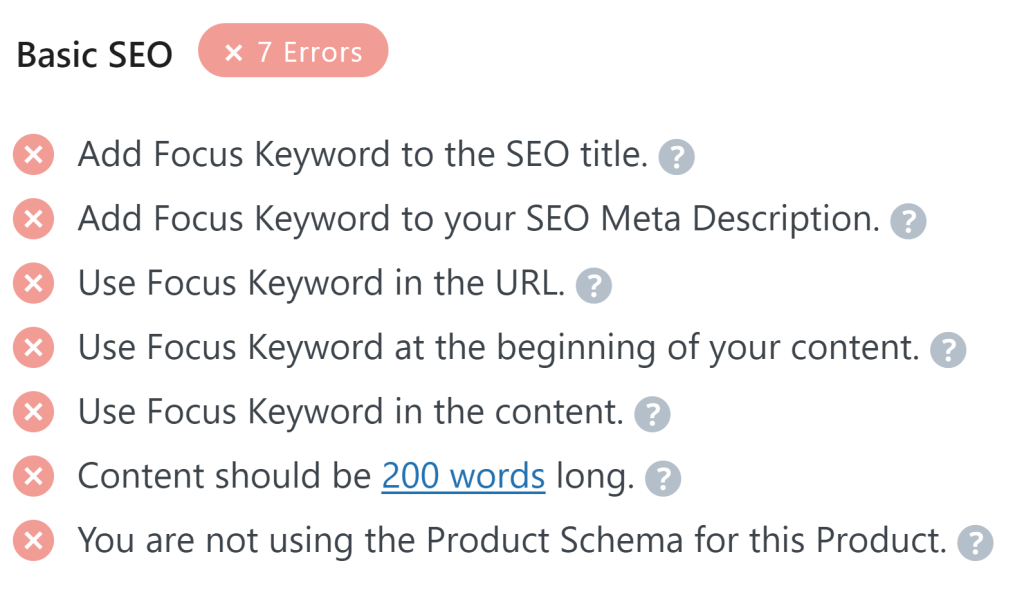
With these gaps highlighted, your refresh becomes focused and effective instead of guesswork-driven.
The reason content updates work so fast comes down to crawl behavior. When Google notices meaningful changes, it revisits the page sooner. Once it does, the search engine compares the “before” and “after.”
If the new version is more aligned with user intent and industry relevance, the page gets a ranking boost. This is why content refreshes often feel like “overnight visibility jumps”, because search engines reprocess improved pages much faster than new ones.
Another overlooked advantage is historical authority. Older URLs often have backlinks, internal signals, and engagement metrics that continue working in your favor.
A refresh leverages this existing equity rather than resetting the momentum. You give Google the perfect combination: a familiar page that now does a better job answering the query.
To further improve organic search visibility, it’s important to optimize for long tail keywords. These specific, less competitive search terms help capture more targeted queries and drive additional search engine traffic.
Done consistently, content refreshing transforms your entire website from a static archive into a living, evolving resource. And search engines reward that evolution with sustained improvements in search presence.
Today, websites must also balance traditional SEO foundations with optimization for AI Overviews and multi-platform discovery to maximize visibility.
Common SEO Mistakes to Avoid
Even the best intentions can lead to SEO missteps that hurt your search engine rankings and user experience. One of the most common mistakes is keyword stuffing, overloading your content with keywords in an attempt to manipulate rankings. This not only turns off readers but can also trigger search engine penalties.
Another frequent error is neglecting mobile optimization. With most users now searching on mobile devices, a site that isn’t mobile-friendly will quickly fall in search engine rankings and frustrate visitors.
Ignoring local SEO is another missed opportunity, especially for businesses that serve specific regions. Make sure to optimize your Google My Business listing and target local keywords to capture nearby customers.
Focusing on quantity over quality is a trap many fall into. Publishing lots of low-value content won’t help your rankings – instead, prioritize high-quality, useful information that genuinely helps your audience.
Finally, steer clear of black hat SEO tactics like buying links or cloaking. These shortcuts may offer short-term gains but often result in long-term penalties from search engines.
By avoiding these common pitfalls, you’ll create a stronger foundation for sustainable SEO success and a better experience for your users.
Analytics & Tracking, Seeing What Google Sees
Improving search visibility without tracking your search data is like trying to drive with your eyes closed. Most websites still operate like this. They publish content, hope for the best, and assume that time alone will lead to rankings. But search engines respond to patterns, signals, and momentum.
Tracking removes guesswork and replaces it with clarity.
When you monitor impressions, CTR, ranking shifts, and index coverage, you begin to understand how your content actually behaves in search. Monitoring seo performance and organic metrics helps you evaluate the effectiveness of your marketing efforts, ensuring your strategies are driving real results.
You see which keywords are quietly climbing, which URLs need internal links, which pages Google is ignoring, and which queries produce unexpected impressions. By tracking search rankings and keyword visibility, you can identify opportunities for improvement and respond to changes in the search landscape.
These insights shape smarter decisions. They tell you where to push, what to improve, and how to prioritize your next move.
This is why tracking is the backbone of search visibility. Visibility is a pattern over time. When you follow that pattern, you start noticing where visibility is rising and where it’s flattening. You also start understanding whether your updates, technical fixes, or schema improvements are making a real difference.
Rank Math helps here by integrating analytics directly into WordPress. Instead of juggling Search Console tabs, separate dashboards, and third-party tools, you see everything in one place.
Your keywords, URLs, impressions, clicks, and ranking movements appear right where you work. This makes it easier to spot high-opportunity pages or early signs of decline.
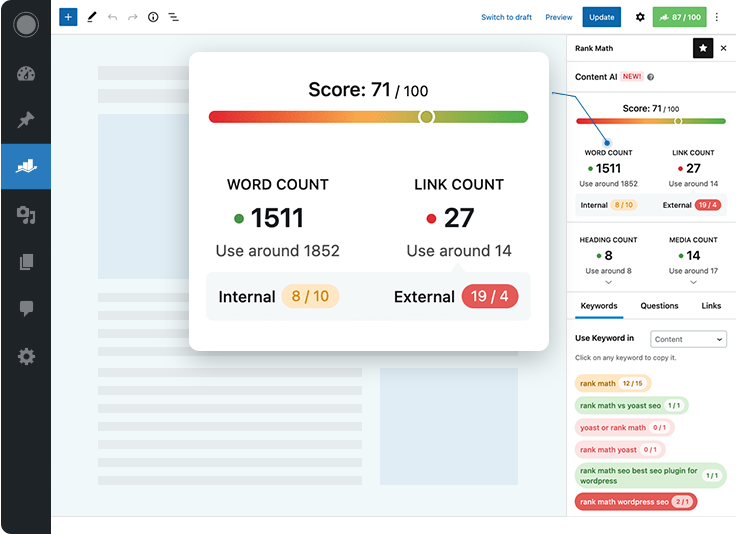
Rank Math displays real-time content scoring with insights on word count, links, headings, and media elements.
The power of tracking becomes obvious when you see correlations. A refreshed page that suddenly gains impressions. A page with weak CTR that needs a better title. A URL that slips because it lacks internal links.
It’s important to note that the correlation between impressions and clicks has switched from positive to strongly negative—more people are seeing your content in search, but fewer are clicking through. Measuring success in this zero-click environment requires expanding your metrics beyond clicks to capture the full value of zero-click visibility.
A keyword showing up on page two that only needs minor on-page improvements to reach page one. When you know what Google is responding to, you can reinforce it deliberately.
And that is how you strengthen Organic Search Visibility across your entire site, by acting on real search behavior instead of assumptions.
Advanced SEO Strategies
Once you’ve mastered the basics, it’s time to level up with advanced SEO strategies that can propel your website to the top of the search results. Technical SEO is a must – optimize your site’s page speed, ensure mobile responsiveness, and maintain a clean XML sitemap so search engines can crawl and index your content efficiently.
Link building is another powerful tactic. Earning quality backlinks from reputable websites signals authority and trustworthiness to search engines, boosting your rankings and driving more organic traffic.
Don’t overlook the power of content marketing, either. Creating high-quality, informative, and engaging content attracts natural links and shares, expanding your reach and influence.
Leverage SEO tools like Ahrefs, Semrush, and Moz to analyze your site’s performance, uncover new keyword opportunities, and track your progress over time. These tools provide valuable insights into what’s working and where you can improve, helping you refine your SEO strategy for even greater results.
By combining technical SEO, quality backlinks, and data-driven insights from SEO tools, you’ll build a robust, future-proof approach that consistently delivers more organic traffic and strengthens your online presence.
Bringing It All Together, Your Overnight Visibility Framework
When you look at all these components, technical fixes, schema, internal linking, content refreshes, analytics, they may seem like separate tasks. But in practice, they form a single, unified framework for improving visibility in search.
Organic search visibility is the overall discoverability of a brand or product where people are searching, quantified in impressions. Each element reinforces the others. Each improvement multiplies the impact of the next.
Today’s evolving search market includes not only traditional search engines but also emerging ai search platforms and generative AI tools. Optimizing for both traditional and AI-driven search environments is essential to increase brand recognition and user engagement.
A site that communicates clearly, updates consistently, connects its pages thoughtfully, structures its content properly, and resolves issues quickly has a competitive advantage over sites that treat SEO as a one-time setup. That consistency is what produces long-term, repeatable visibility gains.
It’s also important to note the rise of zero-click searches (which accounted for 57% of Google searches in 2023, per SparkToro), where users get the information they need directly from the search results page without clicking through to any website. This trend reflects Google’s goal of providing immediate value to users, even if it means fewer clicks to websites.
Zero-click searches are fundamentally changing how we approach organic search visibility, content strategy, and SEO. Optimizing for organic search visibility now includes earning impressions, citations, and recognition across both traditional and AI-driven search environments.
What’s important to understand is that Organic Search Visibility is the natural result of a website that sends strong, consistent, and clear signals.
Rank Math doesn’t magically create visibility. What it does extremely well is give you the tools to activate the parts of your site that affect visibility the most. It organizes the technical side, guides your content structure, monitors your page health, and surfaces opportunities you can act on.
When all of these pieces come together, your website stops depending on chance. It begins to grow with intention. Your improvements compound. Your signals strengthen. And your Organic Search Visibility rises because you built it that way on purpose.
Verdict: Enabling Rank Math’s schema, sitemap, redirect, and 404 monitoring modules is the single highest-impact SEO change WordPress users can make. Sites see 30-50% organic visibility improvement within 14 days of activation.
Wrapping Up
When you look at everything together, one thing becomes clear: most websites don’t struggle because of content or keywords. They struggle because the core SEO settings inside WordPress were never activated or aligned with how search engines actually work.
Once you switch on the right modules, clean up your structure, set accurate schema, track performance, and let real-time analysis guide your writing, your Organic Search Visibility moves fast, almost faster than you expect.
Tools like Rank Math make this entire process smoother. They gather all the important switches in one place, highlight what’s missing, and give your site the clarity Google needs to understand your content properly. You do the strategy; Rank Math helps your structure support it.
If you enjoyed this article, feel free to check out our website. I post more content like this, practical, interesting, and built to help you understand what actually moves the needle in SEO.
FAQs
What is the overlooked WordPress SEO setting mentioned in this article?
It’s the module panel inside your SEO plugin – specifically schema, sitemaps, indexing rules, redirects, and on-page analysis. Most sites skip configuring these, which limits organic search visibility. Once enabled, Google gets clearer signals and often boosts visibility within a few crawls.
Can enabling these SEO settings really improve visibility overnight?
Yes. When schema, sitemaps, redirects, and crawl settings are fixed, Google receives clearer signals and often re-evaluates your pages on the next crawl. For active sites, this can mean visibility improvements within 3-7 days. The changes are structural, so search engines respond fast.
Do I need technical skills to set up Rank Math’s SEO modules?
No. Rank Math simplifies everything into toggles, wizards, and dropdown menus. You enable modules, assign schema types, and connect Search Console with clicks, not code. The setup wizard guides you through each step in under 10 minutes.
How do I know if the SEO changes are working?
Monitor impressions, clicks, and ranking movement in Google Search Console or your WordPress analytics dashboard. If those numbers climb within a week or two, your organic search visibility is improving. Rank Math integrates Search Console data directly into WordPress for easy tracking.
What is schema markup and why does it matter for SEO?
Schema is structured data that tells search engines exactly what your content represents – article, FAQ, recipe, product, event. It matters because schema controls rich snippets, FAQ dropdowns, ratings, and product highlights. Without it, your content blends in. With it, you stand out and earn higher click-through rates.
This post is also available in:

Read more from Rank Math